In the following parts, we will describe the general properties and functions of the Kerberos protocol. We'll look at what SSO actually means and what the possibilities are. We'll analyze the individual components and elements that the Kerberos protocol uses. We'll describe the Kerberos authentication process (i.e., SSO) from simplified, through more detailed, to a detailed description. We'll look at how SSO authentication works between different domains. And we'll mention the possibilities of using Kerberos SSO for web applications.
This series is also published (in a slightly modified form) as part of the Microsoft TechNet Blog CZ/SK in the Microsoft section on Živě. The first part Kerberos Part 1 – Microsoft Active Directory.
Microsoft AD DS
Of course, we won't describe everything here (and we assume some knowledge of AD DS), I've already described some other things years ago in the articles Directory Services and LDAP, Active Directory komponenty - domain, tree, forest, site and DNS (Domain Name System) focused on Microsoft. A link to more materials can be found at the end of the article.
Active Directory Domain Services
Active Directory (AD) is a directory service from Microsoft. Active Directory Domain Controller (DC or domain controller) is a server running Active Directory Domain Services (AD DS, this name has been used since Windows Server 2008, before that only Active Directory was used). AD DS provides a distributed database that contains network objects (such as user, computer, group) in a hierarchical structure. It also provides authentication and authorization of users and computers in the network. It uses the LDAP protocol, extended Kerberos version 5, and DNS (Domain Name System).
For AD DS management from Windows Server 2008, the Remote Server Administration Tools (RSAT) package is used, which is part of server OS and can be installed additionally on the client.
Domain
A Domain is a logical group of computers that share a common AD database. When we create a domain, a tree and forest are automatically created. The simplest is to have everything only once. In practice, this is not always possible, so we have to create more complex structures. A domain is represented in schemas as a triangle, elements inside are members of that domain.
The name of an Active Directory domain is typically a full DNS (Domain Name System) name (example company.local). It can contain letters, numbers, hyphens, and dots (only for separating components), with a maximum length of 64 characters. However, each domain also has (for compatibility reasons) a pre-Windows 2000 name, which is referred to as the NetBIOS domain name (example company). This can be a maximum of 15 characters long and must not contain a dot and a number of other characters.
We can view domain names using the Active Directory Domains and Trusts tool, for example. In the window, we see a list of domains and their DNS names, if we right-click on a domain and select Properties, we'll see the NetBIOS name and also the forest and domain functional levels.
Tree and Domain Hierarchy
Within a tree, there is a main root domain (Tree Root Domain), which has its own namespace (e.g., company.local). Under the root domain, we can create other domains, which are called Child Domains, these contain the namespace of the parent domain (Parent Domain) and their relative name (e.g., test.company.local). Each domain has its own AD database, which is located on all domain controllers of that domain. Only one root domain can exist within a tree, if we want a second one (mainly due to a new namespace), we must create a new tree. A tree is represented in schemas as an oval or circle.
Forest, Schema, and Trust Relationships
One or more trees are located in a forest. The forest shares a common AD schema (Active Directory Schema). The schema defines the AD database, what can be stored in it, and what structure it has. Each domain has its own database (content), but the same structure (schema). Within the forest, there is one root domain (Forest Root Domain), which is the first domain created in that forest. It contains the Enterprise Admins and Schema Admins groups. A forest is represented in schemas as a rectangle or circle.
If we want to find out which domain is the Forest Root, we can run the Active Directory Domains and Trusts tool, which we also use to manage trust relationships. We choose Action - Change forest and here we see the current root domain.
All domains within the forest have automatically created trust. It's a Two-way Transitive Trust, which means that the trust relationship is bidirectional and is not limited to two directly connected domains, but can extend further (if the second domain has trust with another domain, the first domain also trusts this third domain). Trust is created between the root domains of trees within the forest, this is called Tree-Root Trust. And between parent domains within the tree, this is Parent-Child Trust. We can manually create trust between different forests (established between Forest Root Domains), this is Forest Trust, and further Shortcut Trust, Realm Trust and External Trust.
The Active Directory Schema tool is used to manage the schema. This is not standard among Administrative Tools (even when we have installed RSAT, which we need), but it is necessary to register the library regsvr32 schmmgmt.dll. Then we can use the mmc console and add the Active Directory Schema Snap-in (best to save afterwards).
Global Catalog
The Global Catalog (GC) service is important within the forest. It contains an index for all objects within the forest (it's a partial read-only copy of directory partitions), with only basic information for each. There must be at least one GC server in each domain (and it is also a DC). A domain controller has data only about objects that belong to its domain. If we want to access an element from another domain, the Global Catalog is used, which provides us with information on which domain controller this object is located.
The Active Directory Sites and Services tool is used to set up the global catalog, where we click through the corresponding Site to the desired DC and under it right-click on NTDS Settings and select Properties.
Domain Relationship Schema
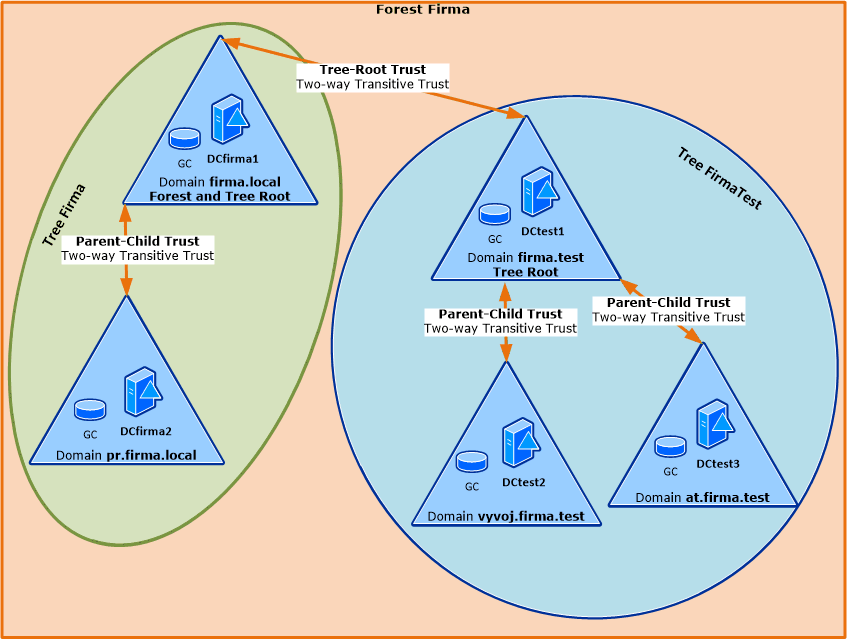
The following image simply displays the above described. There is an environment with one forest, two trees and a total of five domains. First, the controller DCcompany1 was installed, creating the domain company.local (and tree and forest) and becoming the root for both the tree and the entire forest. A subordinate domain pr.company.local was added to this domain. A second forest was also created, which has the root domain company.test. There are two subordinate domains in this forest.
Trust relationships were automatically created, so from the domain pr.company.local we can communicate with objects in dev.company.test (it must of course be arranged network-wise, here we're dealing with the logical part). Communication proceeds along trust relationships, first to the root domain of the tree company.local, through the root relationship of the forest to company.test up to dev.company.test.
Note: In the schemas, only one domain controller is shown for each domain. In practice, there are usually at least two.
Finding a Domain Controller or KDC
When a user logs in within a domain, they must find a suitable domain controller (DC). In the case of Kerberos authentication, it contacts the Authentication Service (AS) on the Key Distribution Center (KDC), this service runs on every DC.
The controller is searched for using a DNS SRV record (or NetBIOS) for the given domain. Generally, it's a record _ldap._tcp.DnsDomainName (e.g., _ldap._tcp.company.local), but Microsoft uses special records to search only for Windows LDAP servers, _ldap._tcp.dc._msdcs.DnsDomainName (e.g., _ldap._tcp.dc._msdcs.company.local) The client gets a list of all available controllers and sends an LDAP query to them, they respond with basic information. The client uses the first DC that responded and using its IP address and subnet determines which Site it belongs to. Using the DNS SRV record _ldap._tcp.SiteName._sites.dc._msdcs.DnsDomainName (e.g., _ldap._tcp.Prague._sites.dc._msdcs.company.local) it finds a list of all DCs in the given Site. It sends an LDAP query to all of them, the first one that responds is used for authentication. The result is that controllers in the same Site as the client are preferred, if there are more, they are chosen using Round Robin.
For some situations, it's necessary to find a Global Catalog (GC), this is done similarly using the record _ldap._tcp.gc._msdcs.DnsForestName (e.g., _ldap._tcp.gc._msdcs.company.local). There are also other records for GC. Identically, there are several records for Kerberos KDC, some general and others specifically for Microsoft servers. For MS, the main one is _kerberos._tcp.dc._msdcs.DnsDomainName (e.g., _kerberos._tcp.dc._msdcs.company.local).
Note: All these SRV records are registered by the NetLogon service on DC at its startup.
There are no comments yet.