Note: I have slightly modified this article and included it in a new series on Kerberos SSO. Meanwhile, I changed its title from the original Cross Domain Kerberos Single Sign-On.
The answer to the main question of whether SSO will work between two domains is: If there is a trust relationship between the domains, everything works automatically. If the domains are in the same forest, the trust is set automatically.
Kerberos Single Sign-On
The general principle of SSO using the Kerberos protocol was described in previous parts of the series Kerberos protocol with focus on SSO in AD DS. The main principle remains the same, whether we communicate within the same domain or to another. Here we will repeat some parts of the SSO process that are of interest to us in connection with today's topic.
First, the user must authenticate, they enter their login credentials on the station [1]. The client contacts the Authentication Service (AS) on the Key Distribution Center (KDC), which means on some domain controller (DC). The controller is found using DNS (or possibly NetBIOS) SRV records for the given domain. Generally, it is a record _ldap._tcp.DnsDomainName (e.g., _ldap._tcp.firma.local), but Microsoft uses special records to search for Windows LDAP servers, _ldap._tcp.dc._msdcs.DnsDomainName (e.g., _ldap._tcp.dc._msdcs.firma.local). The client obtains a list of available controllers and sends an LDAP query to them, they respond with basic information. The client uses the first DC that responded. Then it can also be determined whether the controller is in the same Site as the client, if not, it tries to find a more suitable DC, again using a DNS query _ldap._tcp.SiteName._sites.dc._msdcs.DnsDomainName (e.g., _ldap._tcp.Praha._sites.dc._msdcs.firma.local). The entire authentication process is handled by the Net Logon service on the client. When Kerberos authentication occurs (AS uses the AD user database), the client obtains a Ticket-Granting Ticket (TGT) [2]. In most cases, both the DC and the global catalog (GC) are used during authentication.
When the client wants to access a network service (e.g., an application on a web server) that supports Kerberos and requires authentication, the SSO principle is used. The client contacts its KDC on the Ticket-Granting Service (TGS), i.e., its domain controller, and requests a Service Ticket. The request sends (among other things) the service type (e.g., HTTP, KRBTGT, LDAP, CIFS) and the server address (e.g., www.firma.local), which together form the Service Principal Name (SPN), a unique identifier of the service running on the server. Each service that uses Kerberos authentication must have an SPN. If the TGS finds the SPN in Active Directory (and other authentication conditions are met), it sends a Service Ticket in response [3].
The last part is client verification on the network service (server). The client sends data to the server, which (among other things) contains the Service Ticket. If everything is in order, the server extracts user information (their name) from this data. In the actual authentication process, the server does not communicate with the KDC or DC, but only with the client. If mutual authentication is enabled, the server sends an encrypted timestamp to the client, and the server is also verified on the client [4].
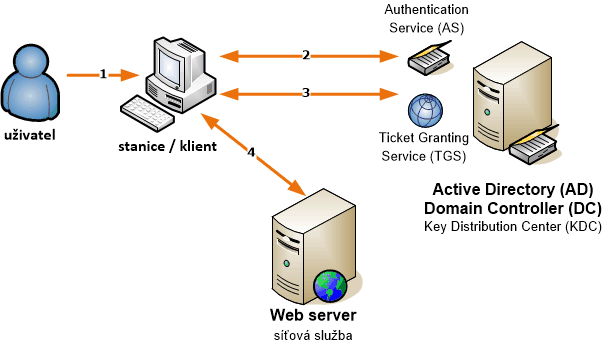
This is a brief SSO process. What differs when communicating within the same domain or to another is only where the Service Ticket is obtained from (in the scheme, this is step 3).
SSO within a domain
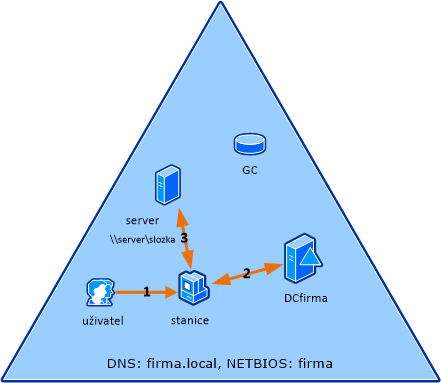
This is the simplest situation. Each DC contains all the information from the given domain. So when searching for an SPN, it is found in its database, and the TGS can process everything directly. The procedure is as follows:
[1] the user (already authenticated) tries to connect to a network service (e.g., fileshare) from the station, and it requires Kerberos authentication
[2] the station contacts its KDC (DCfirma) and obtains a Service Ticket (if the negotiation - authentication - goes smoothly)
[3] the user authenticates to the service using the ticket
SSO between domains within a forest
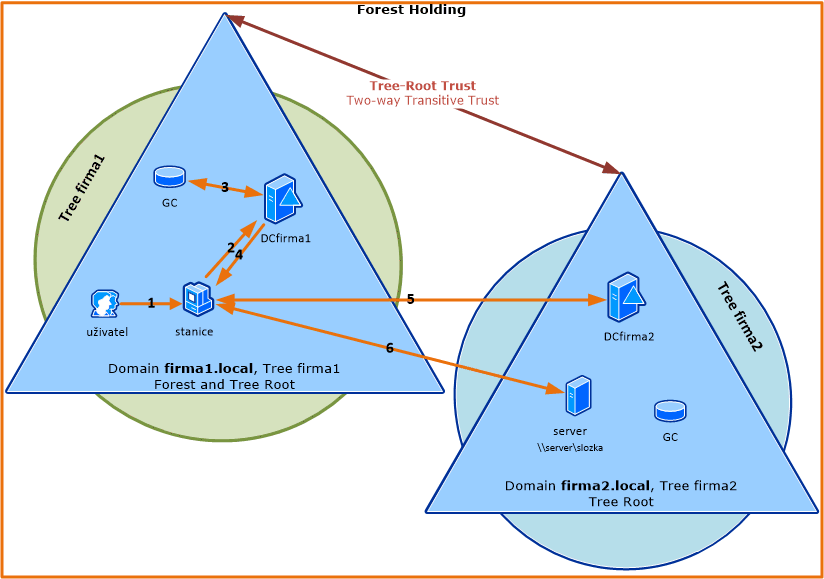
If the service (server) is in a different domain than the client, information from the Global Catalog is used to help find the correct DC.
[1] the user (already authenticated) tries to connect to a network service (e.g., fileshare) from the station, and it requires Kerberos authentication
[2] the station contacts its KDC (DCfirma1) with a request for a Service Ticket for the service's SPN, but the DC does not find the SPN in its AD database
[3] the DC asks the global catalog (GC) if this SPN is in the same forest, which finds it and sends the information back to the controller
[4] the DC provides a referral ticket to the target controller to the client (it is encrypted using the interdomain key)
Note: If the domains are more nested, the information is passed through trust relationships. This means that the client always gets a referral ticket to the next DC to ask. It must first reach the root domain in its tree, then it can move to the target tree and proceed down. Of course, special trust relationships (e.g., Shortcut) can also be created and used.
[5] the station contacts the controller (DCfirma2) in the target domain (which contains the given SPN) and sends it the Referral Ticket, in response it obtains a Service Ticket (if the negotiation - authentication/decryption - goes smoothly)
[6] the user authenticates to the service using the ticket
SSO between domains in different forests
If we want to use SSO between two domains, each in a different forest, we need to establish a trust relationship between the forests Forest Trust. When such trust is created, each forest gathers information about all namespaces in the partner forest. This information includes domain names, UPN suffixes, SPN suffixes, and SID namespaces (security ID). This information is stored in the AD TDO object (Trusted Domain Objects), which is replicated to the Global Catalog (GC).
[1] the user (already authenticated) tries to connect to a network service (e.g., fileshare) from the station, and it requires Kerberos authentication
[2] the station contacts its KDC (DCfirma1) with a request for a Service Ticket for the service's SPN, but the DC does not find the SPN in its AD database
[3] the DC asks the global catalog (GC), which does not find this SPN (because it only has data from its forest), so it checks the information about all Forest Trusts and compares the suffix from the SPN with the list of partner forest suffixes, finds a match, and provides the DC with routing information (Routing Hint)
[4] the DC provides the client with a referral ticket either to the parent (root) domain of its forest or directly to the target domain in another forest
Note: Depending on the domain structure, the methods described in the previous chapter are used until the client reaches the target DC.
[5] the station contacts the controller (DCjfirma) in the target domain (which contains the given SPN) and sends it the last Referral Ticket, obtaining a Service Ticket in return (if the negotiation - authentication/decryption - goes smoothly)
[6] the user authenticates to the service using the ticket
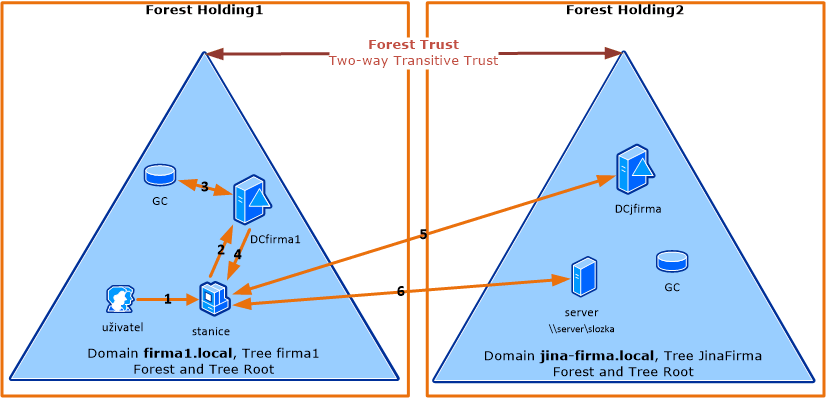
The above diagram shows the simplest situation where both the client and server are in the root domains of the forests. The following diagram shows a slightly more complex situation where nested domains are used.

Practical examples of tickets and packets
Finally, we will show what Kerberos Tickets look like for certain practical situations and what packets are sent in the case of two domains in one forest. The description of the contents of the Tickets and messages can be found in the specification RFC 4120 - 5.3. Tickets.
Service and client in the same domain
The simplest example. The user account bouska is located in the domain firma.local. In the same network, we have a web server www.firma.local, which has an account in the domain with the SPN HTTP/www.firma.local.
C:\>klist

Current LogonId is 0:0x4c956

Cached Tickets: (2)

#0> Client: bouska @ FIRMA.LOCAL
    Server: krbtgt/FIRMA.LOCAL @ FIRMA.LOCAL
    KerbTicket Encryption Type: AES-256-CTS-HMAC-SHA1-96
    Ticket Flags 0x40e00000 -> forwardable renewable initial pre_authent
    Start Time: 5/5/2014 11:14:01 (local)
    End Time:   5/5/2014 21:14:01 (local)
    Renew Time: 5/12/2014 11:14:01 (local)
    Session Key Type: AES-256-CTS-HMAC-SHA1-96
    Cache Flags: 0x1 -> PRIMARY
    Kdc Called: DC

#1> Client: bouska @ FIRMA.LOCAL
    Server: HTTP/www.firma.local @ FIRMA.LOCAL
    KerbTicket Encryption Type: RSADSI RC4-HMAC(NT)
    Ticket Flags 0x40a00000 -> forwardable renewable pre_authent
    Start Time: 5/5/2014 11:18:29 (local)
    End Time:   5/5/2014 21:14:01 (local)
    Renew Time: 5/12/2014 11:14:01 (local)
    Session Key Type: RSADSI RC4-HMAC(NT)
    Cache Flags: 0
    Kdc Called: dc.firma.local
Service with an address from another domain
The second situation is technically the same as the first, the only difference is that the DNS address of the web server is www.firma.cz. The accounts are still in the same domain firma.local.
C:\>klist

Current LogonId is 0:0x4c956

Cached Tickets: (2)

#0> Client: bouska @ FIRMA.LOCAL
    Server: krbtgt/FIRMA.LOCAL @ FIRMA.LOCAL
    KerbTicket Encryption Type: AES-256-CTS-HMAC-SHA1-96
    Ticket Flags 0x40e00000 -> forwardable renewable initial pre_authent
    Start Time: 5/5/2014 17:08:46 (local)
    End Time:   5/6/2014 3:08:46 (local)
    Renew Time: 5/12/2014 17:08:46 (local)
    Session Key Type: AES-256-CTS-HMAC-SHA1-96
    Cache Flags: 0x1 -> PRIMARY
    Kdc Called: dc.firma.local

#1> Client: bouska @ FIRMA.LOCAL
    Server: HTTP/www.firma.cz @ FIRMA.LOCAL
    KerbTicket Encryption Type: RSADSI RC4-HMAC(NT)
    Ticket Flags 0x40a00000 -> forwardable renewable pre_authent
    Start Time: 5/5/2014 17:08:46 (local)
    End Time:   5/6/2014 3:08:46 (local)
    Renew Time: 5/12/2014 17:08:46 (local)
    Session Key Type: RSADSI RC4-HMAC(NT)
    Cache Flags: 0
    Kdc Called: dc.firma.local
The service is in a different domain than the client
The last example shows a situation where we have two domains within one forest. The user account bouska is located in the domain firma2.local. The web server has the address www.firma1.local and its account with SPN HTTP/www.firma1.local is located in the domain firma1.local. It can be seen that the user obtained TGT for both domains. The Service Ticket contains the SPN from the domain firma1.local for the user in the domain firma2.local.
C:\>klist

Current LogonId is 0:0x1c975

Cached Tickets: (3)

#0> Client: bouska @ FIRMA2.LOCAL
    Server: krbtgt/FIRMA1.LOCAL @ FIRMA2.LOCAL
    KerbTicket Encryption Type: RSADSI RC4-HMAC(NT)
    Ticket Flags 0x40a40000 -> forwardable renewable pre_authent ok_as_delegate
    Start Time: 5/5/2014 17:23:11 (local)
    End Time:   5/6/2014 3:23:11 (local)
    Renew Time: 5/12/2014 17:23:11 (local)
    Session Key Type: RSADSI RC4-HMAC(NT)


#1> Client: bouska @ FIRMA2.LOCAL
    Server: krbtgt/FIRMA2.LOCAL @ FIRMA2.LOCAL
    KerbTicket Encryption Type: AES-256-CTS-HMAC-SHA1-96
    Ticket Flags 0x40e00000 -> forwardable renewable initial pre_authent
    Start Time: 5/5/2014 17:23:11 (local)
    End Time:   5/6/2014 3:23:11 (local)
    Renew Time: 5/12/2014 17:23:11 (local)
    Session Key Type: AES-256-CTS-HMAC-SHA1-96


#2> Client: bouska @ FIRMA2.LOCAL
    Server: HTTP/www.firma1.local @ FIRMA1.LOCAL
    KerbTicket Encryption Type: RSADSI RC4-HMAC(NT)
    Ticket Flags 0x40a00000 -> forwardable renewable pre_authent
    Start Time: 5/5/2014 17:23:11 (local)
    End Time:   5/6/2014 3:23:11 (local)
    Renew Time: 5/12/2014 17:23:11 (local)
    Session Key Type: RSADSI RC4-HMAC(NT)
Kerberos packets
The following image shows captured communication using Wireshark. The client (192.168.50.25) requested a web page (192.168.50.15), which requires authentication. The client had its ticket cache cleared, so it first obtained a TGT from its DC (192.168.50.20). Then it requested a Service Ticket, but the SPN is in another domain, so it obtained a Referral Ticket from its DC (192.168.50.20) and contacted the second DC (192.168.50.10). From there, it received the correct Service Ticket, allowing successful login.

Packets used for common Kerberos communication are of type KRB-AS-REQ (10) and KRB-AS-REP (11) for obtaining TGT, KRB-TGS-REQ (12) and KRB-TGS-REP (13) for obtaining Service Ticket, KRB-AP-REQ (14) and optionally KRB-AP-REP (15) for authentication with the service/server. A KRB-ERROR (30) message with some error information may also appear.
The detailed specification of messages can be found in RFC 1510. It is important that requests have two main parts. padata, which stands for pre-authentication data, may contain information needed for processing or decryption. For example, in KRB-TGS-REQ, there is an Authentication Header (Ticket-Granting Ticket and Authenticator). And KDC-REQ-BODY, which contains the actual request data, such as Client Name, Realm, Server Name (SPN). The response may have multiple parts, such as Client Name, Client Realm, and Ticket, which is the actual issued Ticket, showing Server Name (SPN), Realm, and the encrypted part.
Below are examples of individual packets captured by Wireshark.
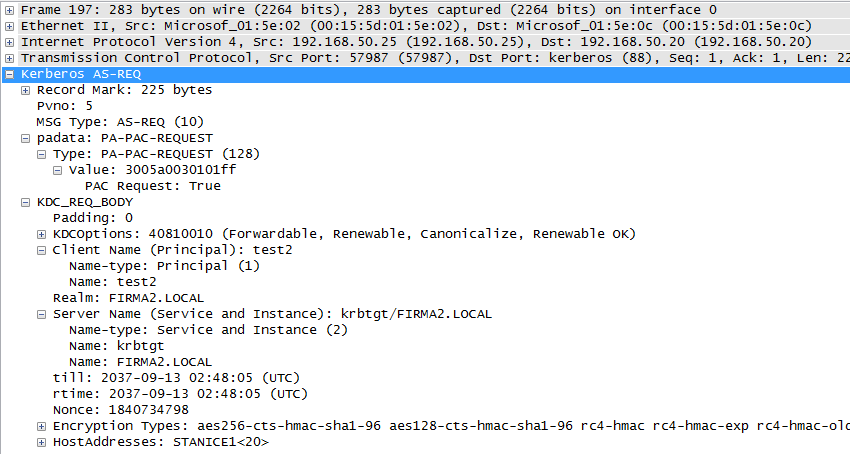
KRB-AS-REQ - request for obtaining TGT
The user test2 contacts its DC (KDC) and requests a TGT, communication is in the domain (Realm) firma2.local.
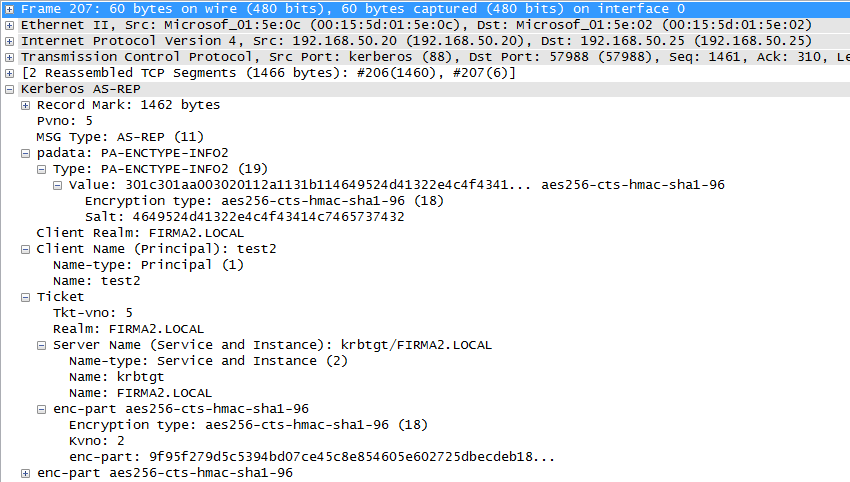
KRB-AS-REP - returning TGT
The domain controller sends the requested ticket.
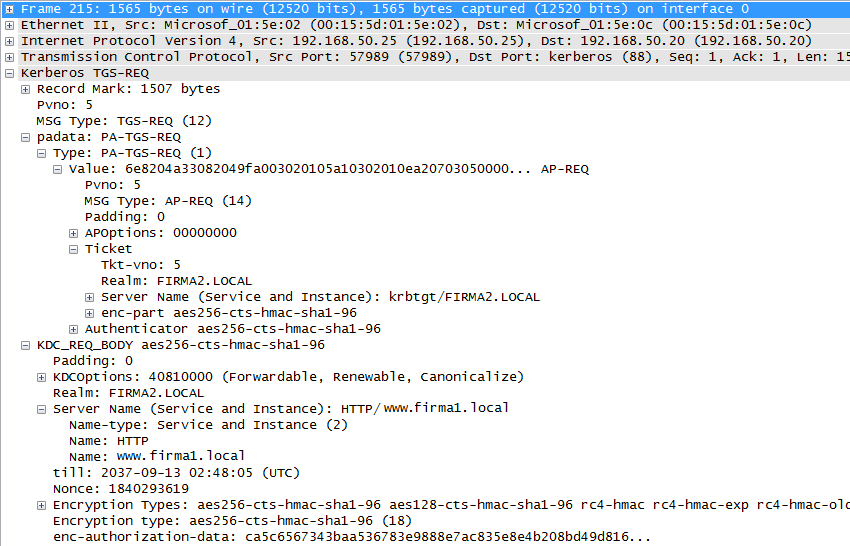
KRB-TGS-REQ 1 - request for obtaining Service Ticket
For connecting to the web www.firma1.local, the client requests a Service Ticket, sending its TGT and contacting its DC in the domain firma2.local.
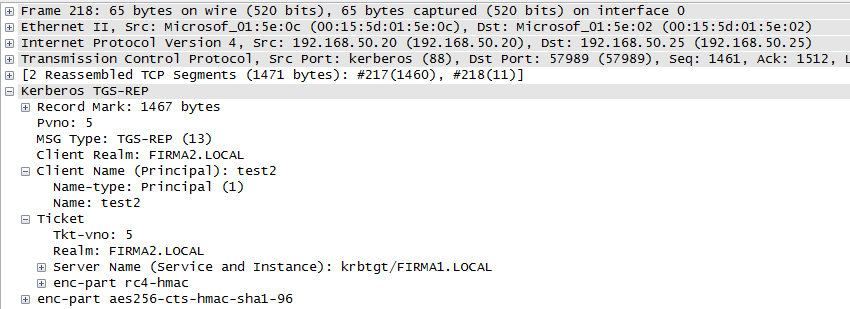
KRB-TGS-REP 1 - response with Ticket
The controller found that the SPN is not in its domain but in the neighboring firma1.local. It returns a Ticket for communication with the KDC in the domain firma1.local.
KRB-TGS-REQ 2 - request for obtaining Service Ticket
The client sends a request for a Service Ticket to the controller in the domain firma1.local, using the TGT for this domain in the request.
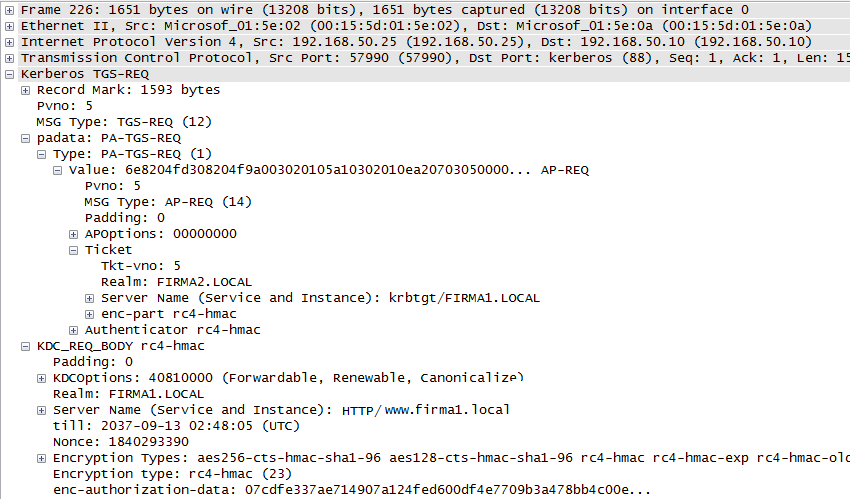
KRB-TGS-REP 2 - response with Ticket
The correct Service Ticket is received in the response.
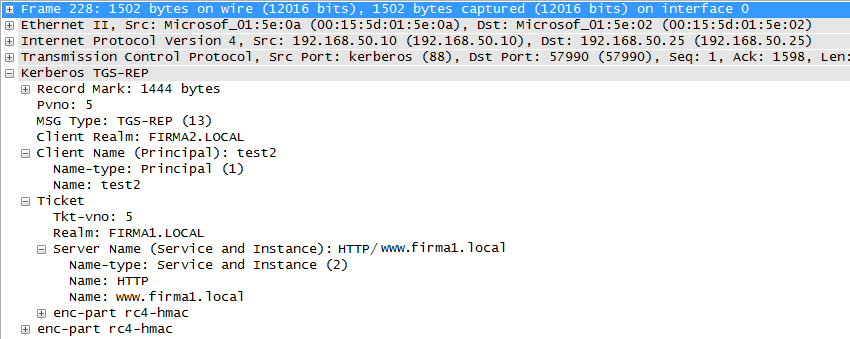
KRB-AP-REQ - sending Ticket to the server
The client sends a GET request to the web server. The HTTP header contains Kerberos authentication KRB-AP-REQ (Service Ticket) using the GSS-API protocol.

References
Some materials I used are listed below. These are Microsoft articles and are mostly older (covering Windows Server 2000 or 2003), but I believe nothing has changed in this area.
- Active Directory
- User Accounts
- Finding DC
- Kerberos
- SSO cross forest
Hezky srozumitelne vysvetleno. Diky