I wrote this article for Connect magazine and it was published in issue Connect 06/10. I'm publishing it here with the kind permission of the editorial staff.
This is the third part of a series on computer networks. A content-wise identical (and more extensive) series already exists on this website: Computer networks, but I wrote this article with some time distance and from a slightly different perspective.
Network Communication Using IP Protocol
In previous issues of Connect magazine, we first briefly summarized everything that such a computer network includes. Then we started a more detailed description from the lower layers of the network and wrote something about the passive elements from which we build networks. In the next issue, we focused on the basic technology that we use most often for communication, namely Ethernet. Today we'll look one layer higher, from the perspective of the OSI model to the 3rd layer (L3), and we'll focus on the IP protocol.
The Internet Protocol (commonly referred to as IP protocol) is part of the Internet Protocol Suite (TCP/IP) family and is used for communication in a computer network. The IP protocol can work over various networks (meaning over different technologies, this is due to abstraction through encapsulation), but in our series, we'll specifically consider traffic over Ethernet, which we talked about last time.
Properties of IP Protocol
The IP protocol defines addressing methods and structures. Currently, Internet Protocol Version 4 (IPv4) is predominantly used, but the newer version Internet Protocol Version 6 (IPv6) has been being deployed for many years. Data from higher layers is encapsulated into a data structure called a packet (or datagram). IP is a connectionless and stateless protocol, which means that before sending the first (and any subsequent) packet, a connection (path) through which the packets would travel is not established. Packets travel independently in the network and each carries complete information about the sender and recipient.
Another defining feature of the IP protocol is that it is unreliable communication. The protocol has no means to ensure reliability. Individual points along the way try to send the packet towards the destination, but it's not guaranteed that it will actually reach the recipient or that it won't arrive multiple times or in a different order than they were sent. Higher layer protocols are used to ensure reliability, the main example being TCP. The fact that it's unreliable communication also has positive properties, which are low overhead and greater speed.
When transmitting data over the network, we must also ensure certain transmission characteristics, depending on what the network path is capable of transmitting. One of the parameters is MTU (Maximum Transmission Unit), which is the maximum size (in bytes) of the PDU (in our case, packet) that the layer is capable of transmitting. For Ethernet, the standard MTU value is 1500 B (we're talking about the size of the packet, which means that the standard frame in this case has a size of 1518 B). If the IP protocol receives data (from a higher layer) larger than the MTU, it contains a mechanism called fragmentation, which divides it into multiple packets and sends it in fragments. However, this method has several disadvantages, so for example, the TCP protocol contains a better method called segmentation and passes data in smaller blocks.
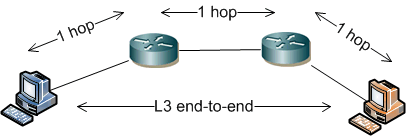
A classic computer network (based on the IP protocol) is built so that intelligence is concentrated at the endpoints (stations, servers, printers) and between them (from the L3 perspective) are routers. We measure the path length from sender to recipient by the number of hops, i.e., the number of devices (routers) through which L3 communication must pass. Communication (on L3) follows the end-to-end principle (the packet contains IP addresses of sender and recipient), where routers only forward data towards the destination (but on L2, communication is point-to-point, the frame always has MAC addresses for the current hop). All higher logic is handled by the endpoints.
TCP/IP Model
Last time we briefly described the OSI model, today we'll take a light look at the Internet model (often referred to as the TCP/IP model). Unlike the seven layers of the OSI model, it has only four layers. In practice, various layer naming is used (and sometimes a different number is mentioned), the table lists the names used by the RFC standard. Generally, the Internet model is quite similar to the OSI model. We can say that the physical and data link layers of the OSI model are combined into one link layer of the TCP/IP model. The network layer corresponds to the internet layer, just as the transport layer is identical. The upper three layers of the OSI model are contained in one application layer in the TCP/IP model.
| layer | name | example |
|---|---|---|
| L4 | Application | SSL, HTTP, DNS |
| L3 | Transport | TCP, UDP |
| L2 | Internet | IP, ICMP, OSPF |
| L1 | Link | Ethernet, ARP |
Although we have now described the Internet model and previously mentioned that it's more realistic for practice, we will continue to refer to layers according to the OSI model in the text, because it's a more common way in literature.
IP Packet
The PDU (Protocol Data Unit) at L3 is referred to as a packet. We can also use the term datagram, which is a packet of an unreliable service. So when we use the UDP protocol at a higher layer, we can generally use the term datagram (although it's still a packet). If TCP is at the higher layer, we should only use the term packet.
A packet is a formatted unit of data that contains control information (header) and user data (payload, encapsulated data from higher layers, up to application data). Before sending over the network, it's passed to the lower layer, in our case Ethernet, which again performs encapsulation and creates a frame, which is then transmitted bit by bit onto the transmission medium.
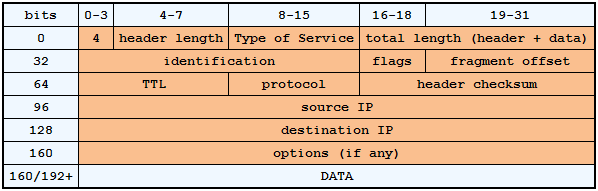
The IPv4 header always contains the source and destination IP address, IP version designation (IPv4 or IPv6), header length, Type of Service (priority), packet size, identification (for fragmentation), whether the data is fragmented, fragment offset in the original packet, TTL (time to live), which is the number of hops through which the packet will pass before it's discarded (so it doesn't circulate forever in case of a loop), determination of the higher layer protocol, and a checksum for the header. Such a standard header has a size of 20B, but it may also contain additional optional properties.
Just as in Ethernet there is a physical address of the device, which is referred to as the MAC address, in the IP protocol we have a logical address of the device, which we call the IP address. This address uniquely identifies a network interface in a computer network and must be unique. In IPv4, 32-bit addresses are used, which are written decimally using four octets (8 bits from the address, therefore a maximum value of 255), an example is the address 10.5.127.2. Addressing in IP networks is a more extensive and complex area, which we'll focus on in the next part.
IPv4 vs. IPv6
In this series of articles, we're talking about the basics of computer networks, so we're focusing on IPv4 (which is the first, practically used version of the protocol), which is still used predominantly. But for completeness, we'll provide some information about IPv6. The main reason for the creation of a new version of the IP protocol is that in IPv4 there are about 4 billion addresses. Which may seem like a large number, but this number of addresses would already be exhausted if various methods like NAT, CIDR, and better ways of assigning addresses hadn't started to be used. Nevertheless, IPv4 addresses are threatened with exhaustion in a short time (estimated to be just over a year).
IPv6 uses 128-bit long addresses (which gives an enormous number of addresses), which are written as 8 groups of four hexadecimal digits separated by colons. Although there are a number of rules for how the address can be written in a shorter way, it's still such a long complicated number that DNS is needed for human use. In IPv6, security through IPsec is an integral part, it focuses on mobility support, contains a method of stateless autoconfiguration of IP address. In IPv6, there is no broadcast transmission, only unicast, multicast, and the new anycast (group of recipients, but data is delivered only to the nearest one).
Routing in IP Network
Communication in an IP network at L3 is referred to as routing (we'll continue to use this term) and is performed by every device that participates in this communication. Endpoints usually use only a simpler form of routing, but even they must decide how to send data. The main elements are those on the path that decide how to further route the packet. These devices are predominantly routers. In local networks, an L3 switch (also referred to as a MultiLayer Switch) is often used for routing, which uses special HW for packet switching (so it achieves high performance). A firewall also has router functions, and we can also use a regular computer equipped with multiple network adapters for routing.
Routing itself means deciding where and how to send a packet when we know the destination address according to the data from its header. "How" means through which local interface and "where" to which next address (hop) in the same subnet. For decision-making, a routing table is used, which contains a list of routes and related information. The routing table is assembled in various ways. Records from directly connected interfaces are automatically generated. For example, in a computer we have two network cards that have an IP address and mask set for two networks. From this data, two records are created that the given network is behind this network interface. For simple networks, static routing is used, where entries in the routing table are entered manually. Dynamically or also manually, records are created for default routing (related term gateway), this data is used when we don't know any path to the destination network.
In more complex networks and when we want to automatically react to changes in network topology, routing protocols are used. These determine the best paths in the network, adjust the routing table, and inform surrounding routers. In this case, we're talking about dynamic routing. Examples of routing protocols are RIP (Routing Information Protocol), EIGRP (Enhanced Interior Gateway Routing Protocol), OSPF (Open Shortest Path First), or the internet BGP (Border Gateway Protocol).
To have the terminology complete, we'll also mention the term routed protocol, which is the protocol used for communication in a routed network, in our case it's the IP protocol.
How a Router Works
A router is a device that works at L3 and uses the first 3 layers of the OSI model for its operation. It serves to connect subnets and separate broadcast domains. A border router is often referred to as a gateway, used to connect a LAN network to a WAN (internet). All unknown communication is routed to it. If the gateway serves us for internet connection, it should not pass private addresses (the destination address must be public).
A router is not a transparent device and for each incoming frame, it removes the L2 header and when sending, it creates a new one (from the data of the current hop) including the frame checksum (the packet itself remains unchanged). These are operations (along with searching in the routing table and forwarding packets) that cost certain overhead and in classic routers are performed by the processor.
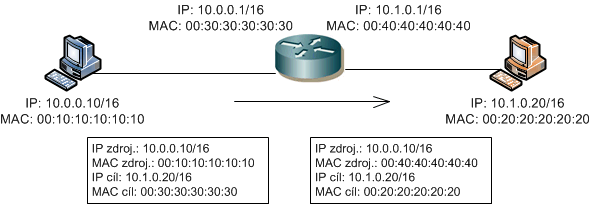
When a router receives a packet (in reality, it receives a frame, but L2 data is removed), it looks at the destination IP address in the header. It searches the routing table in memory to see if it has a route for the destination address. If it doesn't know the route, it discards the packet. If it finds an entry (regardless of how it was created in the table), it determines through which interface to send the data and possibly to which address. When sending, it knows whether the destination address belongs to one of the directly connected subnets or if it needs to send it to the next router (hop) on the path. Before sending the data, it prepares a frame where it lists its MAC address as the source and either the MAC address of the recipient or the next router as the destination. It uses the ARP protocol to find the MAC address. If it cannot determine the address, it discards the packet.
ARP Protocol
When communicating in the networks we are discussing here, we actively use IP addresses (or DNS names that are translated to IP addresses). However, as we know from the previous section, to deliver a frame in Ethernet, our station must know both the source and destination (for the current hop) MAC addresses. The station obviously knows its own details, but it only knows the IP address for the destination. This is where the long-standing Address Resolution Protocol (ARP) defined in RFC 826 comes into play. This applies if we are using IPv4, which is primarily what we are discussing here. IPv6 uses the Neighbor Discovery Protocol (NDP).
The principle of the ARP protocol is simple. First, we need to mention that it only works within the same subnet. This is fine because we only need MAC addresses for devices within the same subnet. The station that needs to find a MAC address creates an ARP request, which contains the sought IP address, and sends it as a broadcast. All stations in the subnet receive this frame, and the one with the given IP address creates an ARP response, providing all necessary details, and sends it back to the requester as a unicast. To reduce the number of broadcasts, devices also use an ARP cache, a temporary memory where they store discovered values for a certain period.
paráda, jako vždycky:-)
je nejak standardizovana doba, po ktere ARP cache expiruje, nebo je to na libovuli vyrobce HW/SW?
respond to [2]lazna: Myslím si, že tato doba standardizovaná není. Všechny spravovatelné switche a routery dovolují tuto dobu upravovat. U Cisco zařízení bývá defaultní hodnota 4 hodiny.
respond to [3]Samuraj: ad "Všechny spravovatelné switche a routery Všechny spravovatelné switche a routery" Bud delate jenom s Ciscem a nebo zijete v idealnim svete ;-) Popravde receno me se jeste pod ruku nedostal kousek, ktery by to umoznoval, ale je fakt ze delam temer vyhradne se SOHO.
V textu pod obrázkem komunikace routeru je napsáno "Pokud cestu nezná, paket zahodí". Jak se tedy provede komunikace na IP adresu někde na konci Internetu, se kterou jsem doposud nekomunikoval?
Existuje routovani na L3, tohle neni switch ktery vyzaduje zaznam do CAM. Proste to posle kam ma nastavenou routu nebo na svoji defaultni na 0.0.0.0/0. ( pokud ji ma ). Pokud ji nema tak se tim nemuze zabyvat. Co se s tim deje dal ho v principu nezajima.
Jinak u takhkle stare diskuze bych odpovedi spis neocekaval, jesm tu take nahodou..
respond to [5]sumo: Když jste doma připojený k internetu, tak na Vašem routeru máte jeden port zapojený do WAN a další port(porty) do Vaší LAN sítě.
"Jak se tedy provede komunikace na IP adresu někde na konci Internetu, se kterou jsem doposud nekomunikoval?"
Ve Vašem routeru je nastavená defaultní routa do sítě WAN. Takže router odešle packet přes WANové rozhraní do internetu. A tam packet putuje přes další routery až k cíli. Vždy se router podívá do svojí routovací tabulky, kde najde cestu. Občas routu chybnou konfigurací nebo poruchou u ISP router nenajde, tak je paket zahozen (nebo koluje ve smyčce do vypršení TTL).