In the MS Outlook calendar, we can create events (Appointment) or meetings (Meeting Request). A meeting differs in that additional people - participants (Attendees) or resources (Resources) are invited. The person who creates it is the organizer.
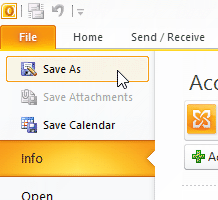
Each event/meeting from the calendar can be saved as a message (msg), iCalendar format (ics) or vCalendar format (vcs). Just select it in the calendar and choose File - Save As in the menu, enter a name and the type you want to save it in. There's also an option when you open an event, where under Forward there is a Forward as iCalendar option.
Calendar Data Exchange Formats
vCalendar
The Internet Mail Consortium (IMC) created the vCalendar (VCS) file format for exchanging calendar data (often associated with the Microsoft Outlook program). It is a text file that starts with the identifier:
BEGIN:VCALENDAR
VERSION:1.0
iCalendar
Today, its successor, the iCalendar (ICS) format, described in RFC 5545 and addenda, is used. It is supported by many products, such as Google Calendar, Apple Calendar, and is also used by Microsoft Outlook, which has made some minor adjustments to it. The file begins with:
BEGIN:VCALENDAR
VERSION:2.0
Using the iCalendar format, we can save both an event and a meeting. A meeting contains (among many other parameters)
METHOD:REQUEST
One or more participants
ATTENDEE;CN="Bouška Petr";RSVP=TRUE:mailto:bouska@firma.cz
And possibly an organizer
ORGANIZER;CN="Bouška Petr":mailto:bouska@firma.cz
Sending Events
As an Email Attachment
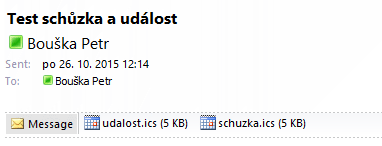
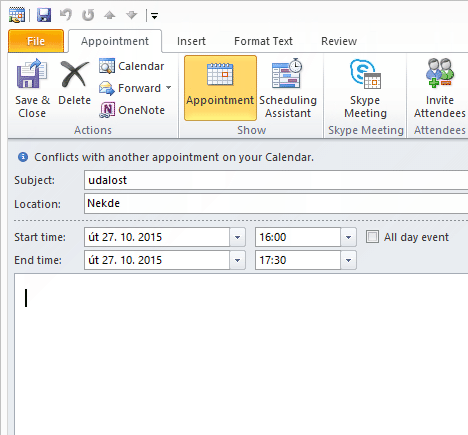
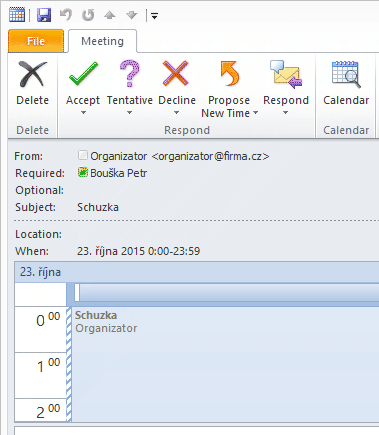
We can send an event or meeting in the iCalendar format as an email attachment. It can be opened and the event can be saved to the calendar using Save & Close. For a meeting, we have buttons like Accept, Decline, etc., and the meeting is normally inserted into the calendar as *Tentative* upon processing.
Automatic Processing of Meeting Requests
I'm not entirely clear on when exactly automatic processing of meeting requests occurs. Presumably, if the request is an attachment, it is processed when opened. If it's in the body of the message, it's processed upon arrival on the server.
We can turn on or off the processing (the details are not clear to me) in the settings of MS Outlook.
File - Options - Mail - Tracking - Automatically process meeting requests and responses to meeting requests and polls
But even if we have Outlook turned off, the event will be inserted into the calendar, so it's processing on the server. On the Exchange server, there are various settings, and for the user, we can list two values:
[PS] C:\>Get-CalendarProcessing uzivatel | FL AutomateProcessing
AutomateProcessing : AutoUpdate
[PS] C:\>Get-CalendarProcessing uzivatel | FL AddNewRequestsTentatively
AddNewRequestsTentatively : True
In the Message Body
The second option is that the meeting is inserted directly in the message (for an event, it probably doesn't work - a strange message comes that we can open, and then it behaves normally). In this way, the invitation is sent when created in Outlook, and the recipient sees a special message (no email icon, but a calendar meeting), where we have the Accept, Decline buttons and a preview of the calendar.
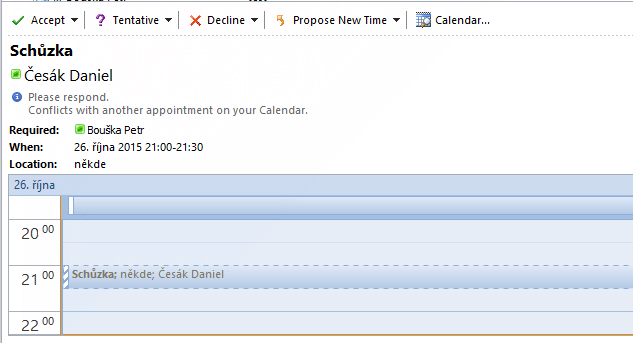
When we want to send an iCalendar file in the body of the email, we can't do it manually (e.g., in Outlook). It can be done programmatically. The message is sent using the extended MIME (Multipurpose Internet Mail Extensions) format. We specify parameters in the header MIME-Version: 1.0. It can contain multiple parts Content-Type: multipart/alternative; and has the Content-class: urn:content-classes:calendarmessage attribute set. In the body of the message (as one part) is the content of the ICS file with the parameters Content-Type: text/calendar; name="meeting.ics"; method=REQUEST; Content-Transfer-Encoding: 8bit.
Sending a Meeting Request using a Script
Using PHP
I first wanted to use PHP, where I expected creating a script would be straightforward. But I still couldn't get it to work, even with various guides on the internet, such as Sending Outlook/Email Calendar Events with PHP.
I'm not sure if I have an error in the correct setting of the MIME message parameters or in the content of the iCalendar file. The result was always a message that had an attachment named not supported calendar message.ics. This attachment could be opened normally, and the invitation was functional.
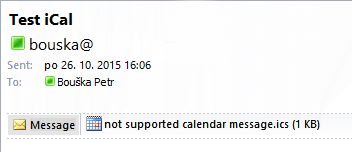
Note: In any case, Outlook/Exchange is quite sensitive to the ICS file format, and many things can cause us problems. For example, when sending successfully, when I had the ORGANIZER parameter only with the email and no CN, the invitation also came as an attachment.
Using Perl
I found an interesting article with a Perl script, and I was able to get it working quickly. It's Exchange compatible iCal invitations. What I needed to do to get it running on Windows:
- download and install ActivePerl, I used the file
ActivePerl-5.22.0.2200-MSWin32-x86-64int-299195.msi - download Email-Date-Format-1.005.tar.gz and MIME-Lite-3.030.tar.gz and extract the
libfolders with their contents into the Perl installation (standardc:\Perl), adding two required libraries - save the Perl script to a file, e.g.
ical.pl, and a test iCalendar tosubject.ics - call the script from the command line in the directory where the script is saved,
d:\>perl ical.pl
The used script ical.pl is from the website mentioned above (you need to change the From, To, and mail server address):
#!/usr/bin/perl -w

use strict;
use MIME::Lite;
my $msg = MIME::Lite->new(
  From    =>'organizator@firma.cz',
  To      =>'ucastnik@firma.cz',
  Subject =>'Test iCalendar',
  Type    =>'multipart/alternative'
);
$msg->attr(
  'content-class' => 'urn:content-classes:calendarmessage'
);
$msg->attach(
  Type => "TEXT",
  Data => "Test iCal"
);
my $part = MIME::Lite->new(
  Type=> "text/calendar; method=REQUEST; name=\"subject.ics\"",
  Filename    => "subject.ics",
  Path=> "subject.ics",
  Encoding    => "8bit",
);
$part->scrub(['date', 'x-mailer', 'mime-version']);
  $part->attr(
  'content-class' => 'urn:content-classes:calendarmessage',
  'content-description' => "subject.ics",
);
$part->replace(
  'content-disposition' => "",
);
$msg->attach($part);
$msg->send('smtp','IP.adresa.mail.serveru', Debug=>1);
We can create the actual invitation in Outlook and save it, then the text file can be edited easily. Example subject.ics file (at least the Attendee needs to be changed):
BEGIN:VCALENDAR
PRODID:-//Microsoft Corporation//Outlook 14.0 MIMEDIR//EN
VERSION:2.0
METHOD:REQUEST
X-MS-OLK-FORCEINSPECTOROPEN:TRUE
BEGIN:VTIMEZONE
TZID:Central Europe Standard Time
BEGIN:STANDARD
DTSTART:16011028T030000
RRULE:FREQ=YEARLY;BYDAY=-1SU;BYMONTH=10
TZOFFSETFROM:+0200
TZOFFSETTO:+0100
END:STANDARD
BEGIN:DAYLIGHT
DTSTART:16010325T020000
RRULE:FREQ=YEARLY;BYDAY=-1SU;BYMONTH=3
TZOFFSETFROM:+0100
TZOFFSETTO:+0200
END:DAYLIGHT
END:VTIMEZONE
BEGIN:VEVENT
ATTENDEE;CN="Ucastnik";RSVP=TRUE:mailto:ucastnik@firma.cz
CLASS:PUBLIC
CREATED:20151022T131746Z
DESCRIPTION:Schuzka
DTEND;TZID="Central Europe Standard Time":20151023T235900
DTSTAMP:20151022T101820Z
DTSTART;TZID="Central Europe Standard Time":20151023T000000
LAST-MODIFIED:20151022T131746Z
PRIORITY:5
SEQUENCE:0
SUMMARY;LANGUAGE=cs:Schuzka
TRANSP:OPAQUE
UID:ok2015102300000020151023000000
X-MICROSOFT-CDO-BUSYSTATUS:TENTATIVE
X-MICROSOFT-CDO-IMPORTANCE:1
X-MICROSOFT-CDO-INTENDEDSTATUS:OOF
X-MICROSOFT-DISALLOW-COUNTER:FALSE
X-MS-OLK-AUTOFILLLOCATION:TRUE
X-MS-OLK-AUTOSTARTCHECK:FALSE
X-MS-OLK-CONFTYPE:0
END:VEVENT
END:VCALENDAR
Different Scenarios for Meeting Requests
I dealt with the situation where an application is sending some event to the calendar. I couldn't find anywhere what the correct way should be. A simple method is to send the ICS file for the event in an attachment. The user opens the attachment, saves it, and has the event in the calendar. Everything is simple and works. But the problem is when we need some information to appear in the calendar, even if the user doesn't open the mail for a week.
In such a case, a meeting invitation sent in the body of the message is suitable. The server will process it immediately upon receipt and normally insert it into the user's calendar. When the user opens the message, they have the option to choose Accept and thereby confirm the meeting. But now the question arises, who should be the meeting organizer in such a case, in other words, from what address should the request come. Because the response (e.g., when accepting) is sent to that address. We can use a non-existent address, but that will cause errors. Some artificial mailbox where the messages will accumulate. In both cases, this address will also be visible for the meeting. The last option is to use the recipient's address. But this may not be the right solution, as occasionally there is a problem (see below).
Setting the Organizer and Participant
It's interesting to see the behavior in Outlook when the sender's email address is combined with the parameters in the ICS file (ORGANIZER, ATTENDEE). If the ORGANIZER parameter is not specified, the email sender is used. If the sender is different from the ORGANIZER, I've read on the internet that such an invitation doesn't work (it comes as an attachment). But it works for me, and Outlook shows the person from ORGANIZER as the sender (only the email header shows that it was sent by someone else).
Meeting Where I'm the Organizer and Participant
If I create a meeting in the Outlook calendar and invite myself as a participant, the incoming email immediately ends up in the deleted items and we see the information that we are the organizer.
As the meeting organizer, you do not need to respond to the meeting.

If I create an ICS file where I set myself as the ORGANIZER, when opened, it also states that I am the organizer and I don't have the buttons available to accept the meeting. However, if I send such an ICS file, for example using a Perl script, in the body of the email, everything works. I can accept the invitation and it is inserted into my calendar. This functionality works in a number of environments where I tested it with Exchange Server 2010 and 2013. But in one infrastructure with Exchange Server 2013, it doesn't work, and the email ends up in the trash. I couldn't figure out what's causing this behavior.
Jedna z věci co není zmíněna je standard CardDAV a CalDAV pro výměnu kontaktů a kalendářů. Bohužel není podporován přímo Outlookem a je nutno využít nějakou jinou aplikaci (například EVO Collaborator) pro přidání této funkce, která pak dovoluje synchronizaci například s Gmailem, iCloud a jinými.
Zdravim,
rad bych se optal, zda jste se nekdy setkal s problemem samovolne odesilanych pozvanek do kalendare (Outlook). Ted poprve v zivote se mi to stalo a odesila se to pomerne hodne a jednatel firmy, kam to chodi, uz je dost nervozni. Nasi IT se s tim nikde nesetkali. Z kalendare jsem tento invitation natvrdo smazal a od vcerejsiho vecera se to odeslalo uz opet 15x ... zadny reminder nastaveny nemam a je to jediny email, na ktery se to odesila, nikomu jinemu ne.
Moc diky za jakekoliv vstupy i odpoved na email milos.kucera@cz.abb.com
Pekny den preji
Milos kucera
Dobrý den mám dotaz jak potvrdím učast schůzky meetingu třeba ?
respond to [1]Jakub: Diky za info. Vyzkousel jsem a funguje super - pouzivam na synchronizaci firemního kalendare v Kerio se soukromym Google kalendářem. Pokud by někdo hledal jak nastavit, tak info jsem nasel třeba zde http://pocitace-a-internet.blogspot.com/2015/03/synchronizace-kontaktu-kalendare-gmailu.html