Microsoft Exchange Server Auth Certificate
When we install the first Exchange Server 2016 (likely also 2019), a Self Signed certificate called Microsoft Exchange Server Auth Certificate is also issued. It has a validity of 5 years and is distributed to all servers in the Exchange organization. It is used for OAuth authentication between servers.
If we configure Exchange Hybrid using the Hybrid Configuration Wizard (HCW), it will typically set up an OAuth authentication relationship. And the Microsoft Exchange Server Auth Certificate will be used.
Expiration of the Certificate and OWA Error
If 5 years have passed, the certificate will expire and will not automatically renew. When a user tries to sign in to Outlook on the web, the mailbox will start to load after entering the login credentials, but then an error will be displayed.
Something went wrong

X-OWA-Error Microsoft.Exchange.Security.OAuth.OAuthTokenRequestFailedException
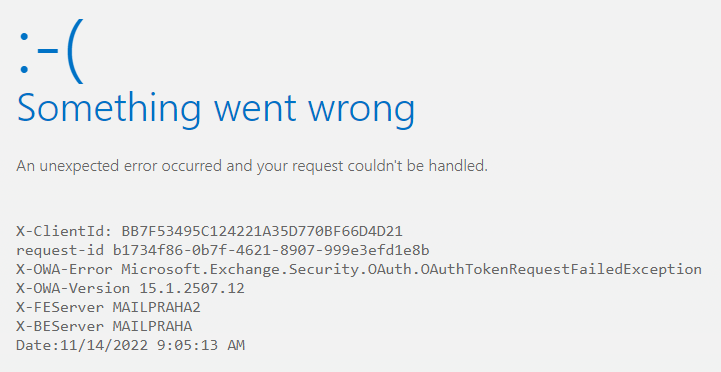
We can view the certificate using the classic certlm.msc. Or the Exchange Admin Center (EAC) - Servers - Certificates. In more detail using PowerShell.
If we search for the error on Google, we will likely quickly find that it's a problem with the expired certificate. But we might not immediately find the Microsoft article that nicely describes the solution - Can't sign in to Outlook on the web or EAC if Exchange Server OAuth certificate is expired. If we search for certain errors on the server, the information is in EWS Application pool crashes because the Exchange Server OAuth certificate is expired.
Brief Steps to Set Up a New Certificate
Check the Current Certificate
First, we'll verify the certificate that is being used for OAuth authentication
(Get-AuthConfig).CurrentCertificateThumbprint | Get-ExchangeCertificate | Format-List
Create and Configure a New Certificate
We'll create a new certificate, we must not overwrite the default SMTP certificate, its Thumbprint will be displayed, which we'll use in the next step
New-ExchangeCertificate -KeySize 2048 -PrivateKeyExportable $true -SubjectName "cn=Microsoft Exchange Server Auth Certificate" -FriendlyName "Microsoft Exchange Server Auth Certificate" -DomainName @()
We'll configure it for server authentication, we'll confirm the warning about the time with Y
Set-AuthConfig -NewCertificateThumbprint <Thumbprint> -NewCertificateEffectiveDate (Get-Date)
Set-AuthConfig -PublishCertificate
Set-AuthConfig -ClearPreviousCertificate
We'll restart the Microsoft Exchange Service Host Service
Restart-Service MSExchangeServiceHost
We'll restart IIS
iisreset
Delete the Original Certificate
We can delete the old certificate (perhaps using EAC).
Exchange Hybrid
If we have Exchange Hybrid, we need to run the Hybrid Configuration Wizard again. It performs the OAuth configuration, configures the AuthServer, and transfers our certificate to Azure AD. More information Configure OAuth authentication between Exchange and Exchange Online organizations.
After the completion, it may still take up to 2 hours before the sign-in to OWA starts working again (I kept trying to troubleshoot, but it seems it just needed some time).
We can perform a connectivity check using Test-OAuthConnectivity
Test-OAuthConnectivity -Service EWS -TargetUri https://outlook.office365.com/ews/exchange.asmx -Mailbox bouska@firma.cz -Verbose | Format-List
Může vypršení certifikátu souviset i s problémem ActiveSync, že se občas neodešle email z mobilních zařízení?