What is SSO?
The commonly used abbreviation SSO comes from the term Single Sign-On. In Czech, it is referred to as jednotné přihlašování, but I prefer the English term. It is a method where we enter our login details only once, and authentication to other services occurs without our intervention (and entering login data). Our data management is performed at a central location (server) where we authenticate. SSO is often associated with centralized user data management (Identity Management), which ensures a common username, password (or alternative authentication such as a certificate), and other data (such as email and address) for various services. If any data changes, we change it in one place, and it reflects on all the services we use.
Not only is it a convenient solution, but it also increases security. Login details do not reach the service; we authenticate at a central location and only pass trusted information to the service. Therefore, it is not important for the application how the user was authenticated. There does not need to be direct communication between the service and the authentication server; the client communicates with it. Of course, this also means a risk; if the central location is attacked, the attacker gains access to various systems.
SSO can be practically implemented in various ways. Each method brings certain advantages and disadvantages.
Kerberos SSO
In this article, we will focus on the widespread SSO method using the Kerberos protocol. Our focus will be specifically on Kerberos by Microsoft, which means domain environment. In this case, the KDC service, which runs on all domain controllers (DC), performs the authentication. Therefore, the client must have access to the DC when using SSO. This service is unlikely to be published on the internet, so SSO is limited to use within an internal network. On the other hand, it is possible to set up trust with other domains (if we have ensured network communication, for example, using VPN), and then SSO works between domains.
The service we want to connect to can run on a Windows server/workstation, whether or not it is part of a domain. It can also be on Linux. It is not necessary for the service to be in the local network; it can be on the internet or another network.
If we are a member of a domain, we may not even realize that SSO occurs very often. At the beginning, we log into the domain (when authenticating to the computer), and when accessing other services (that have SSO set up), we automatically log in. This happens every time we use a network printer, shared disk, connect Outlook to the Exchange server, or many other network services. Without us noticing, our authentication (and subsequent authorization) occurs in the background using SSO. Usually, if authorization fails (we do not have rights to the service), a login dialog appears, and we can use a different account.
Kerberos authentication always uses login to a service, and in such a case, the principle of Single Sign-On is always used.
SSO for the Web
On the internet, SSO is most commonly used for web applications. Within an internal network, Kerberos SSO works for web servers, but the client must be inside the internal network. This is not suitable for home users who are not part of a domain. It is also often a problem for corporate use.
Therefore, there are two solutions. In a corporate environment, a special server Identity Provider is used, which offers identity verification services to the internet. Internally, it authenticates the user against a directory service (such as Active Directory). This means that we can use domain accounts to authenticate to internet services (used, for example, in hybrid clouds). The open standard Security Assertion Markup Language (SAML and the newer SAML2) is often used.
The second option is an internet service that manages user accounts and performs authentication. We can log into various websites with one account (and ideally using SSO). We use something like this, for example, with Google, Facebook, or Microsoft. Some systems in this area are OpenAM (formerly OpenSSO) or WebAuth. Unified identity management is OpenID or the Czech project mojeID.
Practical use is such that when first accessing a web service that uses a unified account, we enter login details. We obtain an encrypted identity, and when accessing another service, it is no longer necessary to enter the details. Initially, however, we must log into the computer, where a different account is used.
When we mentioned the Cloud, there is another option for corporate environments. Accounts from the internal Active Directory are synchronized (e.g., MS DirSync) to the Cloud directory, or federation is performed (e.g., MS Active Directory Federation Services). User accounts then work within the given Cloud services. An example is Microsoft Office 365.
Kerberos Protocol
Kerberos is a network authentication protocol that works based on tickets to allow communicating parties in an unsecured network to securely prove their identity. Initially, we enter our login details, and all subsequent verification works on the principle of SSO.
The Kerberos protocol was developed in the 1980s at the Massachusetts Institute of Technology (MIT). The still-used version 5 has been around since 1993, defined in RFC 1510 - The Kerberos Network Authentication Service (V5). This standard was revised and specified in RFC 4120 - The Kerberos Network Authentication Service (V5) in 2005. In Microsoft's domain environment, Kerberos v5 is the default authentication protocol. As an alternative, or in older Windows (NT 4.0), the NTLM (NT LAN Manager) protocol is used. Issues related to the Kerberos protocol are defined in several other RFC standards.
Standard Kerberos is used for authentication, and Microsoft has extended it with authorization data (sending a list of groups the user is a member of, and possibly other information) using Kerberos Protocol Extensions [MS-KILE]. This data is stored in the Privilege Attribute Certificate (PAC) Data Structure [MS-PAC].
Note: This ticket extension with a list of groups can lead to login issues if the user is a member of too many groups. I described these issues in the article Kerberos authentication and group membership.
Kerberos is widely used (not only in the MS world) due to its features:
- the user's password or its hash is never transmitted over the network - encrypted tickets are exchanged
- it uses symmetric cryptography - various ciphers are supported (such as DES, RC4, AES)
- the architecture is extensible - allowing the use of additional or alternative security methods (ciphers, hashes)
- supports mutual authentication - optionally, not only the client authenticates to the service, but also the service to the client
- protects against eavesdropping or replay attacks (protection using timestamps)
- allows users to access various services without entering a password = Single Sign-On
- simplifies administration - accounts are centrally managed for various applications
- works in a client-server model and requires a trusted third party (KDC) - this is also a weakness, as the KDC must always be running and well-secured
- the client does not authenticate on the server, the server never receives the user's credentials, authentication is performed by the KDC and sends the encrypted user's name (which only the server can decrypt)
- supports impersonation - the user does not directly access resources, the system accesses them on their behalf
- supports delegation of authentication (using proxy ticket, forwarded ticket, protocol transition, and constrained delegation) - allows a service running under an account to take over the user's identity and log in to another service (for example, the user logs in to an application server, which needs to log in to a DB, but must do so under the user's authorization)
The Kerberos protocol is considered secure, protecting against various attacks or misuse. By its principle (such as using temporary tickets and encryption with various keys) and purpose (to enable secure verification in an unsecured network), it provides protection during network communication. However, there are still points where misuse can occur. One point is the user's password; if a weak password is chosen and an attacker can guess/obtain it, the security of the protocol itself will not prevent account misuse. To increase security, a smart card and certificate authentication can be used. The second danger is the compromise of the station from which the user logs in. The Secret Key, which is essentially the user's password, is temporarily stored in memory.
The protocol's name comes from Greek mythology, where Kerberos is a three-headed dog guarding the entrance to the underworld. This is because three parties participate in the communication:
- user - client, who wants to access a network service
- server - more precisely, the service the user wants to access
- Key Distribution Center (KDC) - a trusted third party, part of the domain controller (DC), and contains two independent services - Authentication Service (AS) and Ticket-Granting Service (TGS).
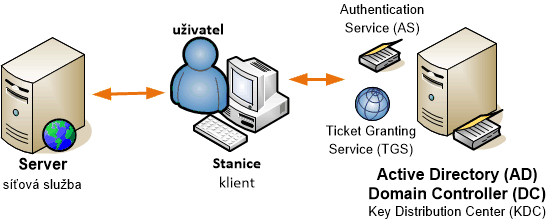
Kerberos V5 typically uses TCP(/UDP) port 88. It is fully integrated into Active Directory, server and client OS from Windows 2000, and many network protocols, such as CIFS/SMB, HTTP, RPC, print services, DFS, IPsec, etc. Kerberos depends on several services, including Active Directory Domain (it does not work for local accounts), TCP/IP network, DNS (Domain Name System), time synchronization (Time Service), and SPN (Service Principal Names).
References
- How the Kerberos Version 5 Authentication Protocol Works
- RFC 4120 - The Kerberos Network Authentication Service (V5)
- RFC 1510 - The Kerberos Network Authentication Service (V5)
- What Is Kerberos Authentication?
- Kerberos Explained
- Five steps to using the Kerberos protocol
- Basic Concepts for the Kerberos Protocol
- Kerberos Protocol Tutorial
- Kerberos FAQ
- Kerberos for the Busy Admin
- Accessing Resources across forest and achieve Single Sign ON (Part1)
- Microsoft Kerberos
- Recommended Practices for Deploying & Using Kerberos in Mixed Environments
- Explain like I’m 5: Kerberos
There are no comments yet.