
Kerberos on the web server
From the information we described in previous parts, we can put together the points that need to be fulfilled for operating Kerberos SSO on a web application server. Some parts we have already described in detail, and some we will still address. There is only a small difference whether we use IIS (where some things are simpler, for example, the keytab file is not needed) or another server. Here we will describe the situation as it is, for example, with Apache HTTP Server.
- for the server, we need a DNS A record (host), this FQDN (address) will be entered by the user in the browser (if we use an alias (CNAME), we may encounter a problem that some browsers do not use this alias but the associated host name), example
www.company.local - service account in Active Directory, preferably a user account without special rights, to which we link the service, the password of the account must not change (after creating the keytab file), example
company\wwwsso - registered service SPN on the service account, which uses the specified FQDN (registration is done together with creating the keytab), example
HTTP/www.company.local - created keytab file using the
ktpasscommand (sometimes it is necessary for the account to be in the default Users container when creating the keytab, we can move it later), example
ktpass -out www.keytab -princ HTTP/www.company.local@COMPANY.LOCAL -mapUser company\wwwsso -mapOp set -pass password -ptype KRB5_NT_PRINCIPAL -kvno 0 -setupn -crypto All
- keytab file uploaded in the folder on the web server and the server/application configured accordingly
Note: We will explain everything about the keytab file in the next part of the series. We will describe the configuration of the web server in the next one.
Kerberos and Single Sign-On with the HTTP protocol
In a domain environment, SSO authentication works automatically for a number of services, such as file sharing or print services. Nowadays, a large number of applications work through a web interface. It would therefore be convenient to log in to these web applications using SSO. And thanks to a special authentication scheme within the HTTP protocol, this is possible.
The Internet Information Services (IIS) web server, as part of Windows, supports SSO through simple settings. But support is also available in other servers, such as Apache HTTP Server or Apache Tomcat. In such a case, the application server handles the Kerberos communication, and the application obtains the user name from its variables. Another option is to use the Kerberos protocol directly in the application (e.g., using ready-made libraries). Similarly, support is available in all modern web browsers, but usually, a small configuration is needed.
If we use IIS on a computer joined to a domain, it can (for example) communicate directly with the domain controller using a service account and handle Kerberos authentication. This is not possible with Apache, even if it runs on a Windows server in the domain. However, there is another option, which is to use a keytab file. Using this method, it is possible to use Kerberos authentication for various application servers, even if they run on Linux or another OS.
The possibility of using Kerberos authentication in the HTTP protocol was introduced by Microsoft in 2001 through the HTTP authentication scheme Negotiate. This was later described in the informational RFC 4559 from 2006. It uses GSSAPI to encapsulate the Kerberos protocol. Authentication is typically performed at the beginning in HTTP, thus authenticating the session. For securing the transport layer, it is advisable to use HTTPS.
Integrated Windows Authentication (IWA)
When we want to use Kerberos SSO for web authentication, Integrated Windows Authentication (IWA) is used in the Microsoft environment, logging in using our Windows credentials (using our current Windows login). It is not a standard and not directly an authentication protocol; this term is used for the authentication method by IIS and Internet Explorer. Other terms used for IWA include HTTP Negotiate Authentication, Windows NT Challenge/Response Authentication, or simply Windows Authentication. I could not find any official documentation describing/defining IWA. I do not know if the entire IWA means only the HTTP authentication scheme Negotiate, or if it includes something else. At least the basics are described in the informational document RFC 4559 - SPNEGO-based Kerberos and NTLM HTTP Authentication in Microsoft Windows.
IWA uses providers for various authentication methods, supporting Negotiate and NTLM, and from IIS 7.0, it is also possible to set Negotiate:Kerberos separately. When we enable IWA authentication on IIS, Negotiate (Kerberos and NTLM) and separate NTLM are used by default. Setting IWA in Internet Explorer ensures that it responds to Negotiate challenges. If we disable IWA, it still responds to separate NTLM. Web servers like Apache and Tomcat use Negotiate when setting up Kerberos.
HTTP Negotiate authentication
When we want to use the Kerberos protocol, the Negotiate method is used. It is an authentication package that implements the SPNEGO (Simple and Protected GSSAPI Negotiation Mechanism, RFC 4178), which is part of the standardized GSS-API (Generic Security Service Application Program Interface, RFC 2743). It is an envelope that allows negotiation/selection of the appropriate protocol. In the case of Microsoft, Kerberos v5 and NTLM are used within Negotiate, but it can be extended with other protocols. Kerberos is preferred, so if the client has everything necessary, it will use Kerberos; if not, it will attempt NTLM.
For HTTP Negotiate (IWA), HTTP/401 challenges are used in the HTTP protocol, just like for other authentications (such as Basic or Digest). The description can be found in the proposed standard RFC 7235 - Hypertext Transfer Protocol (HTTP/1.1): Authentication. This means using the status code HTTP/1.1 401 Unauthorized in the HTTP header. At least this name is given by the RFC standard (RFC 2616 chapter 10.4.2 and the mentioned RFC 7235), but in practice, we often encounter HTTP/1.1 401 Authorization Required.
HTTP Authentication Process
Communication between the client and the web server during authentication proceeds as follows (focused on Kerberos):
- the client sends an HTTP GET request to obtain a page, anonymous authentication is used by default (no authorization data is sent)
- if the server has access to the page set only after user verification, it does not return the page (and code 200), but responds with code 401 and offers supported authentication methods (there may be one or more, in the example IWA, Digest, Basic are given)
HTTP/1.1 401 Unauthorized
WWW-Authenticate: Negotiate
WWW-Authenticate: NTLM
WWW-Authenticate: Digest realm="" nonce="" ...
WWW-Authenticate: Basic realm=""
- the client tries the authentication methods and for the first one it supports, it prepares a response. It sends the HTTP GET request for the page again, but this time it adds authentication data to the header (according to the used method)
Authorization: Negotiate YIIGKwYGKwYBBQUCoI...
- the server verifies the sent authentication data, and if everything is OK, it returns the status code 200 and the requested page. If mutual authentication is used, the server uses
WWW-Authenticate: Negotiatein the header again, as when offering authentication methods, but now it adds its own data.
WWW-Authenticate: Negotiate oYHmzsZsjbVx...
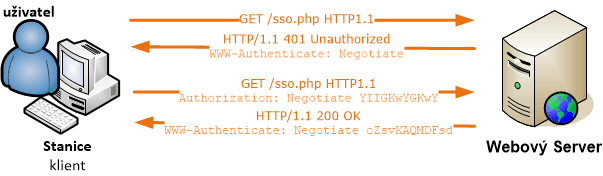
In practice, it is sometimes used that the server does not return the page and code 200, but first redirects to another page, so the client gets code 302 and the address of the page to open.

Authentication from the User's Perspective
If everything goes correctly, Kerberos V5 is used, as we described in previous parts. This means that SSO occurs, the user does not have to enter anything and may not even notice that authentication has occurred. One of the conditions is to have a direct connection to Active Directory. And a properly configured browser (we will describe this later in the article). If all conditions are not met, or something fails, it partly depends on how the web application is written. In most cases, the Windows Security modal window appears, asking for a username and password (or possibly a certificate).
In a certain percentage of cases, we can fill in the login details, Kerberos authentication with DC is performed, and a ticket is sent to the server. In this case, correct login occurs. However, in most cases, NTLM authentication is performed at this point, and if we do not have it enabled as an alternative to Kerberos, the login fails. The login dialog appears again (three times in a row). We cannot tell whether the popping-up dialog will perform Kerberos or NTLM (we can only capture the communication).
Content of Authentication Data
In the client request, which contains the Authorization line in the header, the GSS-API data encoded using Base64 is located after the keyword Negotiate. Inside is SPNEGO and inside the list of supported methods and Kerberos v5 data object. The object contains the Kerberos message KRB-AP-REQ and in it the Service Ticket.

Windows Components for Authentication
In Microsoft OS, user authentication is provided by the Local Security Authority (LSA) service. It calls the interface (security API) Security Support Provider Interface (SSPI), which is a proprietary variant of the standard GSS-API. SSPI uses various providers (SSP - Security Support Provider), for example, the Kerberos V5 protocol (including extensions that allow authentication using a certificate on a smart card) implemented using the dynamically linked library Kerberos SSP (Kerberos.dll). The web browser (such as Internet Explorer) also calls SSPI, which uses Negotiate SSP, which selects Kerberos SSP or NTLM SSP.
References
- IIS logging for Windows Integrated authentication
- Integrated Windows Authentication (IIS 6.0)
- HTTP-Based Cross-Platform Authentication by Using the Negotiate Protocol
- Windows Authentication Architecture
- Logon and Authentication Technologies
- Security Support Provider Interface Architecture
- Microsoft Kerberos
- Authentication in IIS
- Security Support Provider Interface (SSPI)
- RFC 4559 - SPNEGO-based Kerberos and NTLM HTTP Authentication in Microsoft Windows
- RFC 2743 - Generic Security Service Application Program Interface Version 2, Update 1
- RFC 4178 - The Simple and Protected Generic Security Service Application Program Interface (GSS-API) Negotiation Mechanism
- RFC 7235 - Hypertext Transfer Protocol (HTTP/1.1): Authentication
- RFC 2616 - Hypertext Transfer Protocol -- HTTP/1.1
There are no comments yet.