
I tested on MS Windows Server 2008 R2 and a Cisco Catalyst 2960G switch. An interesting article on this topic is Catalyst Switches for Microsoft Network Load Balancing Configuration Example. NLB is an optional Feature on Server 2008, and the Network Load Balancing Manager (from any machine with available connection) is used for management. During the tests, I ran the NLB Manager from cluster members, and several times I encountered a situation where not all members were visible from one server, but they were from the other.
NLB handles the distribution of client requests to a group of servers. The response then comes from the cluster member that processed the request. The main role is played by the virtual IP address, which is called the cluster IP address. This is the address we use to call the application on the cluster. An MAC address is automatically generated for this IP address, its shape depends on the cluster mode. Cluster members should (I'm not sure if this is always a mandatory condition) be in the same subnet.
When configuring NLB, the adapter settings with the selected IP address are automatically modified (it is added to the cluster based on this IP). And the cluster IP is added as a second IP to its standard IP address. So all cluster members get the same IP address (as the second one). The client's request then arrives at all servers on L3 (layer 3 according to the OSI model) at the same time, and they determine according to certain rules which one of them will process the query. The distribution is done based on the calculated hash (it can be based on the source IP address) and the hash range is divided between the servers in the cluster according to the number of servers.
Cluster members must also be aware of how many other active members are in the cluster. So they can properly distribute the incoming communication and process it. That's why they all regularly send the NLB heartbeat (which includes the cluster virtual IP and host IP).
NLB is an MS clustering technology and is part of Windows Server 2000, 2003, and 2008. It can operate in one of three modes: unicast, multicast, and IGMP multicast. It's important that NLB can use the same network adapter for communication between cluster members that is being clustered.
It may be helpful to know that the NLB configuration (including IP and MAC addresses) is stored in the registry in the key HKLM\SYSTEM\CurrentControlSet\Services\WLBS. This is probably for historical reasons, as WLBS is the abbreviation for MS Windows NT Load Balancing Service, which was the predecessor of NLB.
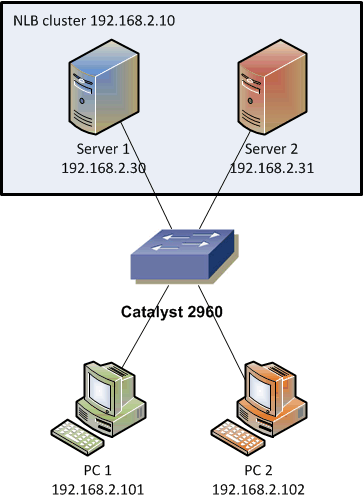
For the tests described below, the following setup was used. Server 1 and Server 2 are used to create the NLB cluster, PC1 is used to send queries, and PC2 is only for monitoring that some communication is also spreading outside the ports where it is directed.
NLB Unicast mode
The default mode for NLB, allegedly with the least problems. NLB adds a second IP address (cluster IP) to the adapters of all cluster members and also changes the MAC addresses of these adapters. The new MAC address is from the range of "common NLB MAC addresses" and is shared by all cluster members and the virtual IP (in my test it was MAC 02:bf:c0:a8:02:0a). This should cause the communication at L2 to arrive at all cluster members at the same time. However, on one switch, two ports cannot be assigned the same MAC address, so in practice this solution does not work (the switch would still change the record of which port has this MAC, and only one would work = MAC address flapping).
NLB solves this by default by masking the MAC addresses in the Ethernet headers of outgoing frames. These are the addresses that the switch learns and stores in the CAM table. NLB creates fake different MAC addresses (02:01:c0:a8:02:0a, 02:02:c0:a8:02:0a) derived from the cluster MAC address, but with a sequential number in the second octet. The communication then takes place using these fake MAC addresses in the headers, but the servers respond to ARP queries with the virtual MAC address. In the ARP reply, we have a different MAC address in the header and a different MAC address in the data as the source, which some devices may interpret as spoofing.
Generally, however, it works, the switch uses the MAC addresses from the frame headers, the clients use the data from the ARP. Clients therefore send data to the virtual MAC address. The switch doesn't know it (no frame came from it), so it sends the frame to all ports in the given VLAN except the incoming one, which is the same as broadcast.
It's also interesting that when a cluster member queries another member for the MAC address through ARP, it uses a different MAC address again, and gets a similar one in the response (03:bf:c0:a8:02:1e, 03:bf:c0:a8:02:1f). This is for direct communication between cluster members. Another interesting thing is that when we test using ICMP echo/reply (ping), we get a response from all members for each request (at this layer, the processing of requests is not yet distributed).
If we use NLB in unicast mode, the MS NLB heartbeat is distributed using broadcast (the destination MAC address is FF:FF:FF:FF:FF:FF) and is sent every second.
Improvement through switch configuration
The solution described above is functional, but the fact that our communication is actually broadcast is certainly not good and unacceptable for many. Fortunately, there is a solution to change this behavior. When we have a Cisco switch, we can statically add the record to the CAM table and even assign one MAC address to multiple ports. This ensures that the communication sent to the cluster (virtual MAC) only reaches the specified ports.
SWITCH(config)#mac address-table static 02bf.c0a8.020a vlan 112 interface Gi0/3 Gi0/17
SWITCH#show mac address-table | inc Gi0/3
112    0201.c0a8.020a    DYNAMIC     Gi0/3
112    02bf.c0a8.020a    STATIC      Gi0/3 Gi0/17
To prevent MAC address masking in unicast mode
Now the MAC address masking looks unnecessary, so we could switch the default behavior to a mode where the cluster MAC is used even at L2. This switch is made in the registry on all cluster members, we need to change the value of MaskSourceMAC to 0 (0 is off, 1 is on) in the path HKLM\SYSTEM\CurrentControlSet\Services\WLBS\Parameters\Interface\Adapter-GUID. A server restart is then required.
Unfortunately, the fact that we statically assign a MAC address to multiple ports does not solve the MAC flapping problem. The switch still learns MAC addresses on the ports (even though we have statically assigned the same one) and although the communication works, the switch is burdened.
NLB IGMP Multicast mode
MS offers two types of multicast mode: non-standard multicast, which uses the Microsoft NLB multicast MAC address for the cluster IP, and standard IGMP multicast, which uses standard multicast MAC addresses (starting with 01:00:5e) and also IGMP Report Message (messages about joining multicast groups).
In multicast mode, the physical adapters retain their original MAC address, a virtual IP address is assigned to the adapter, and the servers respond to ARP queries for the cluster IP with the multicast MAC address (01:00:5e:7f:02:0a). When a client sends a request to this MAC address, the switch sends the frame to all ports except the incoming one in this VLAN (standard multicast behavior within the subnet, so again like broadcast). If IGMP Snooping is working, the switch examines the IGMP Report Message and then sends the data only to the ports that are subscribed to the multicast group.
CAUTION! In this case, a problem may arise if we need clients in other VLANs to communicate with the cluster IP address. Cisco devices will not allow ARP replies where the unicast IP and multicast MAC are different. So the cluster IP is not available to clients from other VLANs. The solution is static records in the router's ARP table.
SWITCH(config)#arp 172.16.63.241 0300.5e11.1111
If we use NLB in IGMP multicast mode, the MS NLB heartbeat is distributed using multicast to the cluster multicast MAC address (01:00:5e:7f:02:0a) and is sent every second. Cluster members use their own MAC address in the response. Interestingly, when capturing communication on a cluster member, the frames sent to the cluster IP and MAC show the MAC address of the given cluster member instead of the multicast MAC address. Also, the NLB heartbeats are not displayed at all in the captured communication.
Improvement through switch configuration
Getting IGMP Snooping to work is not as simple as it seems (it's not enough to just enable it on the active devices, which is the default for Cisco). So even when using multicast, the communication mostly spreads like broadcast. Fortunately, the same thing works here as with unicast. We can set static records in the CAM table on the switch (this setting overrides even IGMP Snooping).
SWITCH(config)#mac address-table static 0100.5e7f.020a vlan 112 interface G0/3 G0/17
Cisco also mentions that for Catalysts 6000 and 6500, the command needs to be supplemented with the keyword disable-snooping.
SWITCH(config)#mac address-table static 0100.5e7f.020a vlan 112 interface G0/3 G0/17 disable-snooping
This solution is probably the best, because no communication that doesn't belong there (not even the NLB heartbeat) reaches the ports outside the cluster and the client.
MAC address tables in different modes
I think the MAC address tables seen by different devices when setting different NLB modes are very informative.
| name | IP address | MAC address | |
|---|---|---|---|
| Server 1 (S1) | PC07 | 192.168.2.30 | 00:22:19:1b:e8:fb |
| Server 2 (S2) | PC08 | 192.168.2.31 | 00:22:19:1c:01:e5 |
| Cluster IP | 192.168.2.10 |
The second table shows what MAC addresses individual devices use for the IP addresses of another device. First, we have our own MAC addresses on the cluster member adapters. Then what MAC address is returned for the cluster IP.
| mode | server 1 | server 2 | cluster (PC sees) |
|---|---|---|---|
| unicast | 02:bf:c0:a8:02:0a | 02:bf:c0:a8:02:0a | 02:bf:c0:a8:02:0a |
| multicast | 00:22:19:1b:e8:fb | 00:22:19:1c:01:e5 | 03:bf:c0:a8:02:0a |
| IGMP multicast | 00:22:19:1b:e8:fb | 00:22:19:1c:01:e5 | 01:00:5e:7f:02:0a |
Then what MAC addresses the cluster members see between themselves. Then what MAC addresses the cluster members return to clients.
| mode | S2 sees for S1 | S1 sees for S2 | PC sees for S1 | PC sees for S2 |
|---|---|---|---|---|
| unicast | 03:bf:c0:a8:02:1e | 03:bf:c0:a8:02:1f | 02:bf:c0:a8:02:0a | 02:bf:c0:a8:02:0a |
| multicast | 00:22:19:1b:e8:fb | 00:22:19:1c:01:e5 | 00:22:19:1b:e8:fb | 00:22:19:1c:01:e5 |
| IGMP multicast | 00:22:19:1b:e8:fb | 00:22:19:1c:01:e5 | 00:22:19:1b:e8:fb | 00:22:19:1c:01:e5 |
And the last ones are the MAC addresses on the switch ports.
| mode | switch sees S2 (Gi0/3) | switch sees S1 (Gi0/17) |
|---|---|---|
| unicast | 02:02:c0:a8:02:0a | 02:01:c0:a8:02:0a |
| multicast | 00:22:19:1c:01:e5 | 00:22:19:1b:e8:fb |
| IGMP multicast | 00:22:19:1c:01:e5 | 00:22:19:1b:e8:fb |
Funguje. Diky
autoa.org
Hu, koukam, ze ty serverove subnety po nekolika malo bitech u jednoho z nasich zakosu maji krome neskutecnyho bordelu v routovaci tabuli taky nejaky pozitivum - broadcasty NLB clusteru chodej jenom clenum NLB clusteru ;-))))
Dobry vecer , hloupa otazecka , ale v druhe tabulce jake mac adresy vraceji clenove clsteru pc:
unicast 03:bf:c0:a8:02:1e 03:bf:c0:a8:02:1f 02:bf:c0:a8:02:0a 02:bf:c0:a8:02:0a
tam by nemeli byt 02:01:c0:a8:02:0a a 02:01 . Predpokladam ze klienti vidi maskovanou adresu . Muzete to prosim trosicku objasnit ? Dik Marek