How the Problem Manifests
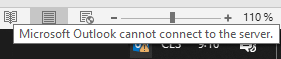
After starting Outlook, the status bar will show the status as Disconnected.

When hovering over the Outlook icon, the message will display Microsoft Outlook cannot connect to the server.
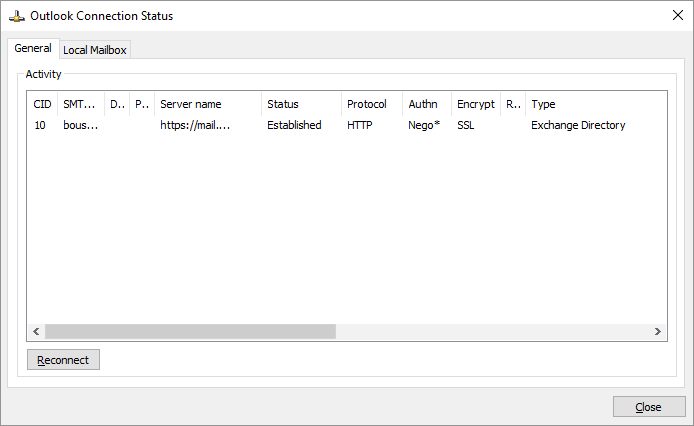
If we want to view the detailed connection information, we can click Ctrl + right-click on the Outlook icon in the notification area (next to the clock) and choose Connection Status.
Identifying the Error
We can find the error in the MAPI HTTP log, but we probably need to know what to look for beforehand. This is the occurrence of the MaxConnectionsExceeded data. The log is typically located at the path
C:\Program Files\Microsoft\Exchange Server\V15\Logging\MapiHttp\Mailbox\
Its name is based on the date and time, for example MapiHttp_2020072806-6.LOG.
Example of a log entry with the rpc MaxConnectionsExceeded error.
2020-07-28T07:11:11.667Z,52c306ac-94e1-4f65-b5e6-d6394a56da95,{5A62F525-560E-4488-9026-01CA3DC30A6F}:1,{AE8EA766-5078-4ED7-
BC2E-C1A2D580D82C},Connect,200,0,0,2614,5,Unknown,15,1,1979,3,FIRMA\bouska,,,,456b7e4c-ac32-4973-8cf1-2d95f29ee7c5@firma.cz,
cde6d549-a614-48cf-8ae4-89a71a7d7ba8,/o=Firma/ou=First Administrative Group/cn=Recipients/cn=bouska,10.0.1.10,MAIL.FIRMA.LOC
AL,<null>,,MAPIAAAAAOip4Kz8ru+n5sX3x/XF6NjtwPHG5tfm3O3Y4tLmvJ+nkqKSqp6umqKvTgwAAAAAAA==,,{362018D5-977C-4168-8477-95DA73BBEE
3B}:117440123,OUTLOOK.EXE,16.0.10363.20015,2,Negotiate,,,,,,,,,FIRMA\bouska,,Flags=None;,cpn=M_ABR/RUM_ABR/RUM_ABRC/M_APAR/M
_APRH/M_DTC/M_DTQ/M_DTE/M_RDE/M_RDEc/M_DTEc/M_APoRH/M_AER/;cpv=0/0/0/2/2/3/3/3/3/4/4/4/4/;I32:OBudg.C[]=1,MoMTException:2614
 (rpc MaxConnectionsExceeded) -> ;
Resolving the Issue Using Throttling Policy Adjustment for the Organization
Documentation Set-ThrottlingPolicy, Change user throttling settings for all users in your organization
Various connection limits (restrictions on user resource consumption) are set by the Throttling Policy. The default setting is determined by the predefined GlobalThrottlingPolicy. We can list the existing policies using the Exchange Management Shell (EMS).
[PS] C:\>Get-ThrottlingPolicy

Name                             ThrottlingPolicyScope IsServiceAccount
----                             --------------------- ----------------
DefaultThrottlingPolicy_749a82f1 Regular               False
GlobalThrottlingPolicy_30fedd7c- Global                False
We can check if the user has a special policy assigned.
[PS] C:\>Get-Mailbox bouska | FL Name, ThrottlingPolicy

Name             : Bouška Petr
ThrottlingPolicy :
We can check the value of RcaMaxConcurrency, which is our current concern.
[PS] C:\>Get-ThrottlingPolicy GlobalThrottlingPolicy* | FL RcaMaxConcurrency

RcaMaxConcurrency : 40
Policies are created with different ThrottlingPolicyScope, which determines the application.
- Global - reserved for the predefined default GlobalThrottlingPolicy
- Organization - applies to all users in the organization
- Regular - for application to specific users
When we want to adjust the limits for all mailboxes, we will create a new policy that automatically inherits the settings from the default Global policy.
New-ThrottlingPolicy -Name DefaultMoreConnection -ThrottlingPolicyScope Organization
And then we modify the required value (it is also possible to set it to unlimited)
Set-ThrottlingPolicy DefaultMoreConnection -RcaMaxConcurrency 200
We can also increase some of the other limits
Set-ThrottlingPolicy DefaultMoreConnection -DiscoveryMaxConcurrency 10 -EwsMaxConcurrency 200
There are no comments yet.