
Note: I conducted tests on the Cisco Catalyst C9500-24Y4C-A with IOS XE 16.12.04.
Note: The Czech word for Stack is stoh, similarly Stacking is stohování, but I usually stick with the Czechified stackování.
Note: I categorize this article under Cisco IOS, even though Catalyst 9000 are equipped with Cisco IOS XE. They are very similar in use (unlike NX-OS, which differs in many commands). The main difference is that IOS is a monolithic system running directly on hardware, while IOS XE is a combination of a Linux Kernel and applications (IOSd) running on top of the kernel.
StackWise Technology
Connecting multiple physical switches into a single Stack using StackWise technology has been a long-standing practice, which I described in the article Cisco IOS 17 - more switches as Stack - StackWise technology. In practice, I haven't encountered any issues, although I've heard that the entire Stack can fail if one member goes down.
StackWise Features
The main advantages of StackWise include:
- simplified configuration, where each switch does not need to be configured individually
- reduced number of uplink connections, (depending on the situation) two links (in different physical boxes) may suffice for the entire Stack
- increased availability, a server or another switch can be connected via multiple paths to different Stack members and set as EtherChannel (usually used within a single switch, but also within the entire Stack), if one switch fails, the Stack (other members) continues to operate
StackWise uses a special (interconnect) stacking cable and the individual members are connected in a closed loop. There can be up to 8 (sometimes 9) members. They must be within a relatively short distance, allowing direct connection. Creating a Stack is simple, connect the switches with the stacking cable and power them on. Everything should be set up automatically.
StackWise Support on Switches
The StackWise technology is supported only for certain categories and types of switches. Basic series of fixed switches do not include it. It is part of higher series of switches categorized as Access. In the highest series (often modular) switches, referred to as Core, different technology is used.
Virtual Switching System (VSS) and StackWise Virtual (SV)
Previously, the Virtual Switching System (VSS) technology was used, for example, with C6500 and C4500. This technology allows connecting 2 physical switches into one virtual switch using standard interfaces and patch cables. It allows connections over longer distances and is also referred to as clustering.
Currently, it has been replaced by StackWise Virtual technology, which is very similar. Some sources state that StackWise Virtual is just a rebranded VSS. However, it was likely rewritten for IOS XE (initially containing many bugs). Almost every new version of IOS XE adds new features and configuration options (simplified compared to VSS).
Cisco Catalyst 9000
Catalyst 9300 Stackwise System Architecture White Paper
Currently, we have Cisco Catalyst 9000 switches (Cisco Catalyst 9000 At-a-Glance). The C9200L, C9200, and C9300L series support a separately purchased Stacking Kit. The C9300 series supports StackWise-480 (in some variants allowing up to 16 members) and StackPower for shared power. The C9400, C9500, and C9600 series support StackWise Virtual.
The first StackWise bus had a speed of 16 Gbps, it is a ring and data could travel in both directions (using the SRP protocol), so Cisco states double the speed 32 Gbps. Today, the lowest speed for C9200L is 80 Gbps and C9300 uses 480 Gbps. The speed is included in the technology name, for example, StackWise-320. Different types of switches with different bus speeds cannot be connected together.
StackWise Virtual (SV) Technology
Documentation
The official documentation is not bad and contains many details not mentioned here.
- Cisco Catalyst 9000 Platform StackWise Virtual White Paper
- High Availability Configuration Guide, Cisco IOS XE Gibraltar 16.12.x (Catalyst 9500 Switches)
- Command Reference, Cisco IOS XE Gibraltar 16.12.x (Catalyst 9500 Switches) - High Availability Commands
- Cisco Live - Next Generation High Availability in Campus
Description of StackWise Virtual
The StackWise Virtual technology is very similar to the older Virtual Switching System (VSS) and functionally quite similar to the standard StackWise. I would say it is more like a cluster and aims to ensure high network core availability. It not only synchronizes configuration but also protocol states and L2 information (FIB - Forwarding Information Base) for switching (not L3). In the event of a failure of the active element, a full switch to the standby occurs in minimal time.
Compared to StackWise
- we can only connect two switches
- it can be over a longer distance (using standard cables)
- we must configure it by switching the switch's operating mode
Only certain switches in the Catalyst 9000 family support StackWise Virtual (some 9400, all 9500, including 9500 High Performance, and 9606R). Depending on the specific platform, there are different requirements for configuring SVL and DAD. Both switches must be the same models with the same software version and the same license level (but Network Advantage is likely required).
StackWise Virtual allows clustering of two physical, directly connected, switches into one virtual switch. Both switches operate as one, sharing the same configuration and forwarding state. Efficiency is increased (we have one control and management plane) and performance is enhanced with a distributed forwarding plane. It helps build a highly available network.
Note: The documentation mostly states that there can be exactly 2 members. Occasionally, the description is more general, suggesting there could be more members.
Recommended High Availability Topology
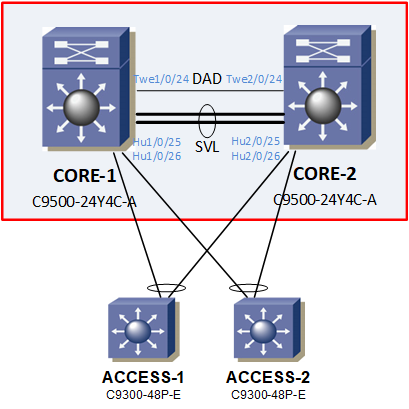
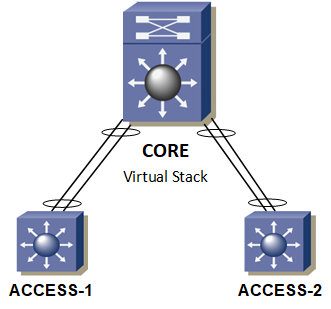
When using StackWise Virtual (SV), a connection ensuring high availability is recommended. That is, all devices (Access Switch, servers, etc.) should be connected via two paths with PortChannel to different physical SV members. On SV switches, Multichassis EtherChannel (MEC) is used, where the ports forming the EtherChannel are located on different physical switches. StackWise Virtual allows the creation of up to 128 Multichassis EtherChannel links (126 are available), each can have up to 8 members. The On mode or control protocols LACP and PAgP are supported.
The following image shows an example of the physical connection of StackWise Virtual and the connection of other switches. The right image is the logical diagram of the same.
Main Principle of StackWise Virtual
Two switches (Cisco Catalyst 9000), which we connect into one logical switch, form a StackWise Virtual Domain. One member is Active, having an active Control and Data Plane, and the other is Standby, having an active Data Plane. The Cisco IOS Stateful SwitchOver (SSO) technology is used, with the Nonstop Forwarding (NSF) extension, minimizing downtime for seamless service takeover in case of one switch failure.
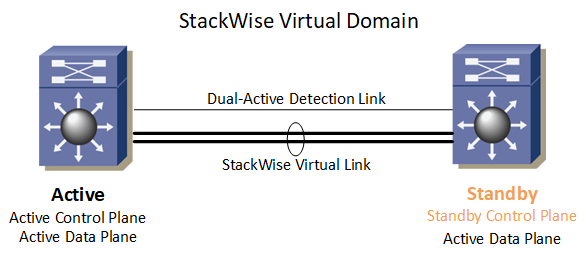
Each switch in the SV domain is assigned a unique ID (Switch ID). This number is used for interface naming to keep names consistent even when the active switch changes. Switching a switch from Standalone mode to StackWise Virtual mode causes a restart. The first switch to boot, or the active virtual switch, is assigned ID 1. The second, or standby virtual switch, is assigned ID 2. Interface numbers are based on the Switch ID.
<INTERFACE_TYPE> <SWITCH_ID>/<MODULE>/<PORT>
Example: Twe1/0/1, Hu2/0/25
During switch boot, it must be determined which is active. The StackWise Virtual Link must be initialized and functional for communication before the rest of the system initializes. The StackWise Discovery Protocol (SDP) is used to determine compatible hardware, software versions, create SVL, and determine the active and standby switch from the Control Plane perspective.
Note: After creating the stack, the management interface on both switches has the same configuration (IP address) and is used on the active switch. When connecting, you always access the active switch.
Choosing the Active Switch
It is decided based on
- manual configuration - using Switch Priorities, we can determine which switch is Active (the one with the higher priority, max is 15)
- first initialized switch - in other words, the switch with the longer uptime
- lower MAC address - if initialized simultaneously, the switch with the lower MAC address becomes active
StackWise Virtual Link (SVL)
Between the switches, there must be an exchange of control information and signaling, facilitated by a dedicated link called the StackWise Virtual Link. It is used for transmitting control traffic (StackWise Virtual Control Traffic) and data (Normal Data Traffic). For example, if data needs to leave from the second stack member to where it arrived, it is transferred via the SVL.
SVL is created as a PortChannel (EtherChannel), which can have 1 to 8 links. To monitor the status of individual links, the Link Management Protocol (LMP) runs. Traffic is encapsulated, adding a 64-byte StackWise Virtual Header (SVH). The link must have sufficient capacity (at least 10 Gbps) and redundancy to handle data transmission during various failures. Generally, all 100G, 40G, 25G, and 10G Ethernet interfaces can be used (some models have different limitations), but all ports forming the SVL must have the same speed.
Detection of Active Switch Failure
If the active switch fails, the Hot-Standby performs a Stateful Switchover (SSO), which should occur very quickly (50 ms). If Multichassis EtherChannel is used, the failure of one switch should have minimal impact on network traffic.
The Standby Switch uses several methods to detect failure
- Redundancy framework heartbeats, sent over the StackWise Virtual Link
- StackWise Discovery Protocol
- Cisco Generic Online Diagnostics (GOLD) failure event
- failure of all StackWise Virtual Link links
Failure of All StackWise Virtual Links
If all SVL links fail connecting the switches, both think the other switch is non-functional and they are the sole active switch. This is known as a dual-active scenario. It can cause serious traffic and network topology issues. Both switches suddenly have the same configuration, using the same IP addresses, encryption keys, Spanning Tree Bridge ID, etc.
We should definitely use multiple links to create the StackWise Virtual Link. However, Cisco StackWise Virtual also offers additional mechanisms for detecting dual-active scenarios. SVL cannot be used to determine if it is a link failure or switch failure. Therefore, an alternative path between the switches must be used.
Dual-Active Detection (DAD)
We have two options for detecting dual-active.
- Fast Hello - requires a dedicated direct L2 connection using physical ports, known as the Dual-Active Detection (DAD) Link, we can set 1 to 4 links (cannot be SVL), low speed is sufficient. If SVL fails, the Standby becomes Active and sends a Recovery Message via the Fast Hello link. If the active switch receives this message, it switches to Recovery Mode. Regular Hello messages are also sent, if not received, the link is non-functional. Convergence is stated to be 50-100 ms.
- Enhanced PAgP - can be used if another Cisco switch is connected via Multichassis EtherChannel to both StackWise Virtual members and supports the Enhanced PAgP protocol (referred to as ePAgP or PAgP+). It adds a new Type Length Value (TLV), sending the ID of the active StackWise Virtual switch. If the second switch becomes active, it sends its ID, the connected switch forwards this message to both StackWise Virtual switches. The original active switch learns that the second has become active and switches to Recovery Mode. Convergence is stated to be 200-250 ms.
If the active switch learns that the second StackWise Virtual member has become active, it switches to Recovery Mode. At that moment, it disables all its ports (error disables) except SVL and DAD to remove itself from the network. It waits for SVL links to be restored. If this occurs, it automatically recovers as Standby (from IOS XE 16.11.1).
I tried to find which switches support Enhanced PAgP and found nothing directly. The documentation states, possibly misleadingly, that Enhanced PAgP was introduced with StackWise Virtual. However, in the description of Virtual Switching System (VSS), we learn that ePAgP was already used there in the same way. The document Campus 3.0 Virtual Switching System Design Guide uses the same image as in the High Availability Configuration Guide, Cisco IOS XE Amsterdam 17.2.x (Catalyst 9600 Switches).
In the description of VSS, we find information that ePAgP is supported on C6500 from IOS 12.2(33)SXH1, C4500 from 12.2(44)SG, and C2960/C3560/C3750 from IOS 12.2(46)SE (for example, Cisco IOS Software Release 12.2(46)SE for Cisco Catalyst 3750-E, 3560-E, 3750, 3560, 2960, and Cisco Catalyst Blade Switch Series). There is also a mention that PAgP is not supported on Stack C3750.
StackWise Virtual Configuration
The completeness of the documentation varies by model and version. For example, I did not find a description of the switch command for the C9500, but I did for the C9200 (it is a question of whether it differs between Stackwise and Stackwise Virtual).
Some commonly used abbreviations
- RP - Route Processor
- CEF - Cisco Express Forwarding
- NSF - Cisco Nonstop Forwarding
- SSO - Stateful Switchover
- SVL - StackWise Virtual Link
- DAD - Dual-Active Detection
Basic StackWise Virtual Configuration
The same configuration is performed on both switches. After the restart, the switches switch from Standalone Mode to StackWise Virtual Mode. Here, we use Fast Hello for DAD.
Network connection - directly connect the ports for SVL and DAD
Set the same StackWise Virtual Domain (1 to 255) on both switches. The first command enables StackWise Virtual and switches us to configuration mode.
SWITCH(config)#stackwise-virtual
SWITCH(config-stackwise-virtual)#domain 100
Set the StackWise Virtual Link ports (SVL ID 1 to 255), PortChannel is set automatically, max. 8 ports.
SWITCH(config)#interface range Hu1/0/25-26
SWITCH(config-if-range)#stackwise-virtual link 1
Set the Dual Active Detection port, max. 4 ports.
SWITCH(config)#interface Twe1/0/24
SWITCH(config-if-range)#stackwise-virtual dual-active-detection
Save the configuration and restart the switches to switch the mode.
SWITCH#write memory
SWITCH#reload
The switch we want to have ID 1 and be Active should be restarted first and we wait. Booting takes a long time. The Startup Config of both switches is combined and based on the choice of the active element.
Special Configuration
Change Switch ID
SWITCH#switch 1 renumber 2
Set priority, the switch with a higher priority has a greater chance of becoming active, values 1 to 15. Cisco does not fully recommend using it because it should not matter which switch is active. If we insist that a certain switch must be active, it may lead to more restarts during switching.
SWITCH#switch 1 priority 15
SWITCH#switch 2 priority 10
Set security
SWITCH(config)#secure-stackwise-virtual authorization-key <128-bits>
Disable Recovery Reload. If the SVL links are unavailable, the switch switches to Recovery Mode. By default, when SVL is restored, the switch automatically restarts. If we do not want this, but the switch should remain in Recovery Mode, we can disable it.
SWITCH(config)#stackwise-virtual
SWITCH(config-stackwise-virtual)#dual-active recovery-reload-disable
Set redundancy mode to Stateful SwitchOver (SSO). It is probably enabled by default. Enabling SSO means enabling Cisco Nonstop Forwarding with Stateful Switchover.
SWITCH(config)#redundancy
SWITCH(config-red)#mode sso
Enable connection to the standby switch console.
SWITCH(config)#redundancy
SWITCH(config-red)#main-cpu
SWITCH(config-r-mc)#standby console enable
By default, we can only connect to the active switch. When connecting to the standby, we cannot use any command.
SWITCH-stby>sho swi
Standby console disabled
A command is available that I expected to set the active or standby role, but in the test, it had no effect (even after a restart). Additionally, I found a description for the C9300 Stack Manager and High Availability Configuration Guide, Cisco IOS XE Gibraltar 16.12.x (Catalyst 9300 Switches) - Configuring 1:1 Redundancy. It probably serves for StackWise on corresponding models, there is a command show switch stack-mode (not available on C9500), which shows the mode N+1 or 1+1.
SWITCH#switch 2 role active
WARNING: Changing the switch role may result in redundancy mode being configured to designated Active/Standby mode for this stack. If the configured Active or Standby switch numbers do not boot up, then the stack will not be able to boot. Do you want to continue?[y/n]? [yes]:
SWITCH#switch 1 role standby
WARNING: Changing the switch role may result in redundancy mode being configured to designated Active/Standby mode for this stack. If the configured Active or Standby switch numbers do not boot up, then the stack will not be able to boot. Do you want to continue?[y/n]? [yes]:
On C9000 switches, the session command to switch to another stack member is not available.
Enabling ePAgP for Dual Active Detection
The following configuration enables DAD using ePAgP for the specified PortChannel (it must be mode desirable, i.e., using PAgP).
SWITCH(config)#stack-mac persistent timer 0
SWITCH(config)#stackwise-virtual
SWITCH(config-stackwise-virtual)#dual-active detection pagp
SWITCH(config-stackwise-virtual)#dual-active detection pagp trust channel-group 10
Deactivating StackWise Virtual
Perform the reverse steps of activation. Exact commands depend on your configuration.
SWITCH(config)#interface Twe1/0/24
SWITCH(config-if-range)#no stackwise-virtual dual-active-detection
SWITCH(config)#interface range Hu1/0/25-26
SWITCH(config-if-range)#no stackwise-virtual link 1
SWITCH(config-if-range)#exit
SWITCH(config)#no stackwise-virtual
SWITCH#write memory
SWITCH#reload
Switching and Restarts
I found limited information on this topic. Some details are in the chapter Reloading the StackWise Virtual domain and its members. I conducted practical tests.
Restart both switches simultaneously. Two different commands for the same result.
SWITCH#reload
Reload command is being issued on Active unit, this will reload the whole stack
Proceed with reload? [confirm]
SWITCH#redundancy reload shelf
Reload the entire shelf [confirm]
Restart Switch ID 2
SWITCH#reload slot 2
Stack is in Half ring setup; Reloading a switch might cause stack split
Proceed with reload?[confirm]
Restart the standby switch. Two different commands for the same result.
SWITCH#reload standby-cpu
Stack is in Half ring setup; Reloading a switch might cause stack split
Proceed with reload? Y/N[confirm]
SWITCH#redundancy reload peer
Stack is in Half ring setup; Reloading a switch might cause stack split
Reload peer [confirm]
Switch active role, causing a restart! The active switch will restart, and the standby will become active.
SWITCH#redundancy force-switchover
Proceed with switchover to standby RP? [confirm]
Displaying StackWise Virtual Information
Information about stack members. The output looks the same as on C9300 switches with classic StackWise (on older C3750, the H/W Version is 0 or 1, and the Role is Master and Member).
SWITCH#show switch
Switch/Stack Mac Address : e41f.7b56.8840 - Local Mac Address
Mac persistency wait time: Indefinite
                                             H/W    Current
Switch#    Role    Mac Address     Priority Version  State
--------------------------------------------------------------
*1        Active  e41f.7b56.8840      1      V02     Ready
 2        Standby e41f.7b56.9600      1      V02     Ready
When a stack member restarts, it goes through several states.
2        Member  0000.0000.0000      0                Removed

2        Standby e41f.7b56.9600      1      V02     HA sync in progress
Displaying configuration information about StackWise Virtual.
SWITCH#show stackwise-virtual
Stackwise Virtual Configuration:
--------------------------------
Stackwise Virtual : Enabled
Domain Number : 100

Switch  Stackwise Virtual Link  Ports
------  ----------------------  ------
1       1                       HundredGigE1/0/25
                                HundredGigE1/0/26
2       1                       HundredGigE2/0/25
                                HundredGigE2/0/26
Displaying details about StackWise Virtual Link
SWITCH#show stackwise-virtual link
Stackwise Virtual Link(SVL) Information:
----------------------------------------
Flags:
------
Link Status
-----------
U-Up D-Down
Protocol Status
---------------
S-Suspended P-Pending E-Error T-Timeout R-Ready
-----------------------------------------------
Switch  SVL    Ports                          Link-Status    Protocol-Status
------  ---    -----                          -----------    ---------------
1       1      HundredGigE1/0/25              U              R
                HundredGigE1/0/26             U              R
2       1      HundredGigE2/0/25              U              R
                HundredGigE2/0/26             U              R
Information about Dual-Active Detection Link (Fast Hello)
SWITCH#show stackwise-virtual dual-active-detection
In dual-active recovery mode: No
Recovery Reload: Enabled

Dual-Active-Detection Configuration:
-------------------------------------
Switch  Dad port                        Status
------  ------------                    ---------
1       TwentyFiveGigE1/0/24            up
2       TwentyFiveGigE2/0/24            up
Information about Dual-Active Detection s Enhanced PAgP
SWITCH#show stackwise-virtual dual-active-detection pagp
Pagp dual-active detection enabled: No
In dual-active recovery mode: No
Recovery Reload: Enabled

No PAgP channel groups configured
Information about device redundancy.
SWITCH#show redundancy
Redundant System Information :
------------------------------
       Available system uptime = 6 hours, 25 minutes
Switchovers system experienced = 0
              Standby failures = 0
        Last switchover reason = none
                 Hardware Mode = Duplex
    Configured Redundancy Mode = sso
     Operating Redundancy Mode = sso
              Maintenance Mode = Disabled
                Communications = Up


Current Processor Information :
-------------------------------
               Active Location = slot 1
        Current Software state = ACTIVE
       Uptime in current state = 6 hours, 25 minutes
                 Image Version = Cisco IOS Software [Gibraltar], Catalyst L3 Switch Software (AT9K_IOSXE), Version 16.12.4,
 RELEASE SOFTWARE (fc5)
Technical Support: https://www.cisco.com/techsupport
Copyright (c) 1986-2020 by Cisco Systems, Inc.
Compiled Thu 09-Jul-20 21:49 by mcpre
                          BOOT = bootflash:packages.conf;
                   CONFIG_FILE =


Peer Processor Information :
----------------------------
              Standby Location = slot 2
        Current Software state = STANDBY HOT
       Uptime in current state = 6 hours, 22 minutes
                 Image Version = Cisco IOS Software [Gibraltar], Catalyst L3 Switch Software (AT9K_IOSXE), Version 16.12.4,
 RELEASE SOFTWARE (fc5)
Technical Support: https://www.cisco.com/techsupport
Copyright (c) 1986-2020 by Cisco Systems, Inc.
Compiled Thu 09-Jul-20 21:49 by mcpre
                         BOOT = bootflash:packages.conf;
                  CONFIG_FILE =
Information about the redundancy status of the device and the operating mode.
SWITCH#show redundancy states
       my state = 13 -ACTIVE
     peer state = 8  -STANDBY HOT
           Mode = Duplex
           Unit = Primary
        Unit ID = 1

Redundancy Mode (Operational) = sso
Redundancy Mode (Configured)  = sso
Redundancy State              = sso
 Maintenance Mode = Disabled
     Manual Swact = enabled
   Communications = Up

     client count = 112
client_notification_TMR = 30000 milliseconds
          RF debug mask = 0x0
Mohu se zeptat, zda jste zkoušel i upgrade? Lze mít každý member na jiné verzi, tj. bez výpadkový upgrade. Nebo je nutný restart, případně ISSU, které dobu výpadku minimalizuje, ale výpadek tam je...
Jinak pěkně rozebráno, děkuji za článek.
respond to [1]Phoenix: Článek popisující upgrade bude zítra. Ale ty C9500 jsem měl dopředu na doporučené verzi, takže upgrade s ISSU jsem v praxi zatím nevyzkoušel.
respond to [2]Samuraj: Zdravím, ISSU jsem na 9500 testoval. Zaznamenal jsem výpadek cca 3x ping. Upgrade byl myslím z verze 16.12.3a na 4a.
Jen bych chtěl doplnit (nebo se přiučit), v kapitole "Doporučená topologie vysoké dostupnosti" uvádíte, že pro port-channel lze použít jako kontrolní protokol jak LACP, tak i PAGP. Obávám se, že PAGP Multichassis etherchannel nepodporuje a je tedy možné pustit to pouze "naostro" v modu "on" a nebo "active", nebo se něco změnilo?
Díky a hezký den!
respond to [3]Bolt: Já jsem PAgP nezkoušel a nemám to v plánu :-). Takže vycházím jen z dokumentace. Ale v principu DAD s Enhanced PAgP je právě nutnost použít PAgP, takže to podle mne fungovat musí. Jinak by se tento způsob propojení pro DAD nedal použít.
respond to [4]Samuraj:
Na tom něco bude :-) Ještě jsem se na to podíval a on je rozdíl v Multichassis Etherchannel (tedy MEC) a Cross-stack Etherchannel, já si tyhle dvě věci spojil v jednu :) . Pro MEC je pagp podporováno, ale pro ten Cross-stack nikoli a liší se to tedy podle platformy. Řekl bych tedy, že virtualizace s pagp problém opravdu nemají, ale na fyzických stacích lze použít jen LACP, nebo "on".
respond to [5]Bolt: Zajímavé :). Já ten termín Multichassis Etherchannel zaznamenal až nyní. Na Stacku 3750tek jsem Etherchannel používal, ale vždy jen LACP. Když jsem psal tento článek a četl o VSS, tak psali, že na 3750 nelze PAgP v tomto případě použít.
jednoduchy dotaz: mam 2 switche ve stacku(1 logicky switch) a jejich uplink je tvoren 2 optikama v etherchanellu (do kazdeho switche 1 optika). Co se stane kdyz dojde ke split brain (poskozeni stackoveho kabelu) pro nadrazeny switch? Jeho etherchanell spadne a hodi error?