
The topics I describe in this article have been newly and more thoroughly explored, and I have prepared an extensive series Kerberos protocol with focus on SSO in AD DS.
Single sign-on (SSO) is a method that allows us to use one login for multiple applications (if they authenticate with the same source, it is not necessary to re-enter the same login details). In Windows, this usually means that when logging into the computer, we authenticate against Active Directory (domain). When subsequent authentication is needed for another system that also uses domain accounts (or maps its accounts to domain accounts), the data we already have in the system is used for verification and login to another application (without needing to enter anything).
In Windows, Integrated Windows Authentication (IWA) is used, which employs the SPNEGO, Kerberos, and NTLMSSP protocols. IWA is primarily associated with web browsers and allows us to use SSO for web applications (browser and web server support is required). SPNEGO (Simple and Protected GSSAPI Negotiation Mechanism, RFC 2478) negotiates whether to use Kerberos (version 5, RFC 4120, which is the successor to NTLM in the MS environment) or NTMLSSP (NT LAN Manager - NTLMv1 or the more secure NTLMv2, but both are not recommended today), or another protocol. Kerberos is a secure protocol that uses a key (ticket) method, and we will focus on it further.
Kerberos and Single sign-on - how it works
The Kerberos protocol is a network authentication protocol that uses strong cryptography for secure client and server authentication over an unsecured network. It works on the principle that the client does not authenticate against the server where it wants to obtain a service, but against the KDC intermediary. The central authentication element increases security and can provide services to multiple applications. On the other hand, it can be a single point of failure (so we need to ensure redundancy), and its compromise affects multiple systems (so we need to secure it well at both the physical and network levels). The KDC knows the encryption keys of all clients (clients, servers, applications), and they authenticate against it; for mutual communication between clients, only the necessary data is provided by the KDC.
A brief description of the Kerberos protocol in Windows:
- user authentication
- when the user logs in for the first time, they enter their login details (we will consider username and password)
- the client performs a one-way hash function on the password to obtain the secret key
- the client sends a request to the Authentication Server (AS), which is part of the Key Distribution Center (KDC), containing the user's details in plain text (it does not send the password or secret key)
- obtaining the Ticket-Granting Ticket
- AS verifies if the user exists and creates their secret key (the password is stored with the user in AD)
- as a response, it sends the client a session key (a key for future encrypted communication between the KDC and the client), which is encrypted using the client's secret key
- it also sends a unique key Ticket-Granting Ticket (TGT), which is encrypted with its key (KDC secret key)
- by decrypting the session key, the client confirms that it is indeed them (without needing to send the password)
- TGT is used to identify the user, containing the client's name, address, validity period, session key
- the client cannot decrypt the TGT (only the KDC can)
- TGT has a limited lifespan (default 10 hours), but automatic re-authentication can occur, and a new TGT is created with each login
- TGT and session key are stored in the ticket cache on the client
- obtaining the Service Ticket
- when we now want to log in to a service on the network, the application on the client uses the TGT and requests a service ticket from the KDC
- the client sends a request for a service ticket to the Ticket Granting Service (TGS), another part of the KDC, using two messages
- one message contains the client's TGT and the service ID - Service Principal Name (SPN), the TGT is already encrypted with the KDC secret key (as we obtained it)
- the second message is the authenticator, consisting of the user's identification and timestamp, encrypted with the session key (client and KDC)
- together, these messages form the user's credentials, which are valid only for the duration of the logon session, so there is no need to ask the user for login again
- TGS decrypts the client's TGT, learns the session key from it, and uses it to decrypt the second message, thus verifying the client
- if the details are correct, TGS sends a response containing parts for the client and the server
- in the client part is the session key for communication between the client and the server (where the service is), encrypted with the session key (client and KDC)
- in the server part is the service ticket - user identification, address, validity period, and session key (client and server), encrypted with the service's secret key
- the client cannot decrypt or modify the server part
- authentication with the service (server)
- the service ticket is then used to authenticate the client on the server
- the service ticket, still encrypted with the service's secret key, is sent to the server (where we want to log in using SSO)
- also the authenticator, which consists of the user's identification and timestamp, is encrypted using the session key (client and server)
- the server decrypts the service ticket, obtains the session key from it, and uses it to decrypt the authenticator
- thus, the server obtains trusted information about the client; if everything is in order, it sends an encrypted confirmation
- the confirmation contains the client's timestamp + 1, encrypted using the session key (client and server)
- establishing a session
- the client decrypts the confirmation and compares the timestamp; if everything is in order, successful authentication has occurred
- thus, not only the client is authenticated on the server, but also the server is authenticated to the client
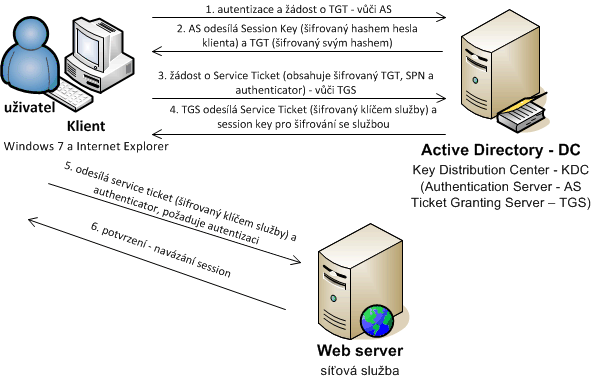
Note: Generally, we used two types of keys. The session key for encrypting communication between two participants, known to both parties. The secret key is known to the KDC and one party, verifying authenticity.
An interesting description of Kerberos can be found on the MS pages Microsoft Kerberos, but unfortunately, the individual links are not clearly visible. A lot of information is also provided by the PDF document Recommended Practices for Deploying & Using Kerberos in Mixed Environments.
Recently, I found a very nice description in the article Explain like I’m 5: Kerberos.
Practical description of SSO to a web application using Active Directory
Let's try to describe the whole process from a practical and simplified perspective. I have dealt with various situations and needed to know exactly what is sent where. Not everything I found in some documentation, so I verified other things through practice and examining captured communication. My conclusions may depend on the environment used; it was a Windows workstation, with an AD DS domain controller as the KDC, and a Tomcat application server on both Linux and Windows (in both cases using a keytab file).
At the beginning, we log into Windows (authentication against AD DS occurs, and we obtain a TGT), now using a web browser, we open a page/address (we will refer to it as a service, e.g., www.company.local) that requires authentication and supports SSO. The client now needs to contact the KDC (running on all domain controllers) to obtain a Service Ticket for the given service. The term Kerberos Realm plays a role, which in the MS world corresponds to the domain (DNS name, e.g., company.local), it is usually written in uppercase (thus, e.g., COMPANY.LOCAL). Previously, I thought (and some literature pointed this out) that the Realm for the given service is determined from its FQDN and according to that, the KDC is queried. But it is not so. The client always contacts its KDC, i.e., its domain controller, which (by default) found using DNS SRV records. For non-Windows Kerberos realms, we can define them using the ksetup command, and they are stored in the registry HKLM\\System\\CurrentControlSet\\Control\\LSA\\Kerberos\\Domains.
When we know the KDC, a request (TGS-REQ) is constructed, which contains the user's Realm (COMPANY.LOCAL), the type of service (HTTP), and its address (www.company.local) = SPN (HTTP/www.company.local) and other details. The KDC searches for the service by SPN (first it searches in its realm, if it does not find the SPN there, it searches in existing trusted domains and possibly refers the client to another controller) and constructs a service ticket (which contains user information), which is encrypted using the service's key (so the client cannot do anything with it) and sends it as a response (TGS-REP). The client sends the service ticket to the service (application server), which learns from it who the authenticated user is and sets them as logged in. The key for encrypting the service ticket is known only to the service (in my case, it uses a keytab) and AD, so spoofing is not possible.
Note: It is also important to consider what exactly (which attribute) is the user information. I did not find any official documentation describing this. In many places, it is mentioned that it is the User Principal Name (UPN, attribute userPrincipalName). Kerberos uses the term Principal Name in its terminology, which may be the reason for confusion with the MS attribute UPN. When capturing communication with Wireshark, the item is named Client Name (Principal), but it only contains the name (without the domain). This would rather look like the attribute sAMAccountName. I did practical tests where I had different UPN and sAMAccountName, and I always got sAMAccountName during SSO. It also seems logical because the UPN attribute is optional in AD (compared to sAMAccountName), and many companies or domains do not use it. Therefore, I am convinced that sAMAccountName is used during SSO, but the application obtains the user in the format sAMAccountName@ClientRealm (e.g., administrator@COMPANY.LOCAL).
From the above, it follows that the server (service) does not need to communicate with AD during authentication; it is sufficient that it owns its key for decryption. Only the client, who wants to authenticate on the server, communicates with AD. It obtains encrypted data, which the server decrypts, thus confirming the authenticity of the contained information. The entire security lies in encryption; a key is always used to decrypt the message only by the correct party, and temporary tickets are used for authentication. Tickets are cached on the client and can be reused.
Note: I accidentally came across an interesting thing. I generated a new keytab with a different DNS address of the server (but it was still the same server) and used the same password as before. Without uploading the keytab to Tomcat, I tried SSO for the new DNS address, and everything worked. Apparently, the service ticket on Tomcat was only decrypted using the old secret key (derived from the password) contained in the keytab, and the SPN was not verified at all.
For various testing, the klist tool, which is part of Windows and lists all tickets, can be useful. Using klist purge, we can delete cached tickets. Similarly, setspn can be useful, which, in addition to setting SPNs on accounts, can also list existing SPNs and which account they are assigned to. We can use the wildcard character * in the search, so for example setspn -Q HTTP/*.
Note: In practice, I dealt with a situation where the application server was located outside the local network and the domain company.local, and the requirement was to access it from the internal network via the public address server.company.cz. The theoretical assumption was confirmed that everything works when we set the SPN HTTP/server.company.cz on the account in the domain company.local. The local client sends a Kerberos request to its DC, which finds the account according to the specified SPN and creates a Service Ticket, which the application server decrypts using the keytab file.
Kerberos request and response packets
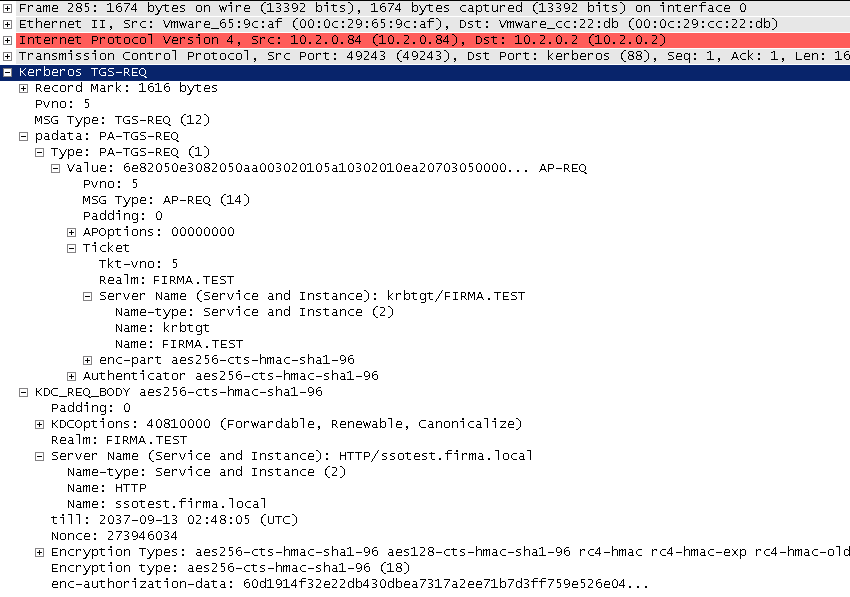
A lot of information can be obtained if we capture the communication on the client and look at the packets exchanged with the KDC. First, we see a request from the client for the SPN HTTP/ssotest.company.local. The user on the client is Administrator logged into the domain company.test.
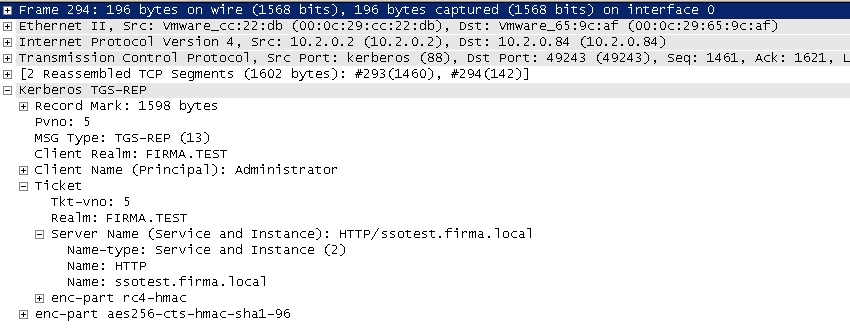
Next, we see a correct response.
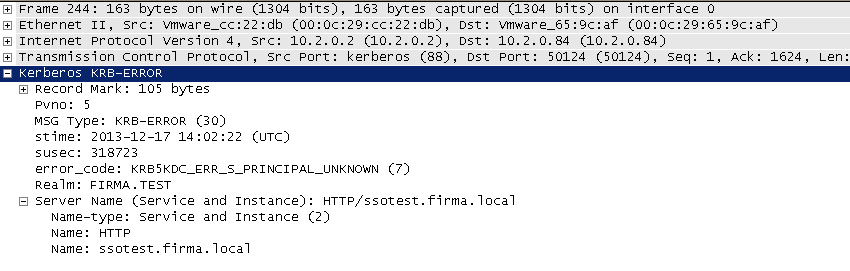
The last example shows the response from the DC if the requested SPN was not found.
... a kromě jiného nepřetěžujeme Secure Channel :-)
http://hepterida.wordpress.com
Super článek, díky
Super popisane + praktuicke ukazky....dakujem :-)
Velice mi to pomohlo, děkuji.
Mám k tomu otázku. Hned v první autorizační fázi mi AS pošle session klíč šifrovaným hashem mého hesla. Poznám při pokusu o rozšifrování jestli mé heslo bylo správně? Pokud ano, tak mohu provést slovníkový nebo brute-force útok heslo. Protože hashovací metoda je známá a mám relativně čas, protože mě neomezuje ani doba platnosti ticketu. I když klíč nestihnu rozšifrovat včas, ničemu to nevadí. Získám přeci heslo a mohu si požádat znovu až heslo rozšifruji. Všechny operace provádím offline a jsem závislý je na svém výpočetním výkonu. Nebo tam je ještě nějaké ale?
Díky za odpoveď
Vojta
respond to [5]Vojta Brzek: Jenom stručně. Přesně to je, jak uvádím v článků:
odešle klientovi session key, který je zašifrovaný pomocí secret key klienta
Popis secret key je v článku www.samuraj-cz.com/clanek/kerberos-cast-4-hlavni-terminy-kerberos-protokolu/. Ze secret key nelze získat heslo.
respond to [6]Samuraj: Chápu, že ze secret key nelze získat heslo přímo. Ale můžu ho začít hádat (třeba slovníkovým útokem). A každé zkoušené/hádané heslo si můžu jednoduše off-line ověřit tak, že ho zahašuji se stejnou solí a získám tak kandidáta na secret key, kterým se pokusím rošifrovat session key. Pokud se mi to podaří, budu znát session key (v té době pravděpodobně už neplatný), ale hlavně budu znát i uživatelské heslo (protože vím, že bylo vstupem hashe).