Cisco MDS are Fibre Channel SAN (Storage Area Network) switches (MDS 9000 series). These switches use NX-OS as their operating system, similar to the Nexus series Ethernet switches. Therefore, the configuration is similar to that of Nexus switches, although optical FC ports are used here instead of metallic/optical Ethernet ports, and new commands are introduced for special purposes. The configuration of Nexus switches is quite similar to the configuration of Catalyst switches, which use Cisco IOS.
Basic Terms
FC - Fibre Channel - is a full-duplex, serial, block-oriented, point-to-point communication interface (network technology) designed for high-speed data transfer (operating at gigabit speeds). It is commonly used to connect disk arrays (computer data storage) to servers in SAN networks. Various physical media can be used for transmission, typically optical fibers or metallic cables (TP). The Fibre Channel Protocol (FCP) or Fibre Channel over Ethernet (FCoE), which encapsulates FC frames into Ethernet networks, is used.
Fabric - Fibre Channel Fabric or Switched Fabric, is a network topology used in FC networks (the most commonly used of the three possible types). Fabric is a single closed network (SAN). It consists of one or more switches (FC switch), to which end devices (servers and storage) are connected. It is very similar to a classic LAN network, where multiple devices can be active simultaneously, and the medium is not shared. For high availability, a SAN network is typically built with two separate fabrics (two groups of switches not interconnected, with end devices connected to both), providing two independent paths.
Basic Configuration
Configuration can be done using CLI (command line interface), which I find the best, similar to configuring Cisco IOS. Or using the Device Manager application, which provides a graphical representation of the MDS switch and allows some configuration via GUI (it can be downloaded from the switch's web interface).
If the switch is in factory settings, a simple configuration wizard will start after connecting to the console, allowing us to set authentication, SNMP, IP address on the Out-of-band management interface (mgmt0), and a few other basic values.
The switch has two RJ-45 connectors, typically one Console port, where we connect with a blue Cisco serial cable, and an Ethernet management port, which we connect to the network for management.
We configure the switch similarly to configuring Nexus or Catalyst. If you, like me, are used to the alias write for saving the configuration, which is not available on Nexus, you can easily add it (I use the abbreviation wri).
SWITCH(config)#cli alias name wri copy running startup
Interface (Port) Configuration
The switch has Fibre Channel, management (mgmt0), and VSAN interfaces. The switch ports are Fibre Channel (FC), and we use the abbreviation fc for their designation (similar to GigabitEthernet with Gi). Port identification is again similar to an Ethernet switch, for example, fc1/1, where the slot/port number is used. We can configure multiple ports at once, and unlike IOS, we do not need the keyword range.
SWITCH(config)#interface fc1/1 - 5, fc1/10
SWITCH(config-if)#switchport description DESCRIPTION
SWITCH(config-if)#port-license acquire
SWITCH(config-if)#no shutdown
In the Fibre Channel world, we do not use MAC addresses but similar WWN - World Wide Name. If the Fibre Channel interface is configured, it is automatically assigned a unique WWN. If its status is up, it also has a Fibre Channel ID (FC ID).
- WWN - World Wide Name - a unique identifier used in the Fibre Channel world, similar to a MAC address in Ethernet
- WWPN - World Wide Port Name - WWN assigned to a port in the Fibre Channel Fabric, Cisco sometimes uses the term Port WWN
- WWNN - World Wide Node Name - WWN assigned to a node (end device, disk array, switch) in the Fibre Channel Fabric, the same WWNN can be seen on all ports of the device, but each port has a different WWPN
- FCID - Fibre Channel ID - more precisely Fibre Channel Node Port Identifier, also abbreviated as N Port ID, a 24-bit number assigned to the end device (N Port) during the FLOGI process. The switch uses FCID to route frames from a given source (initiator) to a specific target in the SAN fabric.
Port Modes
Each switch port can operate in a certain mode: E, F, FL, TL, TE, SD, ST, B. When configuring, we can also use two special values Fx (meaning F or FL mode, i.e., connected device) and auto (automatically negotiates mode E, F, FL or TE). From my perspective, the main modes are:
- F port - Fabric port mode - simply put, we connect a server or disk array here. The port in Fabric mode is used to connect a device (host or disk) that functions as an N port. Only one N port can be connected to an F port.
- E port - Expansion port mode - simply put, we connect another SAN switch here. The port in Expansion mode is used to connect to another E port to create an Inter-Switch Link (ISL) between two switches. It can be set as a PortChannel.
- TE port - Trunking Expansion port mode - an E port that operates in Trunk mode, so it can carry multiple VSANs, further described in the VSAN Trunk section
- N port - Node port - this is a port on the end device side (it can be an HBA port of a server or a target port on a disk array)
SWITCH(config)#interface fc1/1
SWITCH(config-if)#switchport mode F
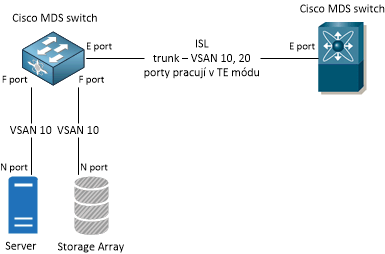
Port Channel
Again, identically to Ethernet switches, we can aggregate multiple ports into one virtual port to increase availability and speed. We create a Port Channel, into which we can include E ports or TE ports (description of TE ports is further down, on MDS 9000 we can combine up to 16 ports and create up to 128 Port Channels). In the following example, ports fc1/47 and fc1/48 are combined into Port Channel 1. A port included in a Port Channel is automatically shut down.
SWITCH(config)#interface fc1/47 - 48
SWITCH(config-if)#switchport mode E
SWITCH(config-if)#channel-group 1 force
SWITCH(config-if)#no shutdown
We can then configure the properties of the Port Channel, for example, enable the PortChannel protocol (the default option is on, where the protocol is not used) and set the allowed VSANs for the trunk.
SWITCH(config)#interface port-channel1
SWITCH(config-if)#channel mode active
SWITCH(config-if)#switchport trunk allowed vsan 10
VSAN Configuration
Virtual Storage Area Network (VSAN) is similar to VLAN (Virtual Local Area Network) in Ethernet (created by Cisco and now an ANSI standard). Using VSAN, we connect ports and create a virtual fabric. One port can belong to multiple VSANs, and ports from different switches can be included in the same VSAN. Within a VSAN, we have separate traffic, as well as security policies, zones, memberships, etc. By default, there is VSAN 1, which is not recommended for operational purposes. We can use VSAN 1 to 4093.
To create a VSAN and configure it, we first need to switch to a special configuration mode.
SWITCH(config)#vsan database
SWITCH(config-vsan-db)#vsan 10
SWITCH(config-vsan-db)#vsan 10 name Name
Assigning a port to a VSAN is not done on the port but in the VSAN configuration.
SWITCH(config)#vsan database
SWITCH(config-vsan-db)#vsan 10 interface fc1/2
VSAN Trunk
Another similar feature to VLAN and Ethernet is Trunking (VSAN trunking). A port in Trunk mode can carry frames in more than one VSAN. It must be an E port, where an ISL is created, and the Extended ISL (EISL) frame format is used. When trunking is used, a port set as an E port operates in Trunking E port mode, i.e., TE port. We configure it as an E port (seen under Admin Mode in the output) and it automatically operates as a TE port (seen under Operational mode in the output).
The Trunking Protocol is used to negotiate operation in Trunk mode, which is enabled by default. If we disable it, no port will switch to TE mode (they remain active).
SWITCH(config)#no trunk protocol enable
SWITCH(config)#trunk protocol enable
By default, Trunk mode is enabled on all Fibre Channel ports, but it only affects E ports. We can set it to on, off, auto.
SWITCH(config-if)#switchport trunk mode off
By default, all VSANs are allowed in Trunk mode, but we can limit their list.
SWITCH(config)#interface fc1/48
SWITCH(config-if)#switchport mode E
SWITCH(config-if)#switchport trunk allowed vsan 10, 20
Zone Configuration - Zoning
We can set up a SAN switch so that all devices (in the same VSAN) can communicate with each other. However, this is not done, and zoning is performed, which sets up controlled access between devices, thereby increasing network and data security. We create zones within a specific VSAN, and only devices in that zone can communicate with each other. A device not included in any zone uses the default zone policy.
FC Aliases
When assigning to zones, we can work with interface, FC ID, port WWN, and other types. We often use port WWN (WWPN), which is an address similar to a MAC address. To make our work and configuration more organized, we can create FC aliases for these WWNs.
SWITCH(config)#fcalias name Server-port-A vsan 10
SWITCH(config-fcalias)#member pwwn 50:05:0c:00:00:c8:aa:50
Zones
Creating/editing a zone in VSAN 10 and adding two members using aliases.
SWITCH(config)#zone name Server vsan 10
SWITCH(config-zone)#member fcalias Server-port-A
SWITCH(config-zone)#member fcalias Pole-port-1
Zone sets and their activation
We then group zones into zone sets, where there can be one or more zones. The entire zoneset is then activated or deactivated as a single entity across all switches in the fabric. Zoning can be managed from any switch in the fabric. When we activate a zoneset, all switches in the fabric receive the active zoneset.
SWITCH(config)#zoneset name SAN-VSAN10 vsan 10
SWITCH(config-zoneset)#member Server
SWITCH(config)#zoneset activate name SAN-VSAN10 vsan 10
Displaying Information
Just a brief list of some show commands for the features configured above:
SWITCH#show interface brief

SWITCH#show vsan
SWITCH#show vsan usage
SWITCH#show vsan membership
SWITCH#show zone
SWITCH#show zoneset vsan 10
SWITCH#show fcalias vsan 1
SWITCH#show zone statistics
SWITCH#show zoneset active
SWITCH#show zone active
SWITCH#show zone status
We will look a bit more at two commands that display information about active port WWN and FC ID.
FLOGI - Fabric Login
A Fabric Login (FLOGI) database is created on the switch. When a device connects to the port and the link switches to the active state (up), it logs in to the fabric topology. At that moment, it is assigned a dynamic 3-byte Fibre Channel ID (FC ID) and has its fixed 8-byte Port WWN.
We can display the FLOGI table (database), which shows a list of ports and active (logged in) devices and their FC ID, Port WWN, and WWN. So if we configure the port correctly and connect a device, we can find out its WWPN and set up zoning.
SWITCH#show flogi database
--------------------------------------------------------------------------------
INTERFACE        VSAN    FCID           PORT NAME               NODE NAME
--------------------------------------------------------------------------------
fc1/1            10    0x5e0000   50:40:20:c0:00:f6:93:da 50:40:20:c0:00:f6:93:db
FCNS - Fibre Channel Name Server
Another database is created for the entire VSAN and contains attributes for all hosts and storage devices, referred to as the Name Server Database and abbreviated as FCNS. A record is created when a device logs in with Port Login (PLOGI) and removed when it logs out. Instances of the FCNS database run on each switch and share information among themselves. We can display the database and obtain useful information.
SWITCH#show fcns database
VSAN 10:
--------------------------------------------------------------------------
FCID        TYPE  PWWN                    (VENDOR)        FC4-TYPE:FEATURE
--------------------------------------------------------------------------
0x5e0000    N     50:40:20:c0:00:f6:93:da                 scsi-fcp:init

SWITCH#show fcns database vsan 10
SWITCH#show fcns database detail
Lze FC (Fibre Channel) použít jako LAN síťovou kartu?
respond to [1]1: Mám tu nový článek věnovaný FC, kde je to snad více vysvětleno. Fiber Channel síť je úplně jiná technologie nežli Ethernet, takže FC HBA nelze použít pro připojení do LAN.
respond to [1]1: No jestli neni spise mysleno EoFC a to lze realizovat... Klasicke FC HBA lze provozovat jako ethernet zarizeni. Jen jsem to vetsinou videl jen v ruznych "nestandartnich" resenich.