
Note: I'm not a storage array specialist, but I had to familiarize myself with basic operations on several types of storage arrays, so I put together certain information and procedures. Perhaps someone will find it useful.
Note: This description is based on ONTAP 9.1. In ONTAP 9.5, the interface changed, but not significantly. A new interface appeared in ONTAP 9.7, but we can still choose the classic version. However, in ONTAP 9.8, it's already mandatory. The new interface may have simplified some things, but it offers far fewer options. So we often have to use CLI.
Note: The latest version now is ONTAP 9.9.1. I tried to update this article a bit, but eventually decided to split it into separate articles. When I was setting up a new NetApp AFF A250 array, I had to study a number of basic ONTAP principles. The description can be found in NetApp ONTAP Components, Principles and Features.
NetApp All Flash FAS (AFF) - basic features
The NetApp AFF8040 storage array is an All Flash FAS system (i.e., FAS that uses only SSD disks) of the 8000 series equipped with the ONTAP system (currently version 9.1 is available), previously called Clustered DataONTAP (before version 9), which includes the web-based OnCommand System Manager for administration. FAS is designed as shared storage, where different workloads use the same storage. It contains many different features for management, data protection, and performance tuning. It also allows dividing the array into virtual parts that act as separate arrays, and this virtual array can be assigned to some entity including separate management.
FAS arrays support simultaneous connection via block access - SAN (Ethernet iSCSI and FCoE, Fibre Channel optics) and file - NAS (NFS, pNFS, CIFS/SMB). It has Thin Provisioning without impact on performance. Special inline deduplication, which uses WAFL and accesses data using pointers, and compression. A technology that performs inline data reduction - compaction (writes multiple unfilled 4kB blocks into one physical 4kB block). All features (such as deduplication, Thin Provisioning, Snapshot Copies, Virtual Clones, Thin Replication) are available for all SAN (FC, iSCSI) and NAS (CIFS, NFS) accesses.
ONTAP supports three types of RAID for aggregates, depending on the disks used, their type (NL-SAS, SAS, SSD), size, and number. RAID4 can use one spare disk and a maximum of 14 disks, RAID-DP (Double Parity) can use two spare disks and a total of up to 28 disks, and the new RAID-TEC (Triple Erasure Encoding) supports three spare disks, a total of 29 disks, and is designed for large SATA and SSD over 6TB.
We can logically divide the physical storage into different Virtual Storage Controllers, thus separating customer domains that have different volumes, IP addresses, access control, etc.
Official documentation
- NetApp ONTAP 9 Documentation Center
- ONTAP 9.1 Documentation
- AFF8040 Documentation
- AFF8000 Tech Specs
- My Support - support, downloading new OS versions and firmware (you need to have a created account and activated product)
- Installation and Setup Instructions AFF8040 - basic description of connection and installation on 4 pages
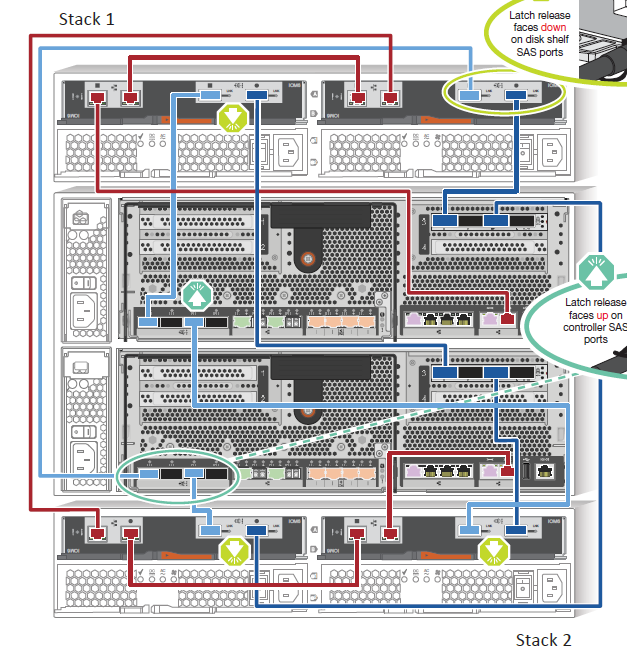
- SAS and ACP Cabling Guide For DS4243, DS2246, DS4486, and DS4246 - detailed description of connecting shelves
- OnCommand Management Software and Management Integration Tools
Configuration and connection
The system configuration can vary, depending on the controllers used, network communication cards, disk shelves, disks, etc. Here's an example of a configuration I encountered.
The system consists of an Enclosure - 6U high Chassis X6227-R6-C, which contains two controllers AFF8040 for HA (node-a and node-b together form an HA Pair) AFF8040-R6. Each controller is equipped with:
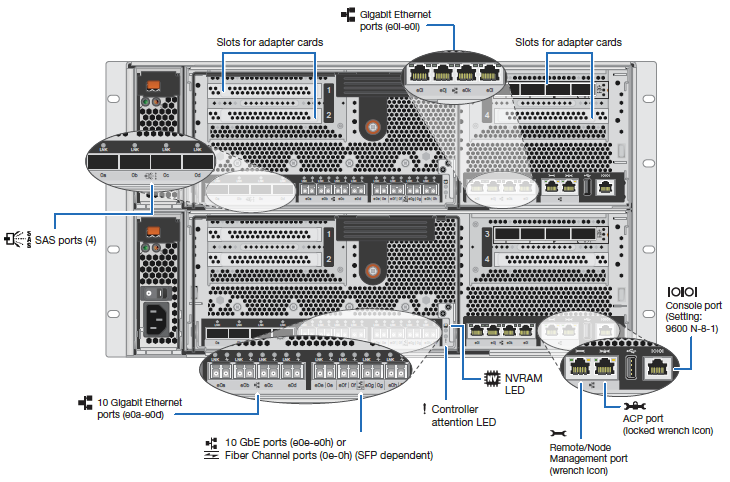
- 4x iSCSI 10Gbps ports for data e0e - e0h
- 8x SAS ports 0a - 0d, 0e - 0h (on an additional card, for shelf connection)
- 4x 10Gbps ports for cluster interconnect e0a - e0d (two used for connecting controllers)
- 6x 1Gbps Ethernet ports e0i - e0l (can be set up differently, standard for managing virtual SVMs for LIF), e0M (cluster or node management)
- port for ACP management connection with the disk shelf
One or more disk shelves are connected to the Enclosure. Here, a 2U high model DS2246 equipped with 24x SSD disks with a capacity of 3.8TB. Supplemented with a complete SW license. Total usable capacity 82.5TB.
Images from the official documentation describing the connection of controllers to the network and the connection of disk shelves.
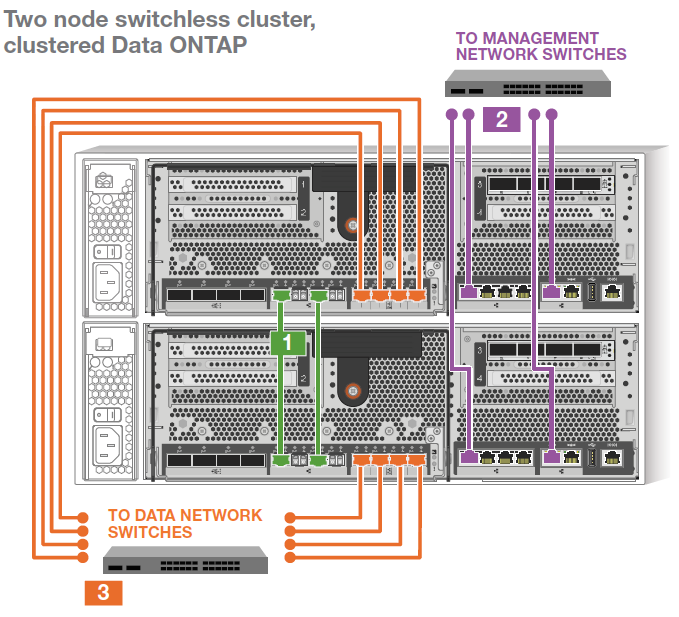
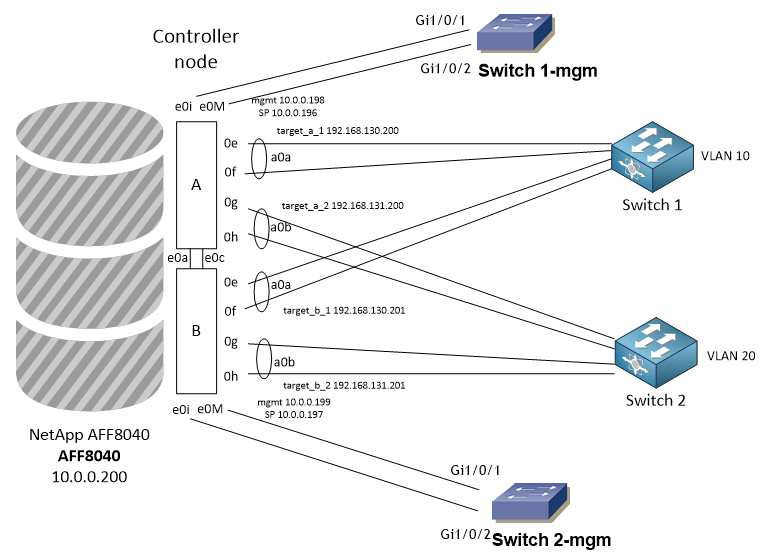
Example of possible network connection. There is a separate LAN network for management and a data iSCSI SAN network.
NetApp MySupport - registration and AutoSupport
Registration
After purchasing a NetApp array (like other brands), it's essentially necessary to register it. On the page mysupport.netapp.com, we first create an account, which we then use to log in. We use it to register the array (if the supplier hasn't already done so). I didn't fully understand it, but the name of the company under which the registration was made is important, accounts are tied to the company and these then have access to registered products (or it's also about Site/Location). For most operations, the serial number is used, there are also other options, such as System ID. The AFF8040 array consists of several parts and each has its serial number. These are two controllers AFF8040-R6 Node-A and Node-B, and then the cluster license item SW-2-CL-BASE (Access Key ID, SW-2-CL-LICENSEMGR).
MySupport
On the first tab My Home (mysupport.netapp.com), we have a dashboard where we can add a few widgets (top right corner Hide/Show Widgets). Here we can see, for example, the latest cases for support.
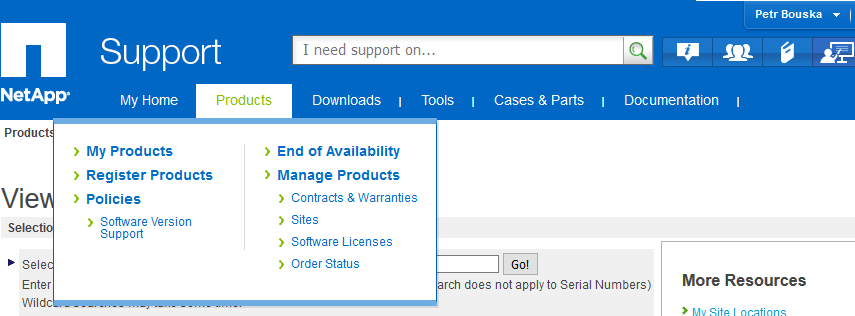
On the Products tab, we can register devices, search for already registered devices, and change some registered parameters (such as location). We either choose the My Products item, where we can search for a device by serial number, but also in bulk by Site Name. If we don't know the Site Name, we can use Manage Products - Site, where we enter only the country and we'll see a list of our Sites and Company Names and a list of products for them.
The Downloads tab allows downloading software and firmware, so it contains images for upgrading the array, for example. Then we have logical tabs for entering and tracking support cases Cases & Parts. And documentation Documentation.
Under Tools is an important link to MyAutoSupport.
AutoSupport
My AutoSupport is a web application that retrieves information from the array using the AutoSupport function. Information About My AutoSupport, the application itself is available at MyAutoSupport, now you can already try the new version New My AutoSupport.
For the array to use the AutoSupport function, it must have access to NetApp through the Management interface (both nodes and cluster). The HTTPS protocol is used by default. Alternatively, SMTP, which is otherwise used for sending email alerts. The array then sends summary information once a week and an alert for certain events. NetApp Support can respond and, for example, when a disk fails, it automatically sends a new part.
The AutoSupport settings don't have many options. In OnCommand System Manager, the settings are located under Hardware and Diagnostics - AutoSupport. We can only turn the function on and off for individual nodes here. For sending email alerts, we can set the sender's address, recipients, and mail server (Mail Hosts). We can also click the Test button, which generates an email alert and an event on NetApp Support (which automatically closes and arrives by email).
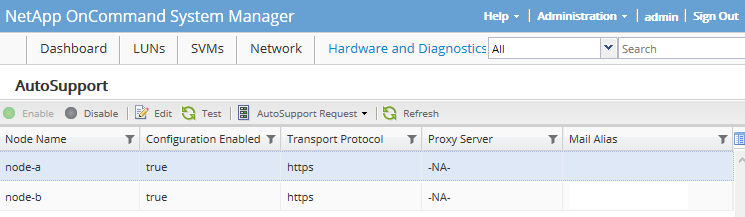
Of course, we can also handle the configuration via CLI. For example, displaying information about the settings.
AFF8040::> autosupport show
Node                   State     From          To            Mail Hosts
--------------------- --------- ------------- -------------  ----------
node-a                 enable
node-b                 enable
2 entries were displayed.
In addition to monitoring hardware failures, My AutoSupport provides us with a lot of interesting information about the array on the web, monitors firmware versions, alerts to configuration Best Practices, we can have reports created, etc.
Note: The NetApp Support App mobile application is also available for Android, iOS, and BlackBerry. But it doesn't do much.
Managing FAS array using ONTAP system
Management can be done using the mgmt_cluster IP address 10.0.0.200, either via the web interface HTTPS or command line SSH. Alternatively, we can connect directly to the Service Processor (SP, controller component for remote management and monitoring) using SSH. In the iSCSI SAN network, four IP addresses are used for client connections.
OnCommand Unified Manager
For more detailed options for monitoring the health and performance of one or more NetApp FAS arrays, we can install/deploy (VMware appliance) OnCommand Unified Manager and OnCommand Performance Manager, which integrates into it. These tools allow better monitoring and tracking of development over time. We can also set up various events that we are notified about by email.
Tools are available for free download at mysupport.netapp.com - Downloads - Software, where in the OnCommand Unified Manager for Clustered Data ONTAP and OnCommand Performance Manager (Unified Manager Performance Pkg) sections, we choose the platform (VMware vSphere is the easiest) and download the current version. The deployment guide can be found in OnCommand Unified Manager - Installation and Setup Guide.pdf.
Both tools have been replaced by a new single tool Active IQ Unified Manager.
Terms for FAS arrays
Controllers in the array are independent, but we can directly network them together to create an HA Pair. Each controller then becomes a node of the cluster. The HA Pair provides fault tolerance because each node can take over control, allowing for non-disruptive SW upgrades and HW maintenance.
- Node - a single controller in the cluster, both are connected via network and are attached to disk shelves, in OnCommand System Manager - Hardware and Diagnostics - Nodes
- LIF - Logical Interface - an IP address or WWPN with assigned properties (role or service policy, home port and home node, failover ports), used for network communication through a port LIF, runs on the assigned node and port (home port and home node), but can move to another port within the Failover Group during failover (doesn't apply to SAN LIFs), in OnCommand System Manager - Network - Network Interfaces
- Portset - a group of interfaces (LIFs) through which a SAN client communicates with the array, can be used to limit available paths to the client, set on the Initiator group, in OnCommand System Manager - LUNs - Portsets
- SVM - Storage Virtual Machines (vServer) - used for secure isolation of shared virtualized storage, we can divide the physical array into several virtual ones, What SVMs are, in OnCommand System Manager - SVMs
- Initiator - a client connecting to a LUN, negotiates connection with the Target
- Target - the target address of the disk array through which the Initiator connects to the LUN
- Initiator group (iGroup) - determines which host can access a specific LUN on the storage system, represents the client (server) on the array, in OnCommand System Manager - LUNs - Initiator Groups
- IQN - iSCSI Qualified Name - iSCSI identifier for initiator or target,
iqn.1991-05.com.microsoft:server.company.local - WAFL - WriteAnywhere File Layout - NetApp's patented technology that sits above RAID and mediates read and write operations, supports large storage, high performance, fast error recovery, and space expansion
Components for creating a disk (LUN) for a server
From the physical layer, which are physical disks in the array, we create several encapsulated logical layers, first from disks to RAID groups. We combine one or more groups into an aggregate, and within the aggregate, we create a number of volumes (FlexVol Volumes). In each volume, we create one (or more) LUN.
- Disk - physical disk in the shelf, in OnCommand System Manager - Hardware and Diagnostics - Disks - Inventory
- RAID Group - group of disks with a set RAID type (NetApp uses its own RAID-DP) and other parameters, in OnCommand System Manager - Hardware and Diagnostics - Aggregates
- Aggregate - can consist of one or more RAID Groups, we set security, performance, backup, etc. on it, doesn't directly contain data, is assigned to a specific controller (if we have two, it works as active-passive), so we can create two aggregates, each assigned to a different controller to utilize the performance of both, in OnCommand System Manager - Hardware and Diagnostics - Aggregates
- Plex - a copy of data, if the aggregate is mirrored, it has 2 plexes (plex0 and plex1)
- Volume - Flexible volume - FlexVol is used, logical space inside the aggregate, contains its own data, we can change the size, something like a partition from the array's perspective, we can have max. 500 Volumes, in OnCommand System Manager - SVMs - open SVM - Volumes
- QTree - from the array's perspective, it's like a subdirectory within a Volume, it's similar to a Volume but has limited properties (snapshots can only be set on Volume, doesn't support space reservations), in OnCommand System Manager - SVMs - open SVM - Qtrees
- LUN - Logical Unit Number - within a Volume (or QTree) we can create one (commonly recommended) or more (if we have many, then it's useful to use QTree) LUNs, from the array's perspective it's a file inside a Volume. From the client's (server's) perspective, it's a disk that we publish to the server (Initiator). It represents an individually addressable logical device. In OnCommand System Manager - LUNs - LUN Management
Recommendations for creating Volume and LUN
- we can use Thin Provisioning, which can save us a lot of space, but this leads to Over-provisioning (we allocate more space than is available), so we must carefully monitor the aggregate utilization (physical space)
- Volume should be larger than LUN, it depends on snapshot usage, but at least by 5% or we can enable Autogrow by 10% (resize automatically)
- we should fill the aggregate (Aggregate, or Tier) only up to 80% for optimal array functioning, maximum 90%, after that problems may occur
- it's good to monitor (or adjust default values in CLI) the utilization of LUN, Volume, Aggregate
Adding a Spare disk
Larger changes, such as transitioning to ADP (if we're not using it), require new initialization, and thus we lose data. We also can't remove a disk without losing RAID/Spare availability (which our old NetApp E2760 array can do).
We found that when our array was configured, the data aggregates were created without Spare disks. The solution would be to add new physical disks, but there's nowhere to put them. So the only option is to move all data and create anew. Another possibility occurred to me, which was successfully implemented.
- move all Volumes to one Aggregate
- delete the empty aggregate
- using CLI, create a new aggregate with the number of disks set to 1 less
- the aggregate was created and correctly shows Spare disks
- then move all Volumes to the new aggregate and repeat everything
Here's an example of commands that worked in my case. The first is creating an aggregate, the second is zeroing the Spare disk.
storage aggregate create -aggregate aggr_data2 -diskcount 23 -node node-b
storage disk zerospares -owner node-b
Added ONTAP 9.8 - networks
The new GUI is heavily reworked. Many things are simplified and hidden, so we need to set many things using CLI. When configuring a new array, various things can be set automatically (but for example, we can't set the IP address for SP, so we have to go to CLI, otherwise errors are logged that we don't have an address). We can use Prepare Storage, which should optimally set up disks, create RAID Groups and aggregates (they're probably called Tiers in the GUI). There's also a wizard for Configure Protocols, which is essentially creating a Storage VM. SVM also creates LIF, but often we have to prepare it manually.
When setting up a new array, or adding a new SVM, for example for a different protocol, two terms related to networks are important (and I didn't deal with them before).
- IPspaces
- address space
- allows dividing the disk array for multiple organizations that can use the same IP addresses
- for one organization, it's recommended to use only one IPspace
- Storage VM (SVM) is placed into one IPspace (cannot be moved) and maintains its own routing table
- no routing occurs cross-SVM or cross-IPspace
- IPspace Cluster is automatically created, where cluster ports are placed and node communication occurs (internal private cluster network), and Default for everything else, including array and node management
- system SVMs are created for each IPspace
- Broadcast Domains
- used to group network ports that belong to the same L2 network (can communicate with each other on L2)
- ports in the group are used by SVM for data traffic or management (or cluster)
- Broadcast Domain is placed into an IPspace
- Broadcast Domain Cluster and Default are automatically created, possibly others like Default-1, etc.
- port in Broadcast Domain (can be placed only in one) is used by LIF
- works with Failover Groups and subnets (enables, controls, and secures LIF Failover behavior)
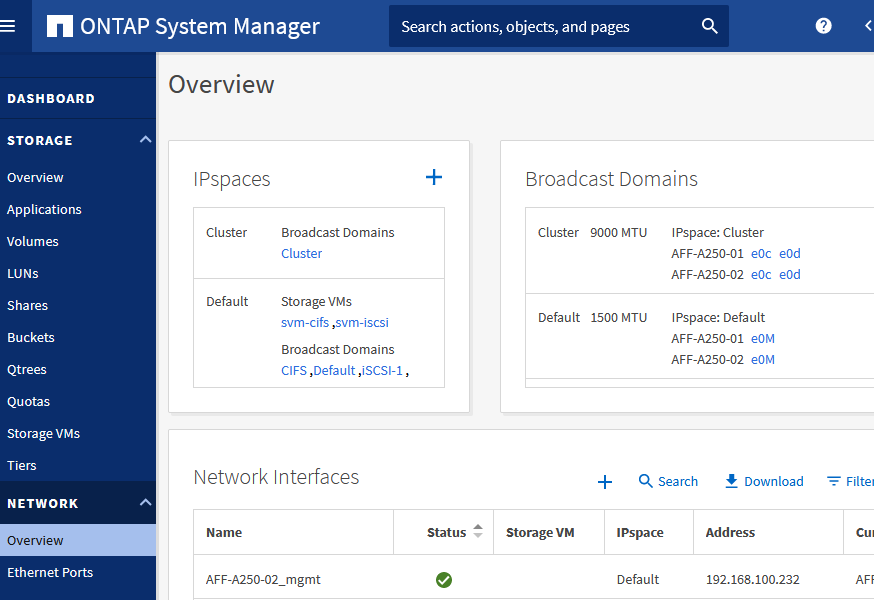
In ONTAP 9.8, new Broadcast Domains are created automatically in certain situations. We can manually create or edit IPspace and Broadcast Domains in NETWORK - Overview.
Before we start creating SVM, we need to prepare ports. For example, if we want to aggregate (combine) some ports into a PortChannel, we create a Link Aggregation Group (NETWORK - Ethernet Ports). We choose ports, mode (preferably LACP, can't be changed later in GUI, must be deleted and recreated if necessary) and load balancing method. For iSCSI ports, we want to set MTU 9000. We see the set value for individual ports, which we can't change. Settings are done on Broadcast Domains (NETWORK - Overview). It's probably better to prepare new Broadcast Domains (if it's for new networks).
When creating SVM (STORAGE - Storage VMs) we enter addresses (create) Network Interface, i.e. LIF. We enter IP address and mask, optionally gateway. If the subnet already exists, the corresponding Broadcast Domain is assigned. Otherwise, the default is used (I'm not sure at what point new Broadcast Domains were generated for the ports). It's important to choose the correct Broadcast Domains where we have free ports (Home Port). LIF will be created (assigned) to them. If the port isn't assigned to any Broadcast Domain, it won't be used.
If entered incorrectly, we'll get an error:
[Job 98] Job failed: LIF "lif_svm-iscsi_595" could not be created because no suitable home port could be found. Use the
 "network port show -node AFF-A250-01" command to review available home ports, then try the command again with the
 "-home-port" argument specified.
Disk Operations (LUN)
Basic Components
When installing a new array, we need to create several objects that we will use further and usually do not need to add more. We will not cover their creation here.
- Aggregates created on specific disks with RAID-DP and assigned to the controller
- one SVM with the iSCSI protocol
- one portset of the iSCSI type, containing all 4 ports (paths)
Naming Rules
I think it is good to establish a certain standard at the beginning for naming objects that we will commonly create on the array. This way, we can tell from the name what the object is and what it belongs to. For example:
- LUN - server-name_lun_number, example
server1_lun_1 - Volume - server-name_vol_number, example
server1_vol_1 - Initiator Group - server-name_igroup, example
server1_igroup
Creating a LUN and Mapping it to a Server
- connect to the array's web interface OnCommand System Manager
- in the main menu, click on LUNs and go to the LUN Management tab
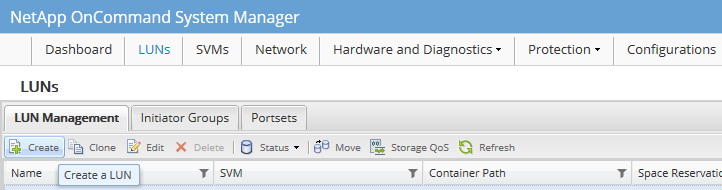
- click the Create button, select our SVM, and the wizard will start
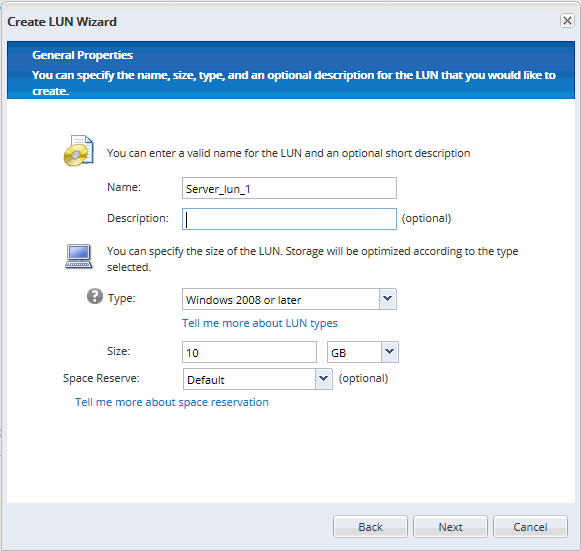
- enter a logical name for the LUN and optionally a description, select the OS type and size, click Next
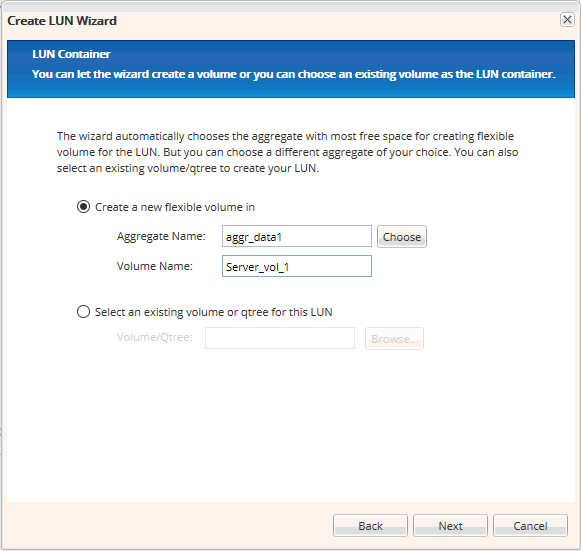
- we can use an existing Volume, but we usually create a new one on the selected aggregate, click Next
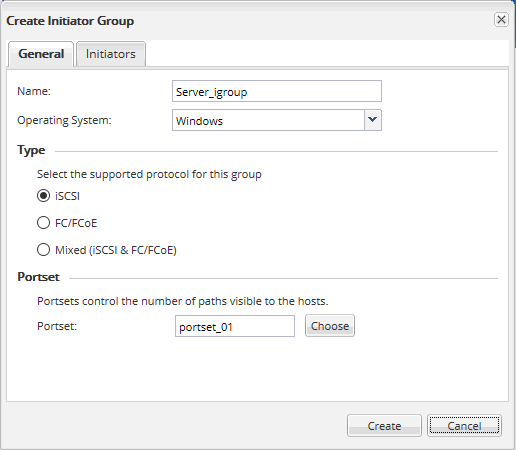
- if we already have a group created for our server, select it, otherwise click Add Initiator Group to create a new group
- enter the group name, we can use the IQN Initiator, but preferably the server name, select the OS type, protocol, portset, and on the Initiators tab, select or enter a new IQN Initiator (copy from the client), click Create
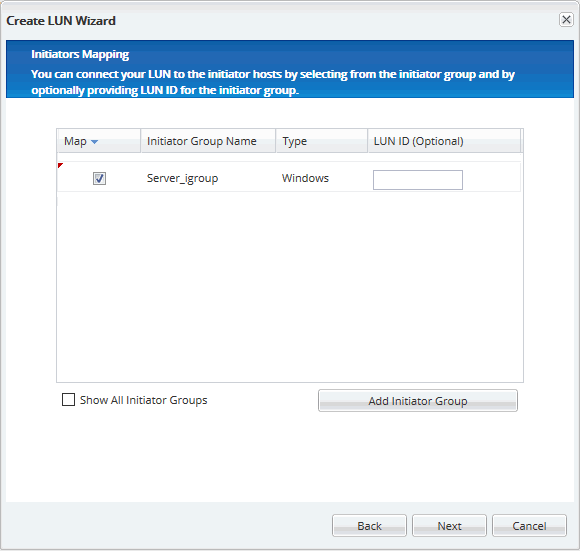
- check the created iGroup and optionally enter the LUN ID, click Next
- finally, we can optionally set QoS, click Next
- review the summary of entered parameters, click Next to create everything
Deleting a LUN on a NetApp Array
- connect to the array's web interface OnCommand System Manager
- in the main menu, click on LUNs and go to the LUN Management tab
- right-click on the LUN and select Offline
- right-click on the LUN and select Delete
Viewing and Deleting a Volume
Deleting a Volume will also delete all contained LUNs, and we usually want to do this rather than just delete the LUN.
- connect to the array's web interface OnCommand System Manager
- in the main menu, click on SVMs and expand the selected SVM
- switch to the Volumes tab
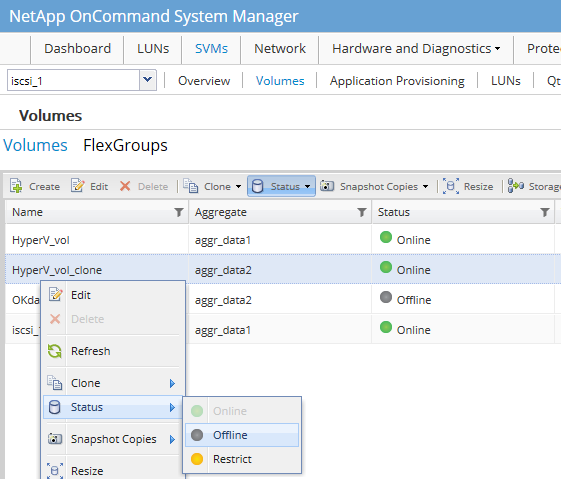
- right-click on the Volume and select Status - Offline, confirm that we want to disconnect
- right-click on the Volume and select Delete, confirm the deletion (including all LUNs)
Increasing the Size of a LUN
- connect to the array's web interface OnCommand System Manager
- in the main menu, click on LUNs and go to the LUN Management tab
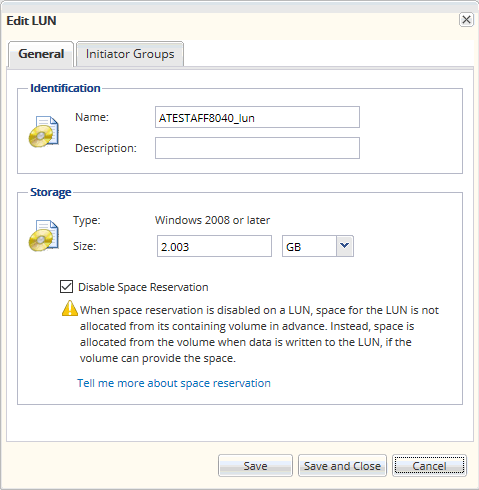
- right-click on the LUN and select Edit
- enter the new size and click Save and Close
- confirm the warning
Enabling Background Deduplication
Note: From ONTAP 9.3, volume-level background deduplication runs automatically thanks to the predefined AFF policy auto. There is no need to schedule the task as described below.
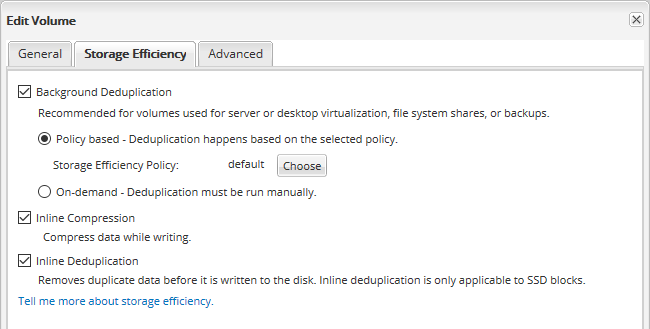
NetApp boasts very good deduplication with FAS arrays. By default, Inline Compression and Inline Deduplication are used, which apply during writing. For many types of volumes (virtualization, backups, file server), NetApp recommends also enabling Background Deduplication, which can be scheduled at regular intervals and performs deduplication on stored data. It is set on the volume (Volume).
- connect to the array's web interface OnCommand System Manager
- in the main menu, click on SVMs and expand the selected SVM
- switch to the Volumes tab
- right-click on the Volume and select Edit
- switch to the Storage Efficiency tab, check Background Deduplication and select the policy
- click Save and Close
There are no comments yet.