
Situation Description
We are dealing with an old FortiGate from 2018. It is a FortiGate-VM64 (model FG-VM00), a virtualized version, which was gradually upgraded from FortiOS 5.6.3 to 7.2.13.
Along with other FortiGate devices, it is connected to a FortiAnalyzer VM (FAZ). A standard upgrade of FortiAnalyzer 7.6.4 to FortiAnalyzer 7.6.6 was performed. After the upgrade, the virtual FortiGate appeared as Down on FortiAnalyzer, while all others worked correctly. On the FortiGate side, the FortiAnalyzer status showed Unauthorized and authorization did not complete (FortiAnalyzer reported no device pending authorization).
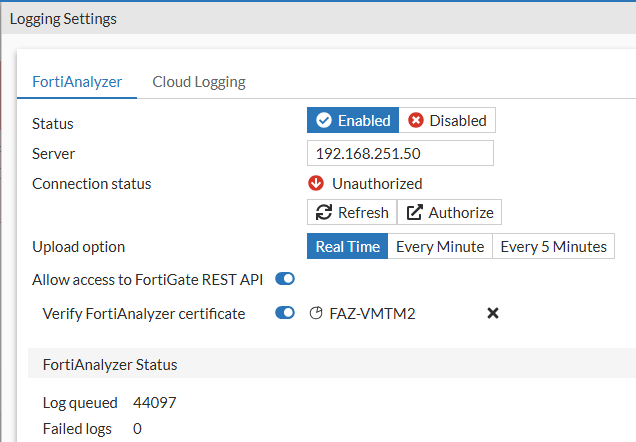
According to the FortiAnalyzer Compatibility Tool, the versions are mutually compatible. Nevertheless, I first tried upgrading FortiOS to 7.4.11, which did not change the situation. I verified that communication was still functional and that the issue occurred with both UDP and TCP.
Troubleshooting the Connection Issue
Solutions to various communication problems between FortiGate and FortiAnalyzer are described in Troubleshooting Tip: FortiGate to FortiAnalyzer connectivity. However, the problem described in this article is not covered there.
Checking the Configuration on FortiGate
Two ways to view the current configuration using CLI.
FW1 # config log fortianalyzer setting

FW1 (setting) # show
config log fortianalyzer setting
set status enable
set server "192.168.251.50"
set serial "FAZ-VMXXXXXXXX"
set source-ip "192.168.251.100"
set upload-option realtime
set reliable enable
end

FW1 # get log fortianalyzer setting
status              : enable
ips-archive         : enable
server              : 192.168.251.50
alt-server          :
fallback-to-primary : enable
certificate-verification: enable
serial              : "FAZ-VMXXXXXXXX"
server-cert-ca      :
preshared-key       :
access-config       : enable
enc-algorithm       : high
ssl-min-proto-version: default
conn-timeout        : 10
monitor-keepalive-period: 5
monitor-failure-retry-period: 5
certificate         :
source-ip           : 192.168.251.100
interface-select-method: auto
upload-option       : realtime
reliable            : enable
priority            : default
max-log-rate        : 0
Connection Test
The connection test from FortiGate to FortiAnalyzer only shows that there is an authentication problem.
FW1 # execute log fortianalyzer test-connectivity
Failed to get FAZ's status. Authentication Failed. (-19)
FortiAnalyzer Debug
Connect to the FortiAnalyzer CLI and start debug. It is ideal to save the output to a file, as a lot of information may be logged. In PuTTY this is a standard setting; Fortinet has a guide Technical Tip: How to create a log file of a session using PuTTY.
We run the OFTP debug here with a filter on the FortiGate IP address (it can also be run without specifying an address).
diagnose debug application oftpd 8 192.168.251.100
diagnose debug enable
To disable debugging, use:
diagnose debug disable
In the log, find the beginning of a communication session from our FortiGate device. It is interesting to notice two phases taking place. First, an SSL connection is established, during which the FortiGate certificate (and its CA) is verified. By default, it is issued by Fortinet. After the connection is established, various FortiGate details are written to the log. Below are a few selected events.
[T4937:oftps.c:2148 :192.168.251.100] SSL clienthello incoming on sockfd[18]
[T4937:oftps.c:1465] -- SSL server got SNI: 'fortinet-ca2.fortinet.com', SSL_CTX located: 0x5578491b5bf0, idx=0
[T4937:oftps.c:598] VERIFY OK: depth=2, /C=US/ST=California/L=Sunnyvale/O=Fortinet/OU=Certificate Authority/CN=fortinet-ca2/emailAddress=support@fortinet.com
[T4937:oftps.c:598] VERIFY OK: depth=1, /C=US/ST=California/L=Sunnyvale/O=Fortinet/OU=Certificate Authority/CN=fortinet-subca2001/emailAddress=support@fortinet.com
[T4937:oftps.c:598] VERIFY OK: depth=0, /C=US/ST=California/L=Sunnyvale/O=Fortinet/OU=FortiGate/CN=FortiGate/emailAddress=support@fortinet.com
[T4937:oftps.c:1804 :192.168.251.100] ssl verify peer cert
[T4937:oftps.c:1826 :192.168.251.100] Peer is using a fortinet certificate. ON=Fortinet
[T4937:oftps.c:1839 :192.168.251.100] Peer cert info, CommonName(CN=FortiGate).
[T4937:oftps.c:2160 :192.168.251.100] SSL_accept one client SUCCESS [ protocol : (772) TLS 1.3  ]
[T4939:login.c:3443 :192.168.251.100] host = 'FW1'
[T4939:login.c:3489 :192.168.251.100] Version: FortiGate-VM64 v7.4.11,build2878,260126 (GA.M)
In the second step, FortiGate verification takes place. An error was logged here that provides more insight into the current problem.
[T4938:login.c:4129 :192.168.251.100] Error No legal SN found in cert and legacy auth mode disabled
[T4938:main.c:4927 :192.168.251.100] LOGIN_REQUEST_LEGACY error:  [handle_login_legacy():4199] invalid device id
FortiGate Debug
We can also run a debug on the FortiGate side, but the error there does not provide much information.
diagnose debug app fgtlogd 255
diagnose debug app miglogd 255
diagnose debug enable

<4871> __on_connect()-1753: oftp_connect(global-faz) failed: oftp failed to authenticate.
FortiGate Authentication Problem on FortiAnalyzer
Based on the error No legal SN found in cert and legacy auth mode disabled, we can quickly find the article Technical Tip: FortiAnalyzer rejects the FGFM/OFTP connection attempts.
Root Cause
FortiGate communicates with FortiAnalyzer using the OFTP protocol (Optimized Fabric Transfer Protocol) on UDP or TCP port 514. FortiAnalyzer now enforces certificate-based authentication and verifies that the Common Name (CN) field contains the device's serial number (SN). Previously, username and password authentication was used.
Note: I could not find anywhere in the documentation when this change was introduced. I would expect it to be highlighted in the Release Notes and What's New. I did not encounter this problem in FortiAnalyzer 7.6.4.
Certificate Check
By default, the (built-in factory) certificate Fortinet_Factory is used for connecting to FortiAnalyzer. In my case, the CN contained the text FortiGate instead of the device serial number.
Certificate information can be found in the GUI.
- (Global/VDOM) - System - Certificates (Local Certificate)
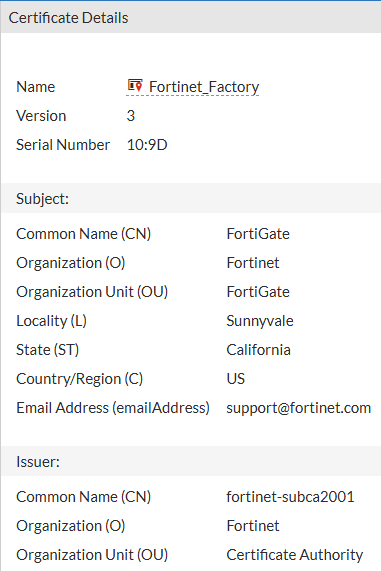
Or via CLI.
get vpn certificate local details
Possible Solutions to the FortiAnalyzer Authentication Problem
There are several ways to resolve the authentication issue and restore FortiGate to FortiAnalyzer communication.
Enabling Legacy Authentication Mode
Several articles describe the following solution: enable Legacy Authentication on FortiAnalyzer using a newly added command. According to available information, this solution is often required for connecting FortiWeb, FortiMail, or FortiADC.
config system log settings
    set legacy-auth-mode enable
end
Shortly after enabling legacy authentication, the FortiGate reconnected and logs began transferring.
Re-generating the Factory Certificate
I contacted Fortinet Support about the issue. Their brief response was that on standard VM devices, it is possible to re-generate the certificate with the device serial number. In some cases this may not be possible, in which case an alternative (custom) certificate must be used.
I searched online again and found the article referenced above. It addresses a different situation but the same certificate problem. Using a command that downloads the license from the internet (from FortiCare) should also trigger the generation of a new certificate. The downside is that it causes a FortiGate reboot.
FW1 # execute vm-license FGVMXXXXXXXX

This operation will reboot the system !
Do you want to continue? (y/n)
We enter the VM License Token, which is the device serial number (in the example FGVMXXXXXXXX). It can be seen in the GUI or displayed in several ways via CLI.
FW1 # get system status | grep "Serial-Number"
Serial-Number: FGVMXXXXXXXX

FW1 # diagnose debug vm-print-license
SerialNumber: FGVMXXXXXXXX
Using an Alternative Certificate
- Technical Tip: How to use an alternate server certificate for OFTP communication between FortiGate and FortiAnalyzer
- Technical Tip: Setup custom certificate for FGFM protocol
For some situations, the best option is to use a custom certificate. In this case, no FortiGate reboot is required. Unfortunately, Fortinet does not provide any documentation specifically covering certificate configuration on FortiGate for OFTP authentication to FortiAnalyzer. The articles referenced above describe different scenarios. I tried an intuitive approach which, after some issues with the certificate type, turned out to be functional and is described below.
Steps to Configure a Custom Certificate for FortiGate to FortiAnalyzer Communication
- issue a certificate from your own CA
- upload the CA certificates to both FortiGate and FortiAnalyzer
- import the issued certificate with its private key to FortiGate
- configure this certificate on FortiGate for the FortiAnalyzer connection
Issue with an Incorrect Certificate
First, let me point out a potential certificate issue (although it is logical, it did not occur to me). I followed the described steps and issued the certificate as a Web Server Certificate. However, the connection to FortiAnalyzer still did not work. The FortiAnalyzer debug logged the following events, showing that the SSL connection was not established.
[T4939:oftps.c:2148 :192.168.251.100] SSL clienthello incoming on sockfd[18]
[T4939:oftps.c:1436 :192.168.251.100] dft-idx=0 inited=1.
[T4939:oftps.c:1927 :192.168.251.100] SSL socket[18] pid[1685] ssl[0x7f95400681b0] SSL_new() success.
[T4937:oftps.c:2189 :192.168.251.100] SSL accept failed. SSL_accept()=-1 SSL_get_error()=5
[T4937:oftps.c:2342 :192.168.251.100] SSL pid[1685] ssl[0x7f95400681b0] shuting down sockfd[18] ip[192.168.251.100] connected[1]
[T4937:oftps.c:2355 :192.168.251.100] SSL_shutdown Error. SSL_get_error[1]
I was unable to find anything related to the error, but Fortinet Support advised me and sent a link to the article mentioned above.
The certificate must have the Enhanced Key Usage purpose set to Client Authentication. Interestingly, I do not see this purpose in the properties of the Fortinet_Factory certificate. However, when using OpenSSL, the information is displayed.
c:\> openssl x509 -noout -text -purpose -in Fortinet_Factory.cer

...
Certificate purposes:
SSL client : Yes
SSL client CA : No
SSL server : Yes
SSL server CA : No
I therefore had to issue a new certificate from the certification authority. In the case of MS CA, the Computer template can be used, for example. Ideally, create a copy and customize it. With this certificate, the connection worked.
Importing Certificates to FortiAnalyzer
- System Settings - Certificates - Create New/Import - CA Certificate
Upload the certification authority certificate(s).
Importing Certificates to FortiGate
- (Global/VDOM) - System - Certificates - Create/Import - CA Certificate
Upload the certification authority certificate(s).
- (Global/VDOM) - System - Certificates - Create/Import - Certificate
Upload the issued certificate with its private key (for example in PFX format), which must have the FortiGate serial number in the Common Name field of the Subject. It must have the Client Authentication purpose. Assign a name to the certificate.
Configuring the Certificate on FortiGate
In the configuration, enter the name of your certificate and it will be used for connecting and authenticating to FortiAnalyzer.
FW1 # config log fortianalyzer setting
FW1 (setting) # set certificate OFTP_authentication
FW1 (setting) # end

In order to verify identity of FortiAnalyzer serial number is needed.
If serial number is not set, connection will be set as unverified and
access to local config and files will be accessible only with user name/password.
FortiGate can establish a connection to obtain the serial number now.Do you want to try to connect now? (y/n)y

Obtained serial number from X509 certificate of Fortianalyzer is: FAZ-VMXXXXXXXX
Serial number from certificate MUST be the same as serial number observed in Fortianalyzer.
If these two serial numbers don't match, connection will be dropped.
Please make sure the serial numbers are matching.
In case that Fortianalyzer is using a third-party certificate, certificate verification must be disabled.
Do you confirm that this is the correct serial number? (y/n)y

serial to be set:FAZ-VMXXXXXXXX
Hi Petr,
great job here, this article is excellent.
I ran into this exact issue today, now it's working correctly using the Legacy Authentication method. I tried using an alternative cert but my FAZ didn't like it for some reason... Funnily the authentication showed VERIFY OK on CA and FG certs, but at a latter stage I got:
[handle_login_legacy:3641 10.55.126.254] Error No legal SN found in cert and legacy auth mode disabled
[__helper_thr_run_task:3986 10.55.126.254] LOGIN_REQUEST_LEGACY error: [oftp_get_opt_timezone():2789] timezone parse error: GMTa-1
Of course, the SN is shown in the CN field and the timezone... it is just correctly set on both sides.
Anyway, no custom cert but my setup is working now, so... Kudos to you! :)