
Note: The description in this article is based on Terraform version 1.14.6, FortiOS Provider version 1.24.1 and FortiGate with FortiOS 7.4.11.
Adding Records to the DNS Server
We build on information from previous articles that described the use of Terraform and connecting to FortiGate. In today's example, we will handle a situation where we run a DNS server on FortiGate and want to add new DNS records using Terraform. Of course, we could simply perform the entire DNS Database configuration and create a DNS Zone.
The problem is that there is no separate resource for DNS records, they are configured as nested blocks within the settings of the entire zone (DNS Database). Therefore, we cannot simply add new objects; we must first import the existing configuration.
Another problem is that nested blocks are represented as an unordered group of items. They are loaded in random order. When compared with the configuration, changes are suggested (item rewriting). We will solve this at the end of the article by sorting. But it is still not ideal, if we want to remove one item, then all the following ones will be completely changed.
Importing the Existing Configuration
We create a file import.tf. Using the import block, we will import a resource of type fortios_system_dnsdatabase; we will use dns as the name in the configuration. We are loading an existing zone named domain.tld.
import {
  to = fortios_system_dnsdatabase.dns
  id = "domain.tld"
}
Generating the Configuration
Using the Terraform CLI, we will first generate a configuration file.
PS D:\Terraform\FortiGate> terraform plan --generate-config-out=generated.tf
fortios_system_dnsdatabase.dns: Preparing import... [id=domain.tld]
fortios_system_dnsdatabase.dns: Refreshing state... [id=domain.tld]

Terraform used the selected providers to generate the following execution plan. Resource actions are indicated with the
 following symbols:
~ update in-place

Terraform will perform the following actions:

  # fortios_system_dnsdatabase.dns will be updated in-place
  # (imported from "domain.tld")
  ~ resource "fortios_system_dnsdatabase" "dns" {
        allow_transfer          = null
        authoritative           = "enable"
        contact                 = "host"
        domain                  = "domain.tld"
      + dynamic_sort_subtable   = "false"
        forwarder               = null
        forwarder6              = "::"
      + get_all_tables          = "false"
        id                      = "domain.tld"

...

        dns_entry {
            canonical_name = null
            hostname       = "server02"
            id             = 2
            ip             = "192.168.0.2"
            ipv6           = "::"
            preference     = 10
            status         = "enable"
            ttl            = 0
            type           = "A"
        }

...

Plan: 1 to import, 0 to add, 1 to change, 0 to destroy.

...
What I find interesting is that in addition to the import, a change is also reported. The arguments dynamic_sort_subtable and get_all_tables are marked as added. In the generated configuration they appear as
  dynamic_sort_subtable = null
  get_all_tables        = null
Import
We then perform an import into the state file according to the import and resource blocks.
PS D:\Terraform\FortiGate> terraform apply
fortios_system_dnsdatabase.dns: Preparing import... [id=domain.tld]
fortios_system_dnsdatabase.dns: Refreshing state... [id=domain.tld]

Terraform used the selected providers to generate the following execution plan. Resource actions are indicated with the
 following symbols:
~ update in-place

...

Plan: 1 to import, 0 to add, 1 to change, 0 to destroy.

Do you want to perform these actions?
  Terraform will perform the actions described above.
  Only 'yes' will be accepted to approve.

  Enter a value: yes

fortios_system_dnsdatabase.dns: Importing... [id=domain.tld]
fortios_system_dnsdatabase.dns: Import complete [id=domain.tld]
fortios_system_dnsdatabase.dns: Modifying... [id=domain.tld]
fortios_system_dnsdatabase.dns: Modifications complete after 0s [id=domain.tld]

Apply complete! Resources: 1 imported, 0 added, 1 changed, 0 destroyed.
Editing the Configuration
We can work directly with the generated.tf file, but for better clarity we can create a new file main.tf and copy the modified configuration into it. The generated configuration contains all arguments of the given resource (including default values, etc.). We can also remove the import.tf file.
resource "fortios_system_dnsdatabase" "dns" {
  name          = "domain.tld"
  domain        = "domain.tld"
  type          = "primary"
  view          = "shadow"
  ttl           = 86400
  authoritative = "enable"

  dns_entry {
    hostname = "server01"
    id       = 1
    ip       = "192.168.0.1"
    type     = "A"
  }
  dns_entry {
    hostname = "server02"
    id       = 2
    ip       = "192.168.0.2"
    type     = "A"
  }
  dns_entry {
    hostname = "server03"
    id       = 3
    ip       = "192.168.0.3"
    type     = "A"
  }
}
We verify that our modified configuration matches the actual state.
PS D:\Terraform\FortiGate> terraform plan
fortios_system_dnsdatabase.dns: Refreshing state... [id=domain.tld]

No changes. Your infrastructure matches the configuration.

Terraform has compared your real infrastructure against your configuration and found no differences, so no changes are needed.
Creating a New DNS Record
We add a new dns_entry block with the new record's data to the configuration.
  dns_entry {
    hostname = "server04"
    id       = 4
    ip       = "192.168.0.4"
    type     = "A"
  }
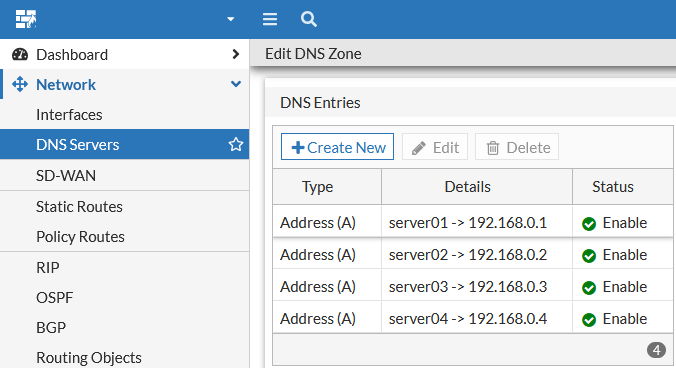
We apply the configuration changes and the record will be created on FortiGate.
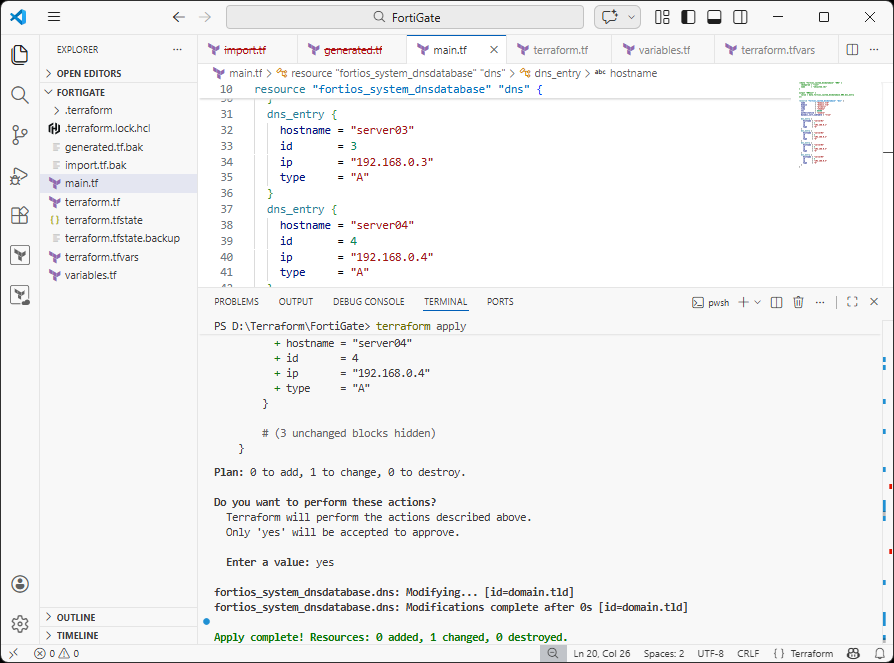
PS D:\Terraform\FortiGate> terraform apply
fortios_system_dnsdatabase.dns: Refreshing state... [id=domain.tld]

Terraform used the selected providers to generate the following execution plan. Resource actions are indicated with the
 following symbols:
~ update in-place

Terraform will perform the following actions:

  # fortios_system_dnsdatabase.dns will be updated in-place
  ~ resource "fortios_system_dnsdatabase" "dns" {
        id                      = "domain.tld"
        name                    = "domain.tld"
        # (23 unchanged attributes hidden)

      + dns_entry {
          + hostname = "server04"
          + id       = 4
          + ip       = "192.168.0.4"
          + type     = "A"
        }

        # (3 unchanged blocks hidden)

    }

Plan: 0 to add, 1 to change, 0 to destroy.

Do you want to perform these actions?
  Terraform will perform the actions described above.
  Only 'yes' will be accepted to approve.

  Enter a value: yes

fortios_system_dnsdatabase.dns: Modifying... [id=domain.tld]
fortios_system_dnsdatabase.dns: Modifications complete after 0s [id=domain.tld]

Apply complete! Resources: 0 added, 1 changed, 0 destroyed.
Configuration Using Variables
We can further refine the configuration so that individual DNS records are defined using a variable in a separate file.
variables.tf
Among the variable definitions, we add a list of objects for DNS records.
# DNS Entries for DNS Zone
variable "dns_entries" {
  description = "DNS resource records"
  type = list(object({
    hostname = string
    id       = number
    ip       = string
    type     = optional(string, "A")
    })
  )
}
dns-records.auto.tfvars
We create a new file where we place the DNS record configuration.
dns_entries = [
  {
    hostname = "server01"
    id       = 1
    ip       = "192.168.0.1"
  } , {
    hostname = "server02"
    id       = 2
    ip       = "192.168.0.2"
  } , {
    hostname = "server03"
    id       = 3
    ip       = "192.168.0.3"
  } , {
    hostname = "server04"
    id       = 4
    ip       = "192.168.0.4"
  }
]
main.tf
We modify the resource configuration and use dynamic Blocks for the nested dns_entry blocks.
resource "fortios_system_dnsdatabase" "dns" {
  name                  = "domain.tld"
  domain                = "domain.tld"
  type                  = "primary"
  view                  = "shadow"
  ttl                   = 86400
  authoritative         = "enable"
  dynamic_sort_subtable = "true"

  dynamic "dns_entry" {
    for_each = var.dns_entries

    content {
      hostname = dns_entry.value.hostname
      id       = dns_entry.value.id
      ip       = dns_entry.value.ip
      type     = dns_entry.value.type
    }
  }
}
Issue with Item Order
The fortios_system_dnsdatabase resource can contain many nested dns_entry blocks for individual DNS records. According to the discussion Ignoring order of resource blocks upon modification, TypeSet is used, which is an unordered collection of items. It does not support indexing by key (ID). These items are referred to as sub-tables from the FortiAPI perspective.
In practice, items are loaded in a different order each time, which can repeatedly trigger the need for a change. A hash is used to compare whether a change has occurred. During tests with a few items, the issue appeared only occasionally. But with a hundred items, it happened every time.
Generating Configuration and Import
Even when generating the configuration, the items are not sorted by ID, and when we then want to perform an import, changes are applied.
PS D:\Terraform\FortiGate> terraform apply

...

Terraform will perform the following actions:

  # fortios_system_dnsdatabase.dns will be updated in-place
  # (imported from "domain.tld")
  ~ resource "fortios_system_dnsdatabase" "dns" {
        allow_transfer          = null
        authoritative           = "enable"
        contact                 = "host"
        domain                  = "domain.tld"
      + dynamic_sort_subtable   = "false"

...

      ~ dns_entry {
            canonical_name = null
          ~ hostname       = "server01" -> "server03"
          ~ id             = 1 -> 3
          ~ ip             = "192.168.0.1" -> "192.168.0.3"
            ipv6           = "::"
            preference     = 10
            status         = "enable"
            ttl            = 0
            type           = "A"
        }
      ~ dns_entry {

...

Plan: 1 to import, 0 to add, 1 to change, 0 to destroy.
When we apply the changes, fortunately nothing changes on FortiGate. The remote objects are imported into the Terraform state.
dynamic_sort_subtable
The solution should be the dynamic_sort_subtable argument, which ensures that items are loaded in sorted order. The problem is that the generated configuration is not sorted.
resource "fortios_system_dnsdatabase" "dns" {
  dynamic_sort_subtable = "true"
Creating a Sorted Configuration
I tried putting together an alternative solution where we use a data source and load fortios_system_dnsdatabase. We sort the items by ID, which we must first convert to a number. Using output, we display the values of individual DNS records in exactly the format we prepared for the variable configuration in the previous section.
locals {
  padded_map = {
    for entry in data.fortios_system_dnsdatabase.DNS.dns_entry :
    format("%010d", tonumber(entry.id)) => entry
  }
  dns_entries_sorted = [
    for k in sort(keys(local.padded_map)) :
    local.padded_map[k]
  ]
}

data "fortios_system_dnsdatabase" "DNS" {
  name = "domain.tld"
}

output "dns_entries" {
  value = [
    for entry in local.dns_entries_sorted : {
      id       = entry.id
      hostname = entry.hostname
      ip       = entry.ip
      type     = entry.type
    }
  ]
}
When we apply the changes, the values are loaded and saved to the state file. At the same time, the individual items (output) are displayed.
PS D:\Terraform\FortiGate> terraform apply
data.fortios_system_dnsdatabase.DNS: Reading...
fortios_system_dnsdatabase.dns: Refreshing state... [id=domain.tld]
data.fortios_system_dnsdatabase.DNS: Read complete after 0s [id=domain.tld]

Changes to Outputs:
  + dns_entries = [
      + {
          + hostname = "server01"
          + id       = 1
          + ip       = "192.168.0.1"
          + type     = "A"
        },
      + {
          + hostname = "server02"
          + id       = 2
          + ip       = "192.168.0.2"
          + type     = "A"
        },
      + {
          + hostname = "server03"
          + id       = 3
          + ip       = "192.168.0.3"
          + type     = "A"
        },
      + {
          + hostname = "server04"
          + id       = 4
          + ip       = "192.168.0.4"
          + type     = "A"
        },
    ]


You can apply this plan to save these new output values to the Terraform state, without changing any real infrastructure.

Do you want to perform these actions?
  Terraform will perform the actions described above.
  Only 'yes' will be accepted to approve.
  Terraform will perform the actions described above.
  Only 'yes' will be accepted to approve.

  Enter a value: yes

Apply complete! Resources: 0 added, 0 changed, 0 destroyed.

Outputs:

dns_entries = [
  {
    "hostname" = "server01"
    "id" = 1
    "ip" = "192.168.0.1"
    "type" = "A"
  },
  {
    "hostname" = "server02"
    "id" = 2
    "ip" = "192.168.0.2"
    "type" = "A"
  },
  {
    "hostname" = "server03"
    "id" = 3
    "ip" = "192.168.0.3"
    "type" = "A"
  },
  {
    "hostname" = "server04"
    "id" = 4
    "ip" = "192.168.0.4"
    "type" = "A"
  },
]
We copy the displayed items (Outputs) into the dns-records.auto.tfvars file. Then we perform the import.
There are no comments yet.