
Introduction
I'm returning to the field of Network Access Control and IEEE 802.1X, put very simply, authentication at a switch port when accessing the network, after almost 20 years. I described my first tests in two articles, Cisco IOS 11 - IEEE 802.1x, port authentication, MS IAS, Cisco IOS 12 - IEEE 802.1x and more advanced features.
Protocols and standards use generic terms (designations), which are given in the article, but we often replace them with a common real-world example (a typical representative).
We focus on wired networks, so as the authenticator we refer to a switch, alternatively it could be an AP (access point). The authentication server (AAA - Authentication, authorization, and accounting) is most often RADIUS, which could be, for example, Microsoft NPS or Extreme Networks ExtremeControl.
When we describe features on switches, we're specifically talking about Cisco IOS XE (it mostly also works on newer versions of Cisco IOS) and we use the older IBNS 1.0 syntax. The text lists only fragments or parts of commands or parameters. Further parts of the series will go into more detail on configuration for Cisco Catalyst Switches and Extreme Networks ExtremeCloud IQ Site Engine with ExtremeControl.
Network Access Control (NAC)
Network Access Control is a security concept that decides who or what is allowed to connect to the network (a wired port, Wi-Fi, VPN) and what network rights (VLAN, ACL, QoS) it is granted. The decision is made based on the identity of the device or user, or possibly its security state (posture). It is a higher-level layer that defines policies and controls access.
IEEE 802.1X
NAC is based on the IEEE 802.1X standard (often referred to simply as 802.1x or dot1x) for port-based network access control and authentication. The standard's name itself uses the term Port-Based Network Access Control. It relies on authentication when accessing the network, so a device (or user) must be verified in order to connect to the local network. On a wired network, authentication takes place at the switch port, on a wireless network, at the SSID level. This article focuses on Ethernet (wired) networks.
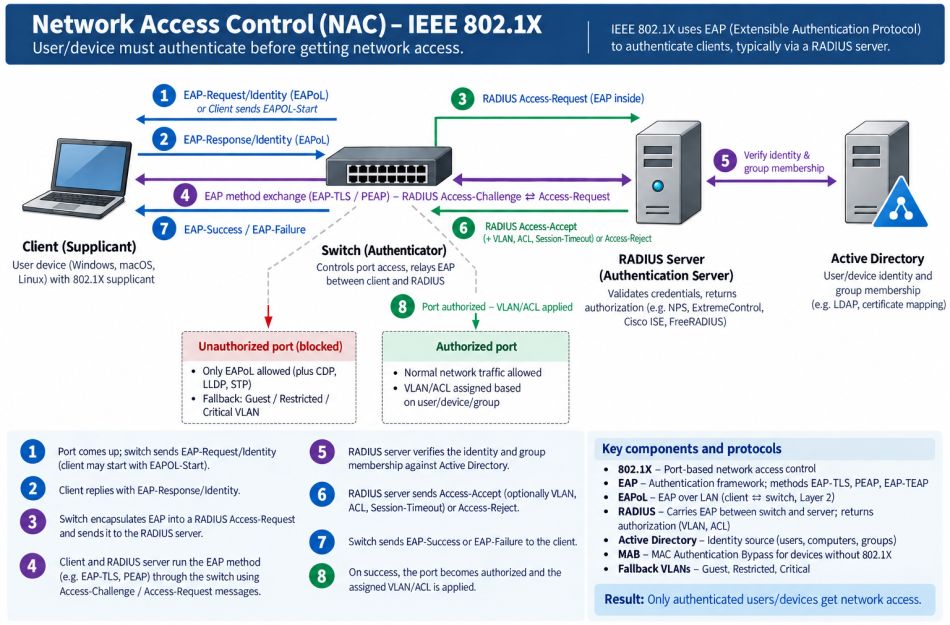
By default, a switch port (with 802.1X enabled) is blocked (unauthorized state) and only lets through 802.1X traffic (i.e. EAPoL) plus the CDP and STP protocols. Only after successful verification (a posture check may also be required) is traffic within the configured VLAN allowed (the port switches to the authorized state). It's also possible to use dynamic VLAN assignment, based on data from the AAA server. And possibly a special guest/quarantine access (a restricted VLAN).
In practice, certificates issued by an enterprise PKI are often used for authentication. The device certificate is verified, which confirms that a company-owned device is connecting. Afterward, the user may also be authenticated, via certificate or credentials, for higher security. We can also use user verification only.
IEEE 802.1X Roles
IEEE 802.1X defines three roles (components):
- Supplicant - the end device, containing software (for example, the Windows 802.1X client) that performs the authentication
- Authenticator - the network element (switch/AP) through which the device accesses the network, it enforces access and relays EAP communication between the supplicant and the RADIUS server
- Authentication server - verifies identity against a source and decides what rights the device is granted, typically a RADIUS server
Extensible Authentication Protocol (EAP)
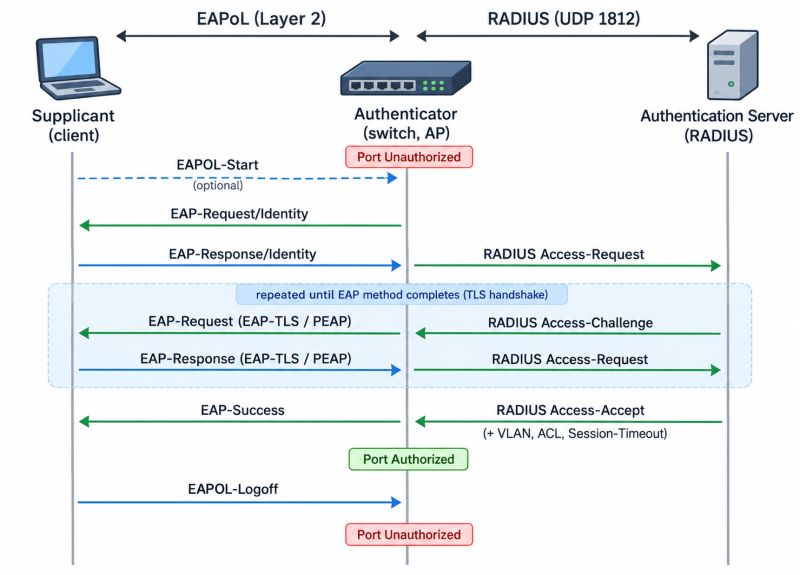
IEEE 802.1X defines the protocol for controlling access to the port. For identity verification, it uses the generic authentication protocol (framework) Extensible Authentication Protocol (EAP) from RFC 3748. This defines the message format and the authentication flow. It supports a number of methods such as EAP-TLS, EAP-TEAP, EAP-TTLS, and PEAP with EAP-MSCHAPv2. Encapsulation/transport of EAP messages over Ethernet or Wi-Fi (between the client and the switch) is handled by EAP over LAN (EAPoL). This runs at L2 (before an IP address is assigned) over Ethernet or Wi-Fi.
The switch unpacks the EAP payload and re-encapsulates it, this time into a RADIUS packet (EAP over RADIUS - EAPoR), for transmission to the authentication server. The RADIUS server verifies the credentials, commonly using an Identity Provider (for example Active Directory) for this. It returns the result to the switch (Access-Accept or Access-Reject) and possibly also a VLAN, ACL, or session time limit.
EAP Message Exchange
Within 802.1X, authentication can be initiated by either the switch or the client. If authentication is enabled on the port (authentication port-control auto), the switch initiates verification when a device connects (the port transitions from down to up). It sends an EAP-Request/Identity frame. If the client does not receive the request, it can initiate authentication itself by sending an EAPOL-Start frame.
Authentication Methods
From a practical standpoint, the possible authentication methods within Network Access Control matter, that is, how a device/user is verified.
We can use 802.1X authentication and the methods supported within EAP. Most often this is EAP-TLS, which uses mutual (client - server) authentication via certificates. Or PEAP with MSCHAPv2 (it's a good idea to enable server certificate validation on the client) for using a username and password. On top of this, within NAC we can use/combine MAB authentication using the device's MAC address. Or, for example, a browser-based login portal (often used for guests on a wireless network).
Verifying the Device or the User
We can configure authentication to be performed for the computer, the user, or both together.
- device certificate authentication
- Windows can verify the computer even before the login screen is displayed, so the network becomes accessible at that point and GPOs, scripts, and communication with the domain controller can work
- we only issue certificates to company devices (in the domain), so we control connections to only approved devices (a VLAN can be assigned based on the group)
- user authentication
- we can use a username and password, when logging into the computer/domain, the same credentials are used for 802.1X (PEAP-MSCHAPv2)
- or a user certificate, the user logs into Windows (with a password, PIN, or Windows Hello) and the system finds and uses their certificate for 802.1X (EAP-TLS)
- if we verify the user, we can control the network based on user roles (on a shared PC, each user can get different access)
- authentication of both the device and the user
- the device is verified first and the network becomes accessible under the device's identity, after the user logs in, re-authentication takes place and the identity switches to the user
- a modern method is EAP-TEAP, which allows verifying both the computer's identity and the logged-in user's identity within a single encrypted TLS tunnel at the same time (so-called Chaining), this can confirm that the user is logging in exclusively from an authorized company device (rather than two separate authentications)
Note: If we use passwordless methods for user login, such as Windows Hello for Business (WHfB) or FIDO2 keys, we cannot use the PEAP-MSCHAPv2 method. Also, Credential Guard, which has been enabled by default since Windows 11 22H2, causes problems with domain credentials (SSO) for PEAP-MSCHAPv2.
General Rules and Recommendations
- Redundancy - network connectivity depends on the availability of the RADIUS servers, so we should have two of them, or otherwise address a Critical VLAN (a failsafe policy for a RADIUS outage)
- DHCP - use a short lease on special VLANs, in some cases up to 2 hours, but in other cases even on the order of minutes
- Enterprise PKI - it's recommended to use certificates (prioritize EAP-TLS), we need to have autoenrollment properly handled and monitor certificate expiration (perform reissuance with enough lead time)
- Segmentation of profiles - besides production networks, also guests and quarantine with limited access and services
- Gradual rollout - start with monitoring mode and observe events, then roll out group by group
- MAB as a fallback mechanism - use MAB for devices without a supplicant, assigning a restricted VLAN in that case
- Dynamic VLAN assignment - implement dynamic assignment of clients to a VLAN from the RADIUS server
- Use both computer and user authentication - for company devices joined to the domain, the most secure approach is to use EAP-TEAP, it is supported from Windows 10 2004 and Windows 11 onward, and the RADIUS server must also support it
MACsec (Media Access Control Security)
802.1X only verifies the device at the time of connection. The traffic on the link itself is then not protected in any way. A complement to this is MACsec (IEEE 802.1AE), which encrypts and ensures the integrity of frames at L2 between the client and the switch (or between switches) using AES-GCM. The encryption keys are negotiated using the MKA protocol (MACsec Key Agreement), which is part of the IEEE 802.1X-2010/2020 standard. The key material can be derived directly from a successful 802.1X (EAP) authentication.
MACsec requires hardware support on the switch as well as support on the client side. The native Windows supplicant does not support MACsec.
Some Special NAC / IEEE 802.1X Options
Within Network Access Control and the IEEE 802.1X standard, we can address a number of practical situations. Most of the features described below are configured on the switch side.
The description is based on the capabilities of Cisco IOS XE used on switches from the Cisco Catalyst 9000 family. We use Authentication Manager commands from Identity-Based Networking Services (IBNS) 1.0, which are also available on Cisco IOS 12.2(50)SE and later. We do not use the newest Cisco Common Classification Policy Language (C3PL) / IBNS 2.0, nor the oldest (Legacy) command variants (such as dot1x guest-vlan 99).
MAC Authentication Bypass (MAB)
For devices that do not support 802.1X, we can use verification via MAC address. MAB can be configured as a fallback authentication method, used when no EAPoL communication arrives. In this case, the switch sends a RADIUS request using the device's MAC address as both the username and password. The RADIUS server checks the MAC address against a database (whitelist) of allowed addresses and returns Access-Accept or Access-Reject accordingly (and possibly a VLAN, etc.).
Note: MAB is a considerably weaker form of authentication than 802.1X (a MAC address can be discovered and spoofed).
Dynamic VLAN Assignment
Besides configuring a default (static) access VLAN in the switch port configuration, we can use dynamic VLAN assignment from the RADIUS server. If client authentication succeeds, then, according to the configured rules (for example, group membership), the server sends attributes for changing the VLAN in the RADIUS response (Access-Accept) (e.g. Tunnel-Type = VLAN, Tunnel-Medium-Type = 802, Tunnel-Private-Group-ID = "20").
Change of Authorization (CoA)
We often also use the RADIUS Change of Authorization (CoA) mechanism at the same time. This allows dynamically changing the authorization parameters of a user's session (such as VLAN changes, switching roles or profiles, or terminating the session) without requiring the user to disconnect and log in again.
Normally, the network element initiates the communication and the RADIUS server responds, but in the case of CoA it's the other way around. When a VLAN change occurs, the server can send a CoA bounce-port command so that the switch briefly shuts down the port. The device then requests a new IP address from DHCP.
aaa server radius dynamic-author
Allowing Communication in the Unauthorized State
By default, an unauthenticated port is blocked. We can change this behavior and allow inbound traffic to the client (the Out direction from the switch). This is typically used to make Wake on LAN work, but we need to have a default VLAN configured on the port (the one in which WoL takes place). The setting determines whether we block both directions or only the direction toward the switch (In).
authentication control-direction in
Another option is open mode, where the port is not blocked (traffic works in both directions). The default VLAN (configured on the port) is used. If authentication fails, the Auth-Fail action is taken, or the port may simply remain in the default VLAN. On successful authentication, a different VLAN can be assigned.
authentication open
Port Host Modes
Cisco switches allow a port to be set to different modes. This determines how many devices can connect and authenticate on a single 802.1X-authorized switch port.
- single-host - allows only a single authenticated client/device (MAC address)
- multi-domain - allows one data device and one voice device (an IP phone), each in a separate VLAN
- multi-auth - allows multiple authenticated devices at the same time, for both the Data VLAN and the Voice VLAN
- multi-host - allows multiple devices, but only the first one is authenticated
Authorization Duration and Re-authentication
After successful authentication, the port transitions to the authorized state. The switch creates a session for the given MAC address. Traffic is allowed for the duration of its validity (without needing to re-authenticate). The session remains valid until a link down/up event occurs (cable disconnection, device restart). Alternatively, we can manually trigger re-authentication (via a command).
Optionally, we can configure periodic re-authentication (reauthentication). The value can be specified in the configuration or returned by the RADIUS server (the Session-Timeout attribute).
Responses to Error States - Guest, Restricted, and Critical VLAN
802.1X allows defining, on the switch, responses to various error states that can occur during authentication. Besides successful verification (Access-Accept), a situation can arise where the client does not respond, authentication fails, or the RADIUS server is not available. In all these cases, the typical action is to authorize the port into a specific VLAN (Cisco uses specific names for these).
event no-response- if no EAPOL frame arrives from the client (it doesn't support 802.1X or doesn't respond) within the given time ((max-reauth-req+ 1) xtimeout tx-period, it's recommended to shorten the default values (2+1x30=90s)), then, if MAB is enabled (and the order is configured), it first falls back to MAB, if that fails, or if there is no MAB, the device may be placed into the Guest VLANevent fail- if the client supports 802.1X but verification repeatedly (event fail retry) fails, it can be placed into the (Fail) Restricted VLAN (action authorize vlan), or move on to the next method in sequence, typically MAB (action next-method)event server dead- if all configured RADIUS servers are unreachable, the port transitions to the critical authentication state and can be placed into the Critical VLAN
Authentication Process and Events
The flow of typical situations during 802.1X authentication:
- 802.1X authentication succeeds - the switch grants the client access to the network (in the default or dynamically assigned VLAN)
- 802.1X authentication times out and MAB is allowed - the switch uses the device's MAC address for authorization,
- if authorization succeeds - the switch grants the client access to the network (in the default or dynamically assigned VLAN)
- if authorization fails - the switch places the client into the Guest VLAN (if configured)
- 802.1X authentication fails (invalid identity) - the switch places the client into the Restricted VLAN (if configured)
- the RADIUS server is unavailable (it's down) - if Inaccessible Authentication Bypass is enabled, the switch places the client into the Critical VLAN (critical-authentication state)
- 802.1X authentication fails/times out - if MAB or a special VLAN is not enabled, the port remains blocked or in the configured state
We can have various scenarios, and the correct configuration needs to be done accordingly. A typical situation is as follows:
- we want 802.1X authentication to take place
- if the client doesn't support it (doesn't respond to the EAP Request), MAC Authentication Bypass is used
- MAB is not sufficiently secure, so devices should be placed into special VLANs
- we can also set up a Guest VLAN for this, but it's more often handled on the RADIUS server, where we have a final
Catch-Allrule that applies to MAC addresses not covered by the preceding rules (and assigns the Guest VLAN) - if 802.1X authentication fails, we usually don't want to perform MAB, but that option can be configured
The supported combinations are:
- 802.1X + MAB
- 802.1X + Guest VLAN
- 802.1X + Restricted VLAN
- 802.1X + Guest VLAN + Restricted VLAN
- 802.1X + MAB + Guest VLAN
Restricted VLAN cannot be used together with MAB. It applies when 802.1X authentication fails, so no MAB attempt takes place. Critical VLAN can be configured together with anything, as it does not depend on the method.
A Solution for Wake on LAN with Open Mode
In practice, dynamic VLAN assignment from the RADIUS server is commonly used, and the port sits in the default VLAN 1 (where there should be no communication at all). Even if we allow communication to the device on the port so that Wake on LAN works, we would have to send the magic packets in VLAN 1.
A solution for situations like this can be the following configuration. We use some special VLAN (we can call it the Restricted VLAN), which we statically configure as the default VLAN on the ports. At the same time, we enable open mode (authentication open). This effectively achieves the (normally unsupported) combination of 802.1X + MAB + Restricted VLAN.
The port communicates in the configured VLAN from the start. If 802.1X authentication fails, MAB authentication can take place. If that also fails, the port remains functional in the default VLAN. If either authentication succeeds, the port can switch to the VLAN assigned by the RADIUS server.
There are no comments yet.